

SkyBlock Enhanced - Modern Edition
The only Hypixel SkyBlock modpack you'll ever need. Modern, pre-configured, and feature-packed with 60+ optimized mods. Install once, configure nothing, play forever.
Versions
About

Hypixel SkyBlock is one of Minecraft's most popular game modes, offering deep progression, complex systems, and endless grinds. But for many players, setting up the right mods can be a headache—outdated versions, performance issues, conflicting configs, and hours of manual tweaking.
SkyBlock Enhanced – Modern Edition solves all of that. It's a complete, pre-configured modpack built specifically for Hypixel SkyBlock on Minecraft 1.21.5/8, delivering a smooth, optimized, and feature-rich experience right out of the box. No guesswork, no complicated setup—just install, launch, and play with all the best performance and QoL mods already configured.
Whether you're a new player looking for an easy start or a veteran wanting the best tools available, SkyBlock Enhanced gives you everything you need in one modern package.

What is SkyBlock Enhanced – Modern Edition?
SkyBlock Enhanced – Modern Edition is the go-to modpack for Hypixel SkyBlock, designed for modern Minecraft using the Fabric mod loader. Unlike legacy 1.8.9 packs that suffer from slow loading times and poor optimization, this pack leverages the speed and efficiency of Minecraft 1.21.10 and Fabric to deliver exceptional performance—even with over 60 included mods.
Why So Many Mods?
You may be used to 1.8.9 and Forge's slow loading times, where 10+ mods made the game incredibly slow. SkyBlock Enhanced – Modern Edition uses Fabric and Minecraft 1.21 for excellent performance and fast load times. Even with over 60 mods, this pack runs better than any 1.8.9 modded instance you've used before.
More than ten of these mods are focused purely on boosting your FPS, ensuring smooth, stable performance. The rest bring tons of quality-of-life features—all pre-configured for a clean screen and zero overlay clutter.
Old Setup vs. SkyBlock Enhanced
| Old Manual Setup | SkyBlock Enhanced |
|---|---|
| Hours spent finding compatible mods | Pre-configured, ready to play |
| Performance issues | Optimized with 13 performance mods |
| Overlapping UI elements | Resolution-specific config presets |
| Manual updates for each mod | One-Click Updates for everything |
| No guidance for beginners | Custom Welcome Wizard on first launch |
Key Features Overview
Here's what makes SkyBlock Enhanced – Modern Edition stand out:
- Pre-configured experience – Over 20 hours spent fine-tuning every feature for new and experienced players alike
- Optimized performance – 13 mods dedicated to maximizing FPS, plus performance presets for every system
- SkyBlock-specific QoL improvements – 9 major SkyBlock mods with hundreds of helpful features
- Welcome Wizard customization – Choose your performance profile, UI layout, and resource packs on first launch
- Config and backup manager – Easily export, import, and restore your configurations
- Custom main menu and visual design – Immersive SkyBlock-themed interface
- One-click updates – Keep all your mods up to date effortlessly
You'll also find config presets for 1080p, 1440p, and 4K, removing GUI overlap and keeping everything sharp on any screen size. Just launch and play—it's that simple. The best configs for you are applied automatically!

Need help? Want to share configs? Looking for updates?
Join the official SkyBlock Enhanced Discord server — it's the best place to get support, connect with other players, and stay updated on new releases.
What you'll find:
- Dedicated support channels for troubleshooting
- Config sharing and custom presets from the community
- Announcements for updates and new features
- Active discussions about mods and optimization tips
- A friendly community of SkyBlock players
Whether you're stuck on installation, want to show off your custom setup, or just want to chat about Hypixel SkyBlock — we'd love to have you!

Performance and Optimization
With 13 mods dedicated to improving performance, you can be sure the game will run smoothly on almost any hardware. Fabric and modern Minecraft architecture allow for faster loading times, better memory management, and higher frame rates compared to older 1.8.9 setups.
Performance-Focused Mods
| Mod | Purpose |
|---|---|
| Sodium | Rendering optimization for massive FPS boosts |
| ImmediatelyFast | Speeds up rendering of UI and entities |
| FerriteCore | Reduces memory usage |
| Entity Culling | Hides entities behind walls to improve FPS |
| Krypton | Network stack optimization |
| C2ME | Faster chunk loading |
| More Culling | Intelligent rendering culling |
| ThreadTweak | Better thread management |
| Very Many Players | Optimizes performance in crowded areas |
Performance Presets
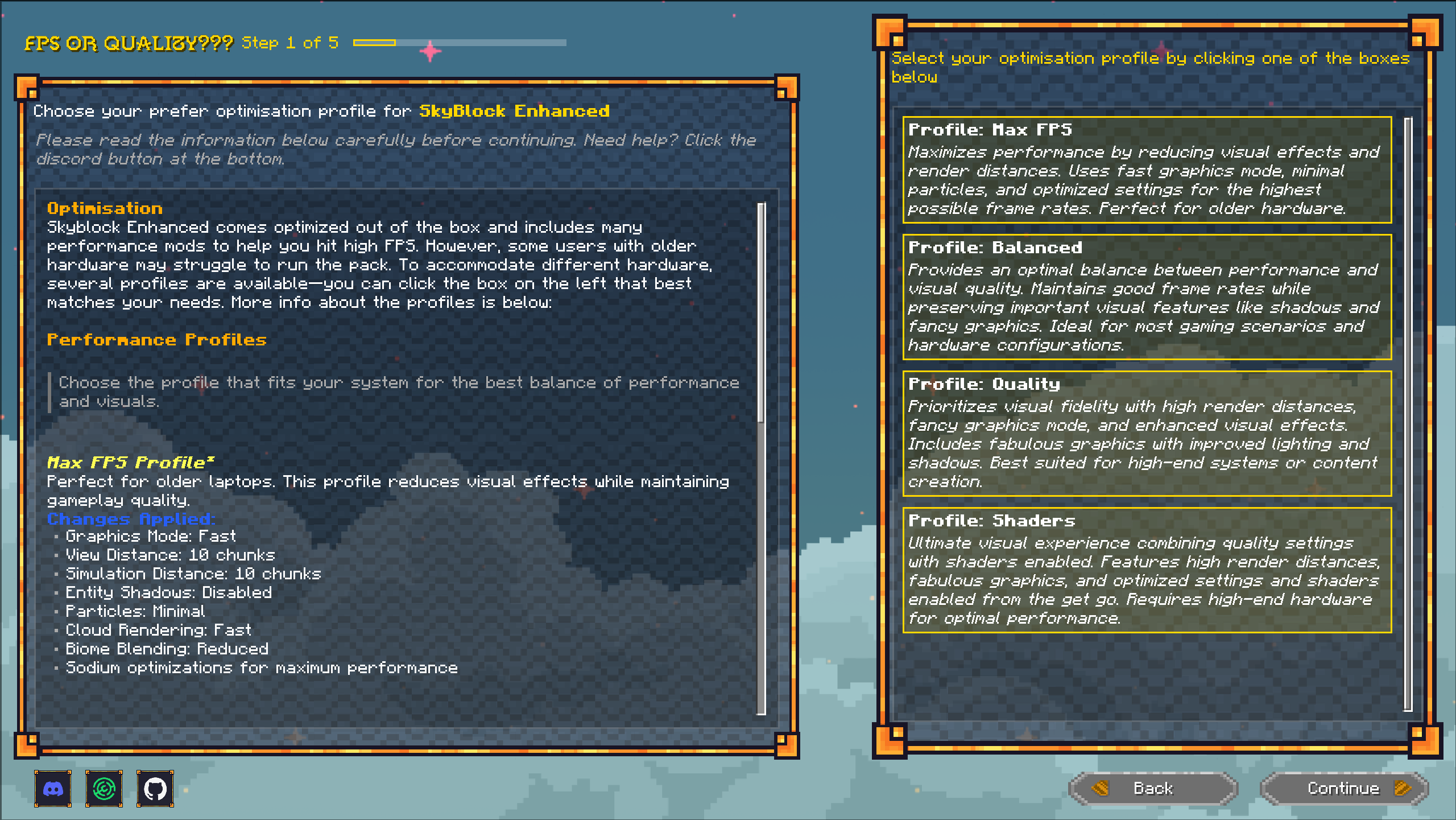
But with thousands of different computers out there, mods can't be the only solution. In addition to mods, SkyBlock Enhanced also offers different config presets. In the custom Welcome Wizard (more on that below), you'll be able to choose between four performance profiles depending on your hardware:
- Performance: Lowers render distance and visual quality for maximum FPS on low-end PCs
- Balanced: Keeps things close to vanilla and the out-of-the-box settings—recommended for most players
- Quality: Boosts render distance and sets visual sliders to the max for high-end systems
- Shaders: For people who want everything to look extra nice (Warning: Shaders break certain in-world overlay features in some mods)
Quality-of-Life Features
With 9 SkyBlock-specific QoL mods plus 25 smaller general QoL mods, you'll have access to everything you could want. SkyHanni and Skyblocker bring you tons of quality-of-life features, all pre-configured for a clean screen and zero overlay clutter—just useful information where you need it. Don't take my word for it, try it out yourself!
SkyHanni
SkyHanni
The powerhouse all-rounder with features for farming, combat, mining, and more:
- Garden QoL features like crops per hour, and more
- Damage indicators and Slayer helpers
- Diana waypoints and Inquisitor sharing
- Mineshaft detection with party integration
- Customizable scoreboard and tab list
- Hundreds of specialized HUDs you can enable
Skyblocker
Skyblocker
All-around QoL mod for SkyBlock:
- Dungeons: Puzzle solvers (terminals, creeper beams, blaze, three weirdos), Croesus profit tracking, timers, score counters, minimaps
- Quality of Life: Quick inventory buttons (storage, crafting, accessories), Bazaar/AH prices in tooltips, crafting helpers, experiment solvers
- Events: Kuudra supply tracking, foraging overlays, commission HUDs
- Built-in wiki lookup and profile viewer
Firmament
Firmament
Inspired by NEU, bringing powerful inventory tools:
- Storage overlay
- Item search bar working with all SkyBlock items (via REI)
- Flexible macro system for hotkeys
- Import your NEU button layouts seamlessly
- Cursor position saving between inventories
SkyOcean
SkyOcean
Lightweight QoL improvements:
- Item value screen (J key) with detailed pricing
- Storage search (O key or command)
- Trophy fish tracking and bobber fixes
Additional small mods
Modern Warp Menu
Clean, sleek island navigation with rendered views and one-click warping
Skyblock Tweaks
Highly customizable HUDs for health, mana, defense, speed, skill progress, and more
SkyBlock Profile Viewer
Check any player's profile with /pv — see skills, slayers, inventory, pets, collections, and more
⌨️ Essential Keybinds
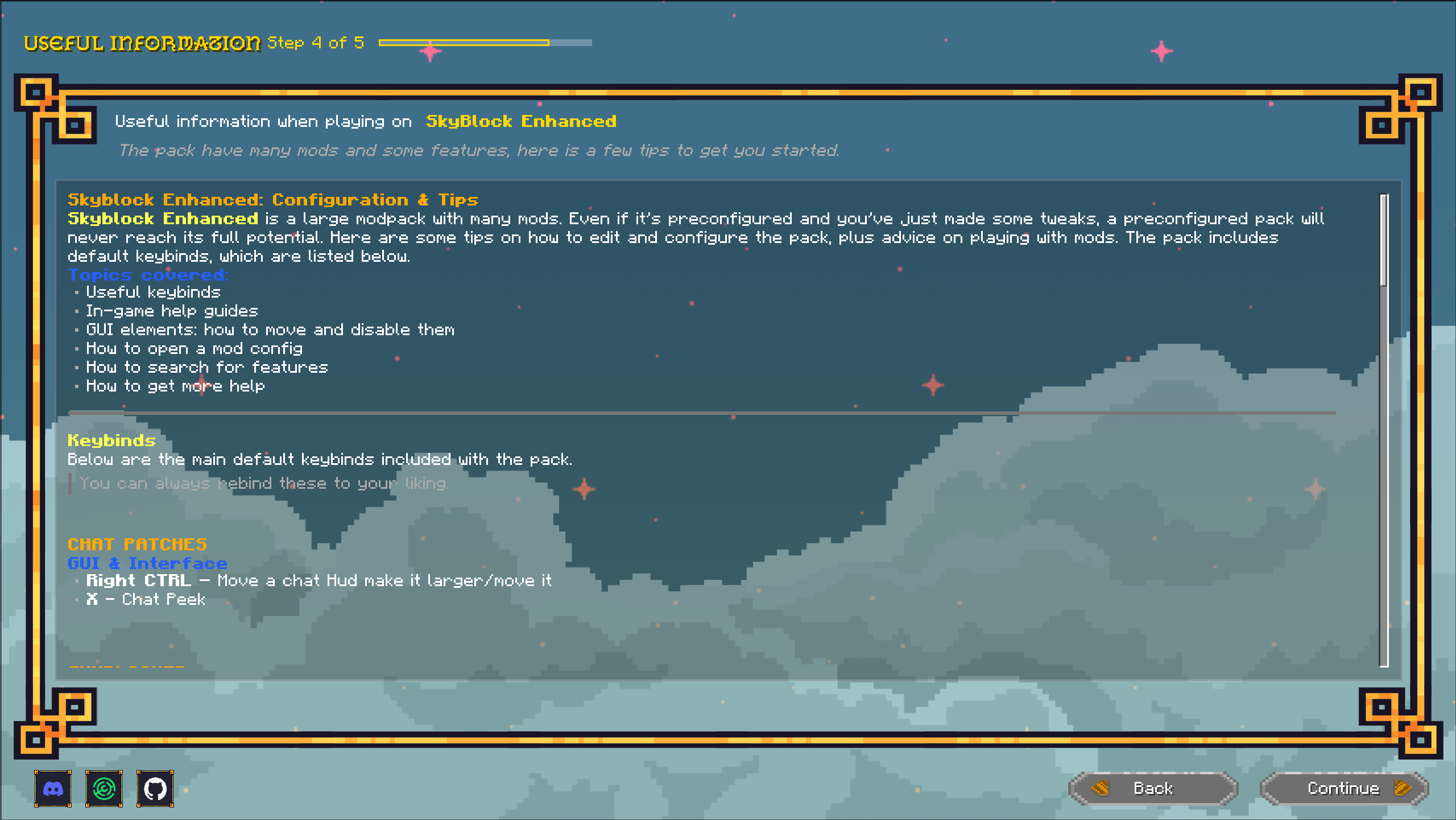
Hotkeys set up in the default pre-configured pack. Learning these will make your gameplay more efficient and fun!
General / Quick Access
F7– Move GUI / EditorM– Warp MenuK– Toggle Shaders
Wiki & Info (SkyBlocker)
F1– Fandom Wiki (hover over item)F4– Hypixel Wiki (hover over item)F6– Item Price Lookup
Item Management (SkyBlocker)
P– Protect ItemH– Lock Hotbar SlotZ– Bazaar Refresh
SkyHanni
X– Chat PeekZ– Garden Home / Mining SpotH– Set Garden Home / Rep HelperB– Barn TeleportV– Warp to Pest / TrapperR– Reset Fishing TimerY– Share WaypointK– Accept VisitorX– Reduce Mouse SensitivityLeft Shift– Fortune BreakdownLeft Ctrl– Bypass Refuse Prevention
SkyOcean
O– Item SearchJ– Item ValueC– Set Craft Helper Item
Customization and Personalization
Everybody needs a slightly different experience and prefers different features. SkyBlock Enhanced gives you full control over your setup without overwhelming you with choices.
Welcome Wizard
On first launch, you'll see a custom menu asking a few questions you can answer:
- Performance Profile: Do you want higher render distance and shaders, or the lowest possible settings? Depending on your playstyle and PC, this will differ—so you get to choose.
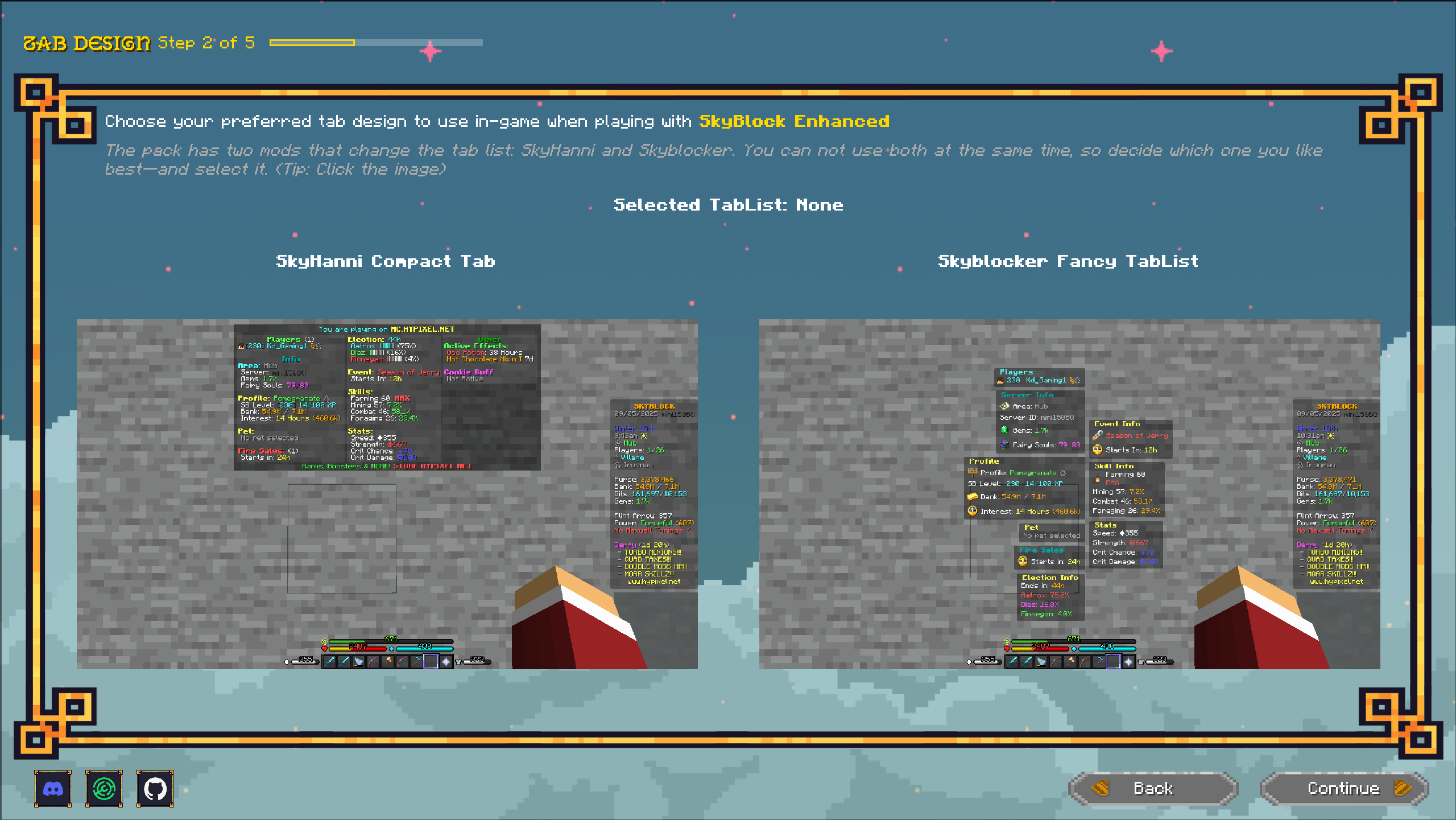
- Tab List: Choose between Skyblocker's fancy tab or SkyHanni's compact tab list.
- Resource Pack Chooser: Choose which resource packs to enable. Five different packs to choose from.
- Useful Information: Hotkeys included in the pack, cool features, and general info that's handy when using SkyBlock Enhanced.
Show case


 ~~~~
~~~~
Config Presets for Every Resolution
Over 20 hours were spent testing features from every mod—enabling and disabling them to make sure the experience is welcoming for new players and great for experienced ones. Configs are also tailored for 1080p, 1440p, and 4K—and this is something no other pack does (to my knowledge).
Why is this important? Screen resolution changes can move UI overlays, causing them to overlap or look out of place. To keep everything clean, extra hours were spent moving and configuring every overlay for each resolution, so your screen looks perfect every time.
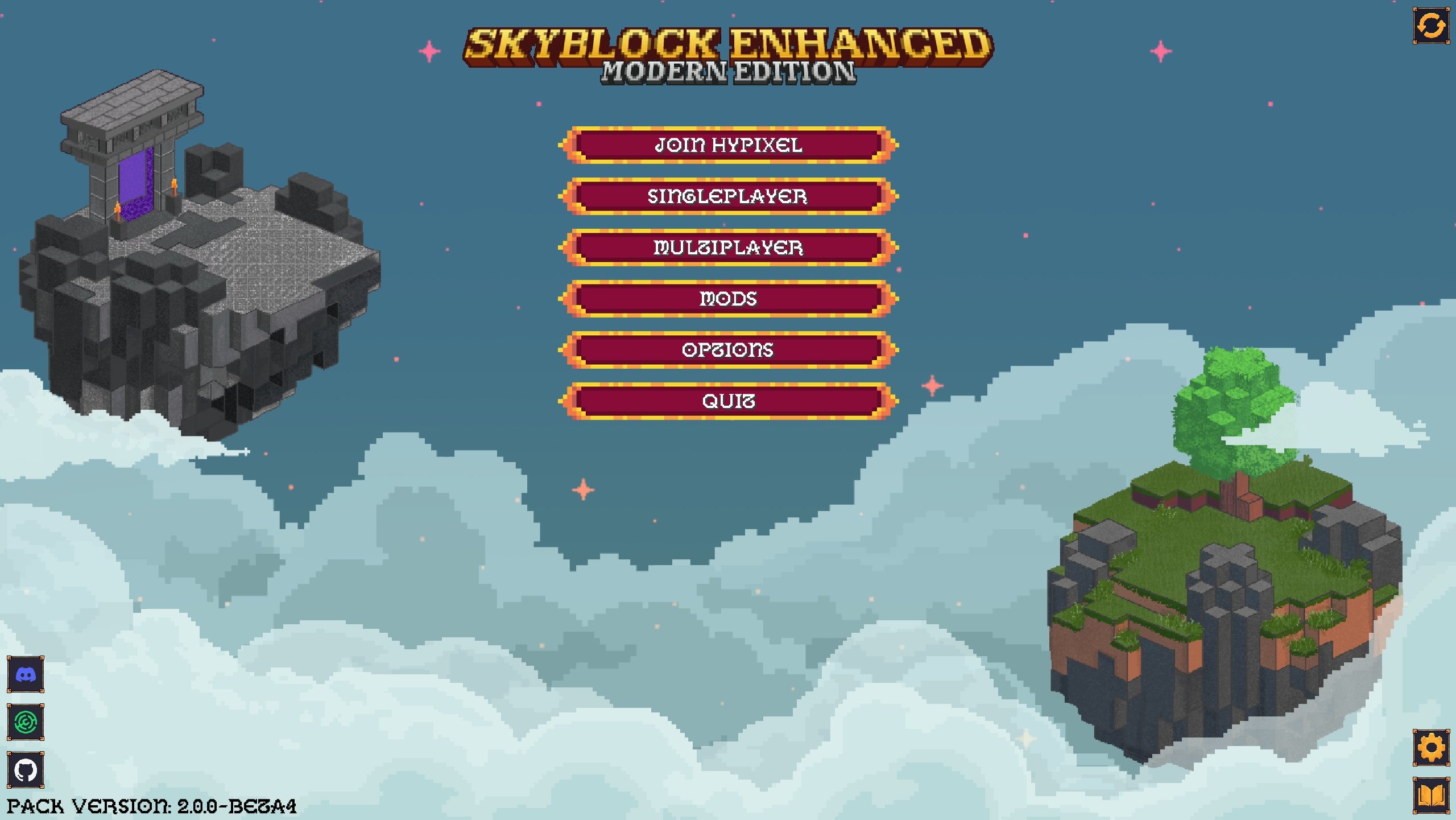
Custom Main Menu
A nice SkyBlock-themed main menu to get you in the Hypixel SkyBlock mood immediately after launching the game.
Show Case
Custom Backup and Config Manager
With so many mods, you'll configure them to your liking over time. And maybe your configs will be perfect for someone else—especially if they're not on the three default screen resolutions available.
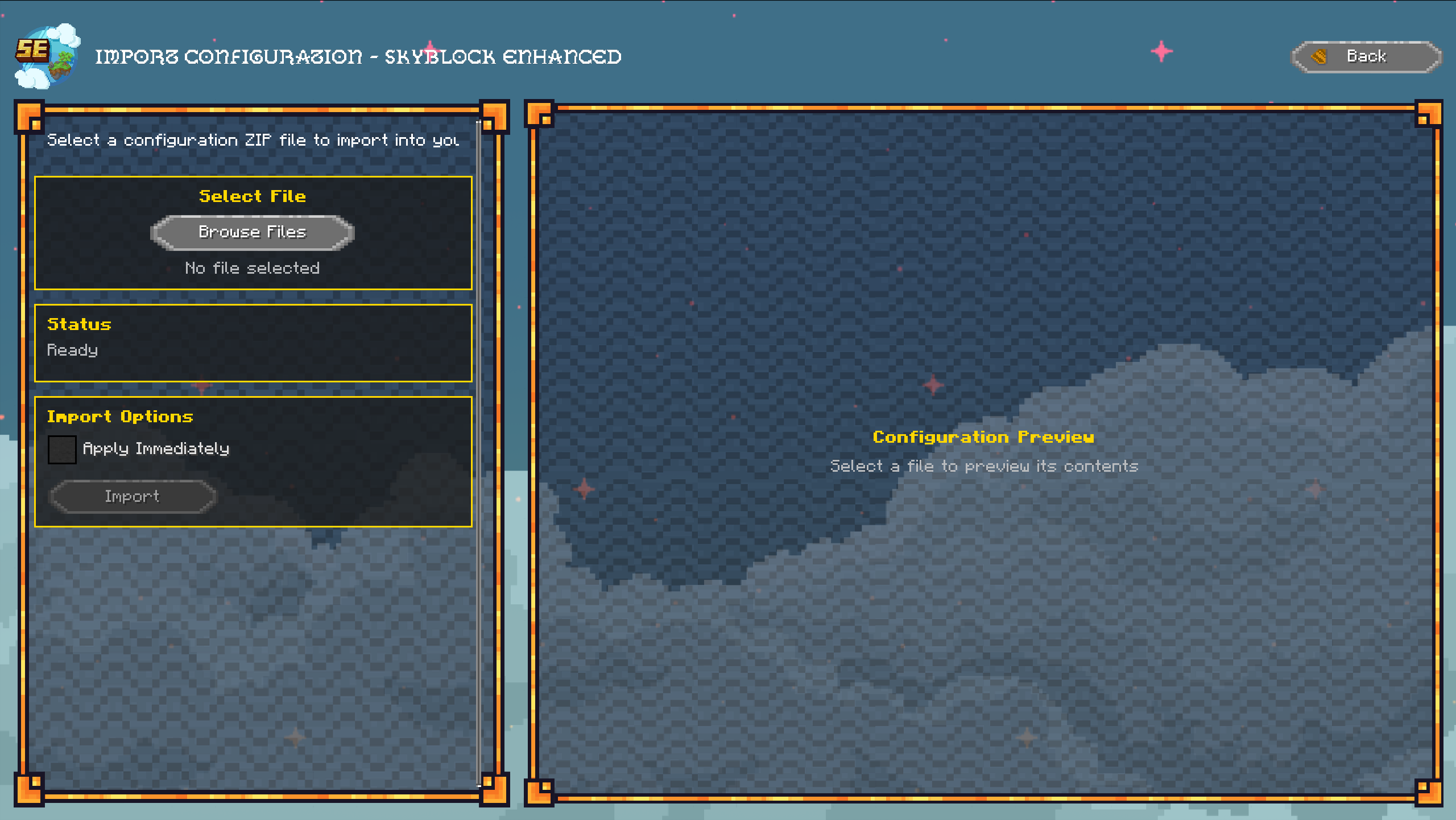
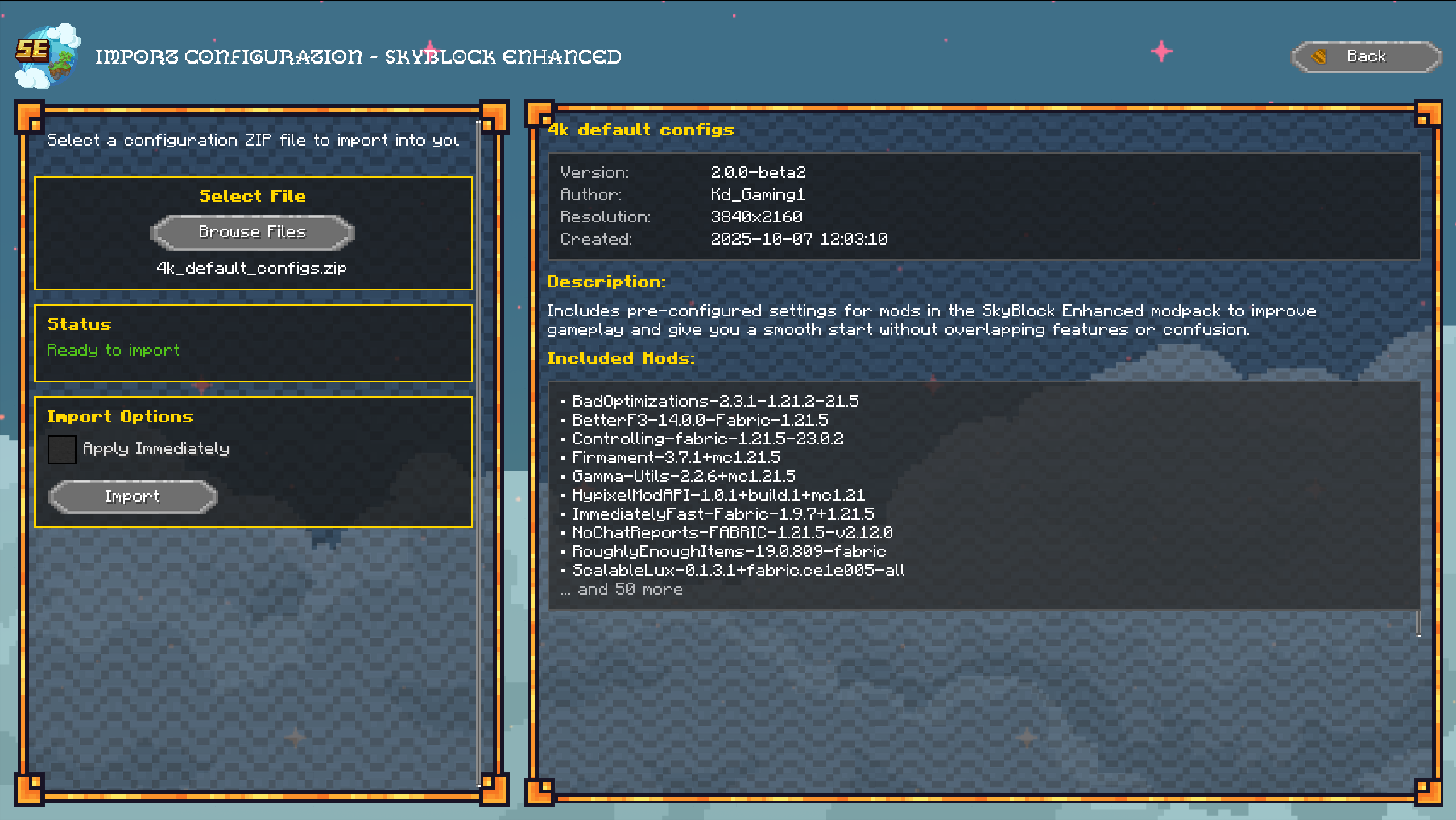
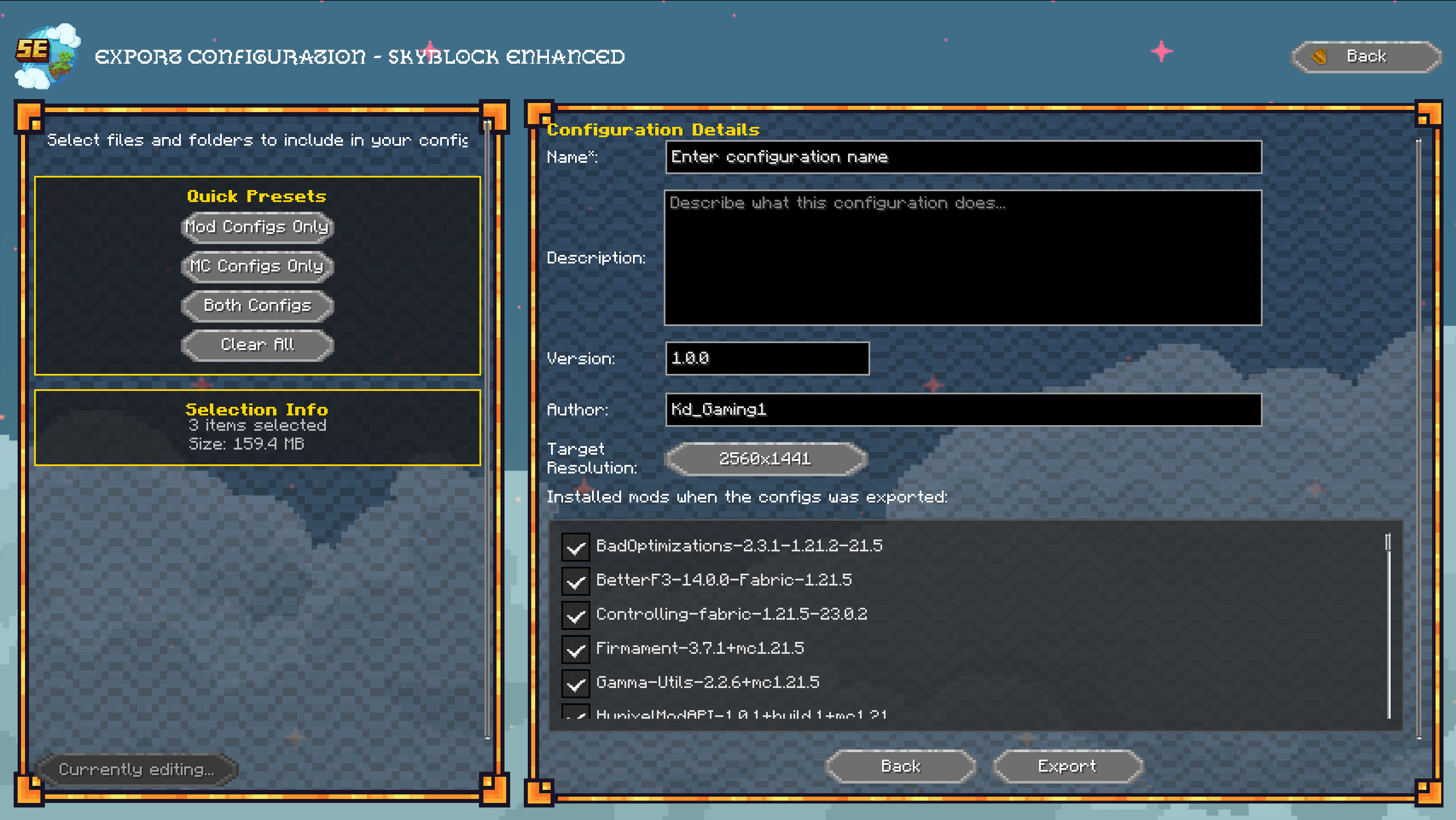
You can export your configs and share them with others! This can be done super easily in the in-game UI via the custom configuration manager. Here, you can:
- Export: Choose the files you want to include, add a name, description, and the resolution it's for, then share it
- Import: Select the file, read the name, description, and resolution it's for, and decide if you want to import it
- Backup: Back up your current configs—when you apply a new config, your old ones are always backed up in case you make a mistake
- Switch: Swap between versioned configs whenever you want
Example use case: You spent hours perfecting your 1440p UI layout. Export it, share it on Discord, and let your friends import it instantly—no manual file copying needed.
Show Case





Installation Guide
Prerequisites
Before you begin, make sure you have:
- A valid Minecraft account (Java Edition)
- Stable internet connection
- The Modrinth App (free download)
Step 1: Download and Install Modrinth
- Go to the Modrinth website.
- Download the installer for your operating system.
- When the download finishes, click the file in your browser's pop-up.
- Can't find it? Open your Downloads folder.
- On Windows: Press Win + E, then click Downloads in the left menu.
- Double-click the installer file.
- If you see any security warnings, click Yes or Run anyway.
- In the setup window, click Next → Next → Install.
- This may take a few minutes.
- When it's done, click Next → Finish.
- The Modrinth App will open automatically.
- If you get pop-ups asking to install additional components, click Yes.
Step 2: Add Your Microsoft Account
To launch Minecraft, you need to connect your Microsoft account.
- Look in the top-right corner for Playing as.
- Click the dropdown → then the green "Log in" button.
- Follow the steps to sign in with the Microsoft account that owns your Minecraft license.
- Once signed in, you'll see your account listed and ready to play.
Step 3: Install SkyBlock Enhanced – Modern Edition
- In the left sidebar, click Discover content (compass icon).
- At the top, select the Modpacks tab (it turns green).
- Search for SkyBlock Enhanced: Modern Edition.
- Click the ⤓ Install button.
- For a specific version: click the pack name → open the Versions tab → select your preferred version.
- Modrinth will now create a new instance automatically.
Step 4: Allocate More RAM
Minecraft runs best when given enough memory. Here's what you should allocate based on your system:
| System RAM | Recommended Allocation | Heavy Mods |
|---|---|---|
| 8GB | 3–4GB | 4GB |
| 16GB | 4GB | 6–8GB |
| 32GB+ | 4GB | 8–10GB |
To check how much RAM your PC has:
Press Ctrl + Shift + Esc → Performance tab → Memory.
Image

Option 1: Allocate RAM to All Instances
- Click the Settings gear in the bottom-left corner.
Image

- Select Default instance options.
- Scroll to Memory Allocated.
- Move the slider to your desired value.
- Example: 4GB = 4096MB
- Close the window — done.
Image

Option 2: Allocate RAM for One Instance
- Open the specific instance.
- Click the gear icon near the Play button.
Image

- Go to Java and Memory.
- Enable Custom Memory Allocation.
- Adjust the slider (e.g. 4GB = 4096MB).
Image

- Close and play.
Step 5: Fix "Resource Reload Failed" Errors
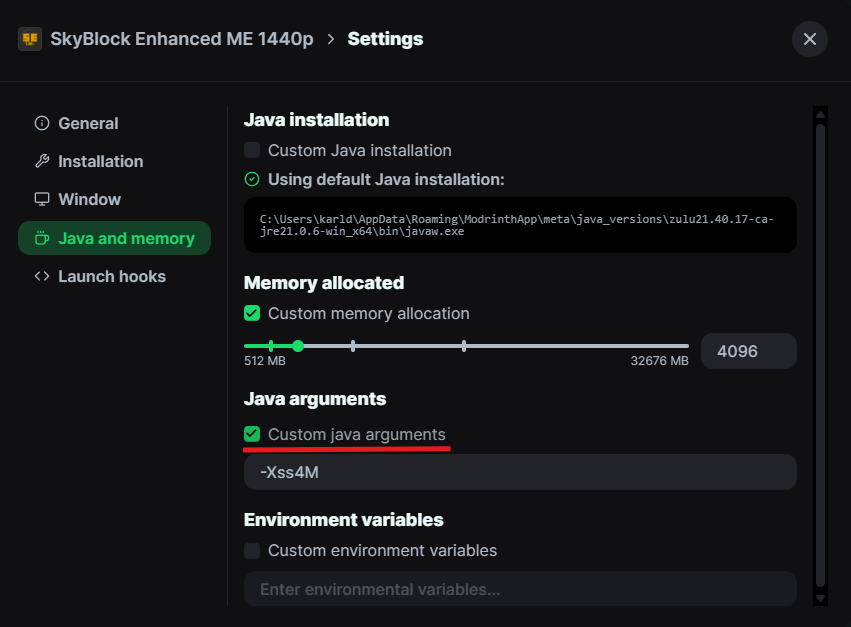
If you get the Resource Reload Failed error after applying resource packs, add this JVM argument: -Xss4M
How to add it:
- Open your instance's page.
- Click the gear icon next to Play.
Image
- Go to Java and Memory.
- Check Custom Java Arguments.
- Paste in
-Xss4M.
Image
- Close the settings and launch.

📋 Full Mod List
🎮 SkyBlock Enhancement Mods
- Bazaar Utils ✦ Hypixel Skyblock by mkram17
- Firmament for Hypixel SkyBlock by nea89o
- Modern Warp Menu by Yukkuritaku
- SkyBlock Profile Viewer by j10a1n15
- Skyblock Tweaks by MisterCheezeCake Removed after version 2.4.0
- Skyblocker • Hypixel Skyblock by Wohlhabend
- SkyHanni for Hypixel SkyBlock by hannibal2
- SkyOcean by j10a1n15
- Zen by aurielynRemoved after version 2.4.0
- Krypt by aurielyn Removed after version 2.4.0
- Skyblock Overhaul (SBO) by SkyblockOverhaul
- Odin by odtheking
⚡ Performance & Optimization
- BadOptimizations by thosea
- C2ME (Concurrent Chunk Management) by ishland
- Entity Culling by tr7zw
- FerriteCore by malte0811
- ImmediatelyFast by RaphiMC
- Krypton by astei
- Lithium by jellysquid3
- More Culling by FX
- Particle Core by fzzyhmstrs
- Sodium by jellysquid3
- ThreadTweak by getchoo Removed after version 2.4.0
- Very Many Players by ishland Removed after version 2.4.0
- ModernFix-mVUS by Coredex
- Better Block Entities by cseden
- Ixeris by decce6
🧩 UI & Quality of Life
- 3D Skin Layers by tr7zw
- Auth Me by axieum
- BetterF3 by TreyRuffy
- Centered Crosshair by JustAlittleWolf
- Chat Patches by OBro1961
- Controlling by jaredlll08
- Continuity by PepperCode1
- Cubes Without Borders by Kira-NT
- Emoji Type by Norbiros
- Gamma Utils (Fullbright) by Sjouwer
- Mod Menu by Prospector
- Model Gap Fix by MehVahdJukaar
- No Chat Reports by Aizistral
- No Double Sneak by Blackilykat
- No Resource Pack Warnings by S_pace%20Walker_
- REI (Roughly Enough Items) by shedaniel
- REI Search Bar Calculations by BigBou
- Sodium Extra by FlashyReese
- Reese's Sodium Options by FlashyReese
- Scale Me by Kd_Gaming1
- PackCore by Kd_Gaming1
- Searchables by jaredlll08
- Sodium Shadowy Path Blocks by Rynnavinx
- Sound Controller by BVengo
- Tooltip Scroll by Provismet
- Wavey Capes by tr7zw
- Zoomify by isxander
- Language Reload by Jerozgen
- kennytvs-epic-force-close-loading-screen-mod-for-fabric by kennytv
🎨 Shaders & Visual
🛠️ Configuration & Libraries
- Architectury API by shedaniel
- Cloth Config API by shedaniel
- Fabric API by modmuss50
- Fabric Language Kotlin by modmuss50
- Fzzy Config by fzzyhmstrs
- Text Placeholder API by Patbox
- YetAnotherConfigLib (YACL) by isxander
- oωo (owo-lib) by glisco
🎨 Resource Packs (Included)
- Furfsky Reborn by Tylerrrr
- Hypixel Plus by ic22487
- Skyblock Dark UI by jani270
- Defrosted by looshy
- Looshy by looshy
Note: All mods included are Hypixel-safe and follow the server's guidelines.

🧩 General
Q: What is SkyBlock Enhanced – Modern Edition?
A: It's a pre-configured modpack designed specifically for Hypixel SkyBlock on modern versions of Minecraft (1.21+). It combines over 60 optimized mods, offering better performance, visuals, and quality-of-life features without requiring manual setup.
Q: Can I use this modpack on the Hypixel Network?
A: Yes — all included mods are allowed on Hypixel, as they follow the server's guidelines. They are client-side and do not automate gameplay. Always double-check with Hypixel's rules if you add your own mods.
Q: Do I need to install mods manually?
A: No. Everything comes pre-installed and configured. Simply install through Modrinth App, launch the instance, and you're ready to play.
Q: What version of Minecraft does this use?
A: The pack runs on Minecraft 1.21.5/1.21.8 using the Fabric mod loader.
⚙️ Installation & Setup
Q: How do I install the pack?
A: Follow the step-by-step guide above. You'll need the Modrinth App, a valid Microsoft account, and a few minutes to let it download and install automatically.
Q: The game crashes or doesn't start — what should I do?
A: Common fixes include:
- Allocating more RAM (see the table above).
- Adding the JVM argument
-Xss4Mif you see a "Resource Reload Failed" message. - Ensuring your Java version is up to date (Java 21 is recommended).
If issues continue, join the Discord server for help.
Q: Can I import my own resource packs or mods?
A: Yes. You can safely add your own client-side mods or resource packs. Just make sure they don't conflict with included ones or violate Hypixel's rules.
Q: How do I update the modpack?
A: The pack includes One-Click Updates through Modrinth. When an update is released, click "Update All" in the instance settings.
Image of Button
This is the button you are looking for:

Then you click the green button. Don't click the text. That will bring you to the Modrinth page for the pack and will not update it.

🚀 Performance & Optimization
Q: Will this modpack work on low-end PCs?
A: Yes. It includes performance-focused profiles you can choose during the Welcome Wizard setup. Start with "Performance" or "Balanced" mode for older systems.
Q: How much RAM should I allocate?
| System RAM | Recommended Allocation | Heavy Mods |
|---|---|---|
| 8GB | 3–4GB | 4GB |
| 16GB | 4–6GB | 6–8GB |
| 32GB+ | 6–8GB | 8–10GB |
Allocating more than 10GB is not recommended unless using heavy mods.
Q: Do shaders work with the modpack?
A: Yes, Iris Shaders and Complementary Shaders Unbound are included. However, some SkyBlock overlays may not display correctly with shaders enabled.
🧰 Customization & Features
Q: Can I change or reset configurations?
A: Absolutely. The built-in Backup and Config Manager lets you save, import, and restore your configurations at any time.
Q: What's the Welcome Wizard for?
A: It's a simple setup tool that runs when you first launch the game. It helps you pick the best visual and performance settings for your PC, preferred UI layout, and resource packs.
Q: Are there configuration presets for different screen resolutions?
A: Yes. There are presets for 1080p, 1440p, and 4K, ensuring overlays and HUD elements look perfect on any display.
🔧 Troubleshooting
Q: I get "Resource Reload Failed" when loading resource packs. What should I do?
A: Add the following JVM argument in your instance settings: -Xss4M
This fixes memory allocation issues when reloading large resource packs.
Q: My FPS is still low. How can I improve it?
- Lower render distance in Video Settings.
- Use the Performance profile.
- Turn off shaders.
- Close other programs running in the background.
Q: My UI elements are overlapping or misaligned.
A: Try switching to a preset that matches your screen resolution. If you've changed your display settings recently, reapply the configs for your resolution in the configuration manager.
💬 Support & Community
Q: Where can I get help or report bugs?
A: Join the official Discord at discord.gg/pdwxyjTta7. You'll find installation guides, troubleshooting help, and active modding discussions.
Q: Can I share my own config setup with others?
A: Yes! Use the in-game config manager to export and share your setup. It's great for friends with similar screen sizes or preferences.
Q: How can I support the project?
A: You can support via Ko-fi (ko-fi.com/kdgaming1) or by using the Bisect Hosting promo code SBE for 25% off — it helps fund updates and continued development.

Support the Project
Want to support my work? You can do this on Ko‑fi. All donations are highly appreciated and help me continue providing support and updates. Thank you to everyone who wants to help!
Server Hosting Partner
In need of your own server? I partner with Bisect Hosting to bring you reliable game servers. Whether you play Minecraft or another title, they deliver high‑performance hardware and fast support.
Use code SBE at checkout for 25% off your first purchase.
🎮 Get 25% Off with Bisect Hosting

Thank You and Next Steps
Thank you for choosing SkyBlock Enhanced – Modern Edition!
You now have access to a modern, optimized, ready-to-play Hypixel SkyBlock experience with over 60 mods, pre-configured settings, and resolution-specific presets. Whether you're farming, doing dungeon runs, or slayers, you're equipped with the best tools available.
If you enjoy the modpack:
- Heart/favorite the project to show your support
- Join the Discord at discord.gg/pdwxyjTta7 for updates and community help
- Share it with friends who play Hypixel SkyBlock
Happy gaming, and see you in SkyBlock!
— Modpack by Kd_Gaming1
Credits
Huge thanks to all the mod developers who put in the work to make these amazing mods for the community. Special thanks to @aurielyn for helping bring PackCore 3.0 to life, and @ic22487 for creating the new logo.
To see all creators and links to the original sources for every project in the modpack, check the Full Mod List section.


![Cobblemon Official Modpack [Fabric]](https://cdn.modrinth.com/data/5FFgwNNP/e7f9ee2e9d361623847853fe2ddce42f519ee64f.png)



Conversation