SkyBlock Profile Viewer
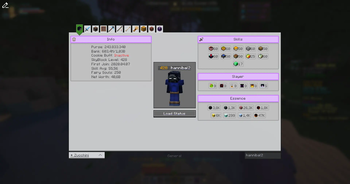
Modern Hypixel SkyBlock Profile Viewer
Versions
Gallery
About
SkyBlock Profile Viewer


A Profile Viewer for Hypixel SkyBlock, developed with love and passion.
The Profile Viewer can be opened with /pv for your own Profile, or /pv <username> for someone else.
You can switch between the tabs using the buttons on the top of the UI.
If a tab has multiple categories, you can switch between them using the buttons on the left side of the UI..
Features
- Profile Spying: Adds a button into the Hypixel Profile Viewer to open this Profile Viewer.
- PronounDB: Integrates with PronounDB to display pronouns of the player.
- Party Finder: Sends a message to open the Profile Viewer for the player that just joined a party finder party.
- Replace Social Options: Replaces Hypixel's "Click to open social options" with "Click to open Profile Viewer" on chat messages.
- Scaling (Experimental): Automatically scales up some elements based on the player's screen size, to make it more readable on larger screens.
- and themes...
Themes
Comes built-in with two themes: Default (Light), Dark and NEU (transparent). Quickly switch between them using the button in the top left corner of the UI.
Theme Showcase
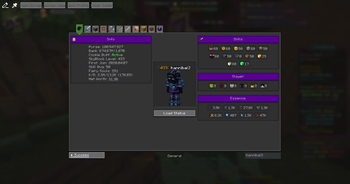
Dark Theme
 A dark mode theme for the profile viewer.
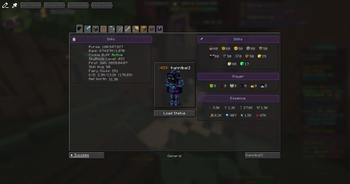
NEU Theme
 A transparent theme for the profile viewer, inspired by NEU's Profile Viewer.
You can also create your own theme, here's a guide:
Creating your own Theme
This needs to be done in a Texturepack.
In the Folder assets/skyblock-pv/themes/ create a new file called <theme_name>.json.
The json should have this layout:
{
    "name": "<theme_name>",
    "textures": {
        ...
    },
    "colors": {
        ...
    }
}
To "replace" a texture, you specify the path to the texture you want to replace as the key, and the path to your new texture as the value. E.g., this replaces the normal button texture with a custom one:
{
    "name": "MyTheme",
    "textures": {
        "skyblock-pv:buttons/normal": "skyblock-pv:<theme>/buttons/normal"
    },
    "colors": {
        ...
    }
}
Some colors might look weird, as they look too similar to the background. By default, it uses the minecraft colors. The colors can either be in hex format or in decimal format.
{
    ...
    "colors": {
        "dark_gray": "#B5B5B5"
    }
}
Pages
🏠 Home Tab
 Designed to be simple and to show off the main aspects of the player's profile.
Designed with a purpose to be screenshot-able and shareable.
📦 Inventory Tab
 Switch between EnderChest, Backpack, ... pages using the custom build Carousel or the buttons up top.
📚 Collections Tab

🎣 Fishing Tab
 All fishing related information, so Essence Upgrades, Trophy Fish, Gear, Stats, ... in one tab.
🔍 And many more tabs...
...we just didn't put them in the ReadMe. Look at them when pv'ing yourself or someone else!
All Tabs
as of 2025-04-16
- Home
- Combat
- Dungeons
- Bestiary
- Crimson Isle
- Mob Kills
- Inventory
- Main Inventory
- Ender Chest
- Backpacks
- Wardrobe
- Accessory
- Sacks
- Personal Vault, Potion Bag, Fishing Bag, Quiver, Candy Bag, etc.
- Collections
- With Minions
- Mining
- Main Mining
- Mining Gear
- HotM
- Glacite
- Fishing
- Pets
- Farming
- Main Farming
- Visitors
- Crops
- Composter
- Museum
- Weapons
- Armor
- Chocolate Factory
- Rift
- Main Rift
- Inventory
- Ender Chest
Mod Compatibility
SkyBlocker
- Issue: SkyBlocker includes its own Profile Viewer.
- Resolution: We override their
/pvcommand with ours. If you prefer SkyBlocker's version, use/skyblocker pvinstead. - Note: We do not provide an option to disable this override, as using our mod implies a preference for our Profile Viewer.





Conversation