
Thaumcraft 4 Tweaks
Thaumcraft 4 addon to fix UI deficiency, performance issues and minor bugs.
Versions
Gallery
About
Please notice the mod is always published to curseforge first. Publication to modrinthn is done by hand and should usually soon follow CF publication, but I sometimes get lazy/forgetful and might postpone this a bit. If you downloaded a jar from modrinth and somehow while crashing it tells you the jar is not signed by me, bug me on discord so I can replace the faulty jar. Description is also more up to date there.
This is an addon to the old mod Thaumcraft 4. It is not intended to be used with newer Thaumcraft 5/6. This addon also only runs on 1.7.10.
License is AGPL 3.0 with additional exceptions on minecraft specific issues. In case you are wondering what that means, it means you are required to hand users a copy of the source code of THIS mod even if you are using TC4Tweaks only on server side. This mostly matters when you are using a custom TC4Tweaks jar, as I'd like to have your contribution back. For normal use of this mod, merely put a link to this page, the github, or curseforge page of this mod alongside your modpack/client download is enough.
Using the mod
This mod is optional on both side and the two side are free to use different version of this mod.
(Incomplete) feature list
Scrolling Through Aspect List
The original function of this addon. This will allow you to scroll through the aspect list in the research table using the mouse wheel. No more clicking yay! The mod will tell you scrolling is enabled when you hover your mouse over any research note.
Scrolling Through Research Pages
This will allow you to scroll through the indiviual pages (the pages that have descripitive texts, recipes, arcane construct illustrations, etc) in the book using the mouse wheel. No more clicking yay!
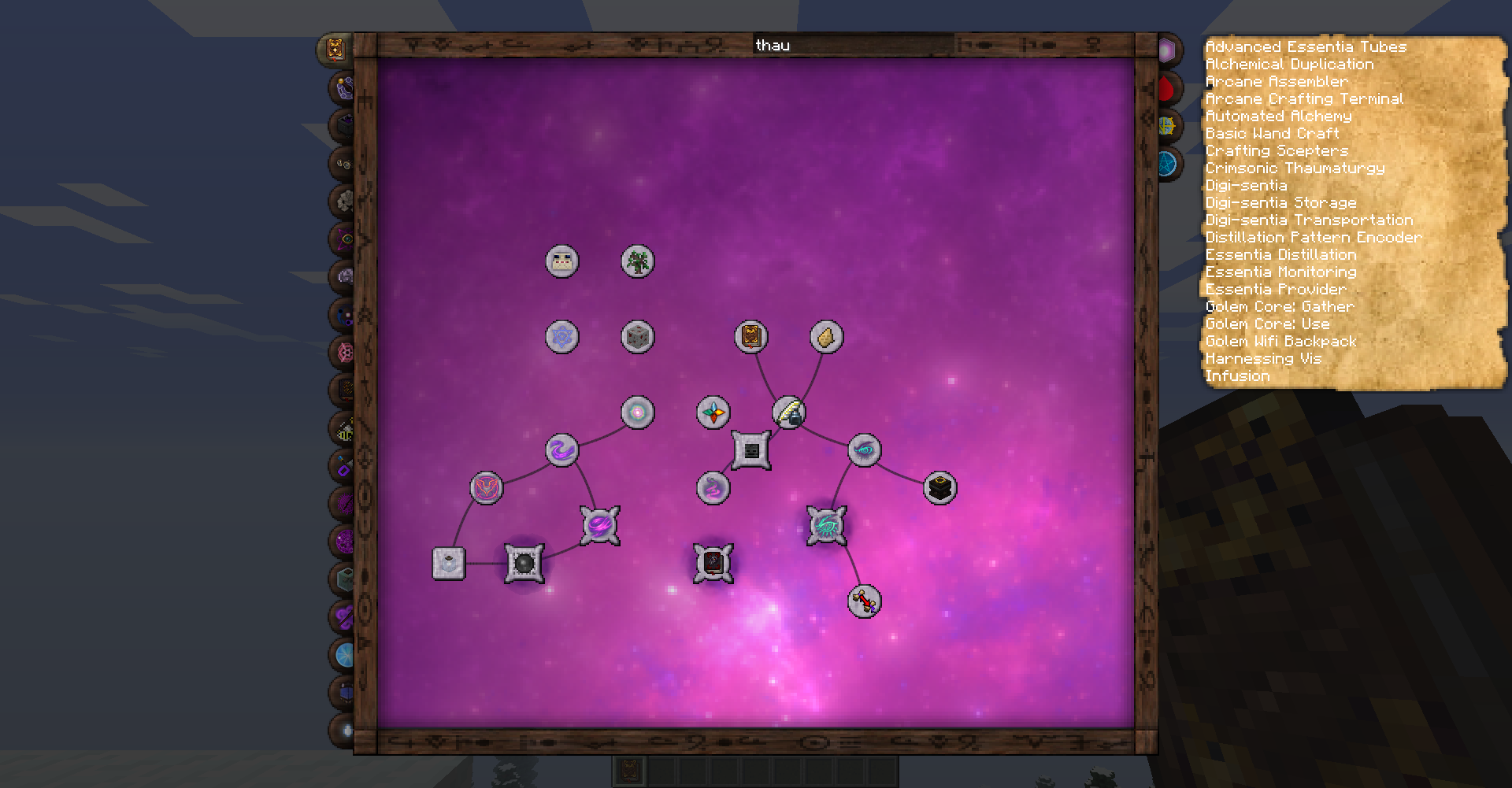
Scaling up the thaumonomicon GUI
Change the browserScale option in .minecraft/config/tc4tweaks.cfg. 2.0 is suitable for 1920x1080 screens under normal gui scale, whereas 1.0 is the same as original. You may want to use a different value if you use another gui scale or resolution.
Fix focus NPE
If you
- Equip a focus MyFocus from some TC4 addon
- Remove said addon from your game
- Congratulations! If you ever pick up this wand your game would crash.
This mod fixes this problem.
Performance boost
Basically, this will somewhat remedy the client side lag in larger modpacks when you open arcane workbench.This should also alleviate the server lag created from some player crafting 64 items using an arcane workbench.
Throttling the GUI update
Version from 1.1.0 onwards allows you to throttle the Arcane Workbench crafting result update to once every X in game ticks. By default this is 4. You can set it longer if it doesn't seems to be effective enough. This value can be changed at runtime without restarting the client by accessing this mod's config GUI (Esc | Mod Options | Select TC4 Tweaks in the mod list | Config | general).
This will somewhat remedy the lag coming from wand recharging. Starting from version 1.2.0-beta2, this alone should be enough to fix this lag and largely remove the need for more aggressive optimization (as detailed below)
Other performance patch
A few random laggy code in TC4 is made more efficient. Most of them will affect client side performance (FPS) only, yet some of them do have an impact even on dedicated servers. Most of these server-affecting patches are targeting the arcane crafting lag. Version from 1.2.0-beta12 onwards add a new patch aimed to fix alchemical furnace lag. Version from 1.4.20 onwards will reduce lag caused by energised nodes checking if they can still see relay. In general, it is suggested to install this mod on dedicated servers. It will make a difference.
Please refer to Technical explaination section if you are curious about the exact detail.
More aggressive optimizations
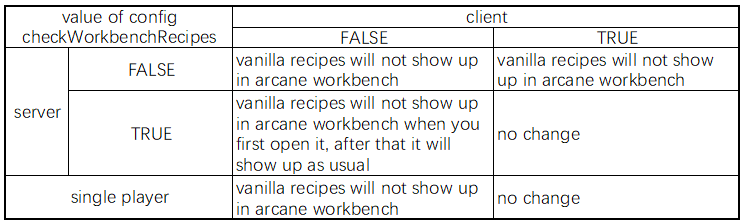
Version from 1.2.0-beta1 onwards ships with an experimental opt-in feature that prevents the arcane workbench from functioning as a normal crafting table. This accounts for the bulk of lag in large modpacks. As you can probably see this is an optimization with some side effects. You are encouraged to try it in game to see how it'd work.
This feature can be conveniently turned on or off at runtime (i.e. no client restart needed) by accessing this mod's config GUI (Esc | Mod Options | Select TC4 Tweaks in the mod list | Config | general). As a precaution, the feature is enabled only if checkWorkbenchRecipes is set to false, not true!
Even though this sounds like a change that needs to be turned on at both side, it actually works just as good on client side, if the server disables this (or simply doesn't have this mod installed) while the client enables it. It is suggested to keep this feature off on dedicated servers, and turn it on at client side only.
Technical explaination
This section is intended for fellow developers to only. Please don't panic if it doesn't make sense to you
ALERT: This text is not frequently updated. Please refer to source code to check what's really happening.
- ScanManager#generateItemHash(Item, int) will no longer create a million string. The hashCode will be computed directly. This conflicts with GT6's fix and will not function if GT6's loading plugin is detected. GT6's fix will take precedence.
- ResearchCategories#getResearch(String) will use a HashMap now, instead of going over every research registered. This HashMap will be recomputed whenever the server starts. HashMap lookup will be disabled if the server haven't finished starting.
- A call hook is injected into TileMagicWorkbench#setInventorySlotContents(IInventory) on client side only. It will throttle the update to once per 200ms. If any update is dropped, a flag will be set. A tick handler will then try to update once per X ticks (config value) in case of a missed update.
- FXSonic have its model changed to static and reloaded only upon resourcepack reload.
- In ThaumcraftCraftingManager findMatchingArcaneRecipe and findMatchingArcaneRecipeAspects got a simple LRU cache with configurable size (default to 16). Old entries will be evicted when cache is full.
- An Thread.currentThread().setPriority(1) is injected to the start of TC4's mapping thread. If the cache is hit somehow the priority will be reverted back to normal in an attempt to ease lock contention.
- GuiResearchRecipeVisitor was using synchronized methods and ConcurrentMap at the same time. synchronized is now removed.
- In ThaumcraftCraftingManager getObjectTags got improved. See code for details.
- Huge amount of changes in GuiResearchBrowser. Consult net.glease.tc4tweak.asm.GuiResearchBrowserVisitor for details
- Most TESR are patched to not render stuff if the chunk is not yet fully loaded.
Should you have any problem using this addon, please send your questions to the github (click the Issues tab on the side of this page). Video trailer not yet available.



Conversation