

Simple Datapacks
Simplifying the use of datapacks
Versions
Simple Datapacks Neoforge 1.21.9 v2.6
2.6 · 6 days ago · 21.36 KB
Simple Datapacks Neoforge 1.21 v2.6
2.6 · 6 days ago · 21.32 KB
Simple Datapacks Forge 1.21.9 v2.6
2.6 · 6 days ago · 20.64 KB
Simple Datapacks Fabric 1.21.9 v2.6
2.6 · 6 days ago · 21.51 KB
Simple Datapacks Forge 1.20.2 v2.6
2.6 · 6 days ago · 21.44 KB
About
📂 Simple Datapacks
The purpose of this mod is to simplify the ways of adding datapacks to the game. To do this, the mod creates a folder in the root directory of Minecraft called datapacks. In my opinion, the capabilities of datapacks are underestimated by players, mostly because not everyone understands how to install datapacks into the game. This is more difficult to do than to install a mod or resource pack, although many datapacks bring a lot of content to the game.
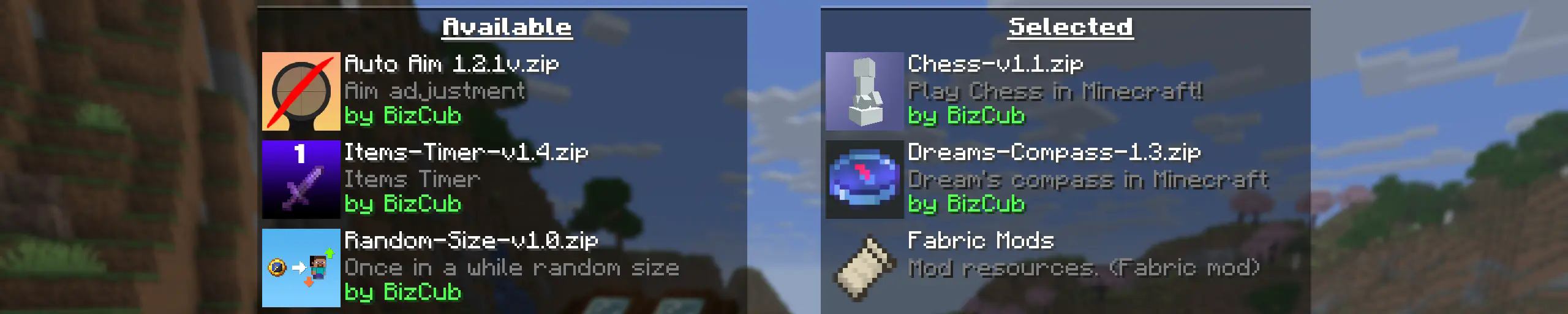
My goal is to make a mod that will help players with installing datapacks into the game so that they can get a new portion of unforgettable impressions. But since my mod was released recently, it is possible that it may contain errors, so please notify me about this on GitHub in the issues section.
💼 Usage

In order to launch a world with datapacks, you need to download any datapack that is compatible with the selected version of Minecraft, open and place the datapack in the datapacks folder, start creating a world and select the desired datapack from the list. Or in the mod settings specify the path to the downloads folder C:\Users\{USERNAME}\Downloads\ (presumable path) and simply open the datapack selection menu and enable the desired
✨ Features
Whenever possible, I added the most basic features for the mod that I could imagine. If you have something to add, you can suggest it to me on GitHub.
-
Since the main thing for me is that as many players as possible start using datapacks, I made the mod available on 4 different loaders so that it can be launched from almost any modpack.
-
The mod has a configuration. The values used by the mod can be changed in the mod menu (Fabric requires ModMenu), and can also be changed in the configuration file, which is available using the Cloth Config API.
-
The mod allows players to add and load datapacks from different folders. To change the sources of these packs, you need to configure them in the mod settings. If you want to specify a folder in the game's root directory, for example, my_datapacks instead of the full path C:\Users{USERNAME}\AppData\Roaming.minecraft\my_datapacks, simply enter the folder name in the field in the mod settings menu. By default, datapacks are loaded from the datapacks folder in the root directory and the downloads folder, allowing them to appear in the game immediately after installation (provided Cloth Config API is loaded; otherwise, only the datapacks folder will be used).
-
By default, datapacks are "Available" after being added to the game, meaning that the required datapacks must be loaded through the datapack menu during world creation or using the
/datapack enablecommand. However, if you want each new datapack to be used by default in the game without manual activation, you can use the automatic datapack loading setting in the mod settings. -
It's possible to disable feature packs (experimental datapacks). If you don't use feature packs, you can disable them to save space on the datapack selection screen.
-
Unlike similar mods, datapacks will continue to work in the world, even if you disable the mod. In the mod settings, you can enable copying datapacks to the world folder. In this case, the datapack will work without the mod, because the game will read it from the world.
-
To ensure stable operation of datapacks in the game, it is recommended to use the
/reloadcommand. AFTER USING DATAPACKS IN THE WORLD, IT IS RECOMMENDED TO RESTART THE WORLD, AS SOME DATAPACKS WILL NOT WORK. More about this on the wiki: https://minecraft.wiki/w/Data_pack#Usage
🤝 Support

Related projects

Sodium
by jellysquid3
The fastest and most compatible rendering optimization mod for Minecraft. Now available for both NeoForge and Fabric!

Iris Shaders
by coderbot
A modern shader pack loader for Minecraft intended to be compatible with existing OptiFine shader packs


Entity Culling
by tr7zw
Using async path-tracing to hide Block-/Entities that are not visible
Download Simple Datapacks
or
Select a game version to see available downloads
No versions match your filters
About the creator


Conversation