

Fresh Grass
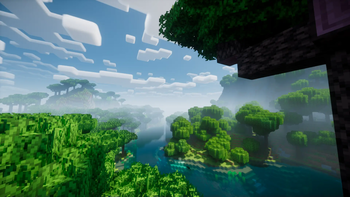
Makes grass blocks more vibrant and lively by enhancing their green color, while staying true to the vanilla look.
Gallery


About
🌿 Fresh Grass – Lively Colors & Improved Colormap 🌿
You can make your Minecraft world look really cool, with Fresh Grass. This is a set of textures that makes everything look more real and pretty. 🍃 It changes the way the colors look and makes the grass and leaves look super green and nice. This means all the different parts of your Minecraft world will look fresh and nice. You will not see colors anymore. Now your fields and forests and gardens will look like they are really alive! 🌱
Fresh Grass is really good at working with shaders and other texture packs. It makes things look better without slowing down your game. The people who made Fresh Grass paid attention to each blade of Fresh Grass and each leaf detail. They wanted to make Fresh Grass and the leaves look really good so your world feels more real. This makes your world feel like you are actually, in it. 🌳✨
Quick Installation Guide:
1️⃣ Download the Fresh Grass .zip file from this page. 2. To do this you need to open Minecraft. Then you have to go to the Options section. From there you need to select Resource Packs. After that you will see an option that says Open Pack Folder. You have to click on that to open the folder, for the Minecraft resource packs.
- Now you need to move the zip file into the resource packs folder. Make sure you put the zip file inside the resource packs folder. The resource packs folder is where the zip file should be.
4️⃣ You can now activate the pack in Minecraft. This will be really cool. You will get to see a world that is very vibrant. The world in Minecraft will be full of color. So go ahead. Activate the pack, in Minecraft and enjoy the new world. It is a lot of fun to play in this world 🌎🎨
Whether you’re exploring forests, building gardens, or just strolling through your world, Fresh Grass makes everything feel more alive. Upgrade your Minecraft visuals today and see the difference! 💚







Conversation