
Effortless Structure
Increase your build speed by batch placing/breaking/using blocks/items in any shapes with correct item and tools consumption. It also includes array/mirror transformers, structures copying/pasting, block randomizer, permission control, etc...
Versions
Effortless Structure 3.4.0
3.4.0 · 1 year ago · 1.81 MB
Effortless Structure 3.4.0
3.4.0 · 1 year ago · 1.96 MB
Effortless Structure 3.4.0
3.4.0 · 1 year ago · 1.96 MB
Effortless Structure 3.4.0
3.4.0 · 1 year ago · 1.82 MB
Effortless Structure 3.4.0
3.4.0 · 1 year ago · 1.82 MB
Gallery
About
Effortless Structure
Effortless Structure is a multiplatform mod for placing and breaking blocks in Minecraft. It offers a set of modes allowing players to create structures and designs with ease. Additionally, it includes an randomizer that randomly selects items from a pre-defined list for random placement.
Features
- Pure Vanilla Compatibility: This mod is designed to be fully compatible with a pure vanilla game without adding new items or making incompatible modifications.
- Item Randomizer: This mod includes an item randomizer that lets players place blocks and entities randomly from a pre-defined list.
- Clipboard: This mod includes a clipboard that lets players copy and paste blocks and entities between worlds.
Platforms
- You need to install this mod on both the client side and server side.
- You can use this mod on servers with different platforms from your client.
- You can use the same mod jar file on multiple targets.
Targets
| Filename | Targets | Fabric | Quilt | Forge | NeoForge |
|---|---|---|---|---|---|
effortless-1.21.3-3.2.0.jar |
1.21.3 1.21.2 |
✓ | ✓ | ✓ | |
effortless-1.21.1-3.2.0.jar |
1.21.1 1.21 |
✓ | ✓ | ✓ | ✓ |
effortless-1.20.6-3.2.0.jar |
1.20.6 1.20.5 |
✓ | ✓ | ✓ | ✓ |
effortless-1.20.4-3.2.0.jar |
1.20.4 1.20.3 |
✓ | ✓ | ✓ | |
effortless-1.20.2-3.2.0.jar |
1.20.2 |
✓ | ✓ | ✓ | |
effortless-1.20.1-3.2.0.jar |
1.20.1 1.20 |
✓ | ✓ | ✓ | |
effortless-1.19.4-3.2.0.jar |
1.19.4 |
✓ | ✓ | ✓ | |
effortless-1.19.3-3.2.0.jar |
1.19.3 |
✓ | ✓ | ✓ | |
effortless-1.19.2-3.2.0.jar |
1.19.2 1.19.1 1.19 |
✓ | ✓ | ✓ | |
effortless-1.18.2-3.2.0.jar |
1.18.2 |
✓ | ✓ | ✓ | |
effortless-1.18.1-3.2.0.jar |
1.18.1 1.18 |
✓ | ✓ | ✓ | |
effortless-1.17.1-3.2.0.jar |
1.17.1 |
✓ | ✓ | ✓ | |
1.17 |
Plugins
- You can use this mod together with these plugins.
| Name | Supported | Note |
|---|---|---|
| Open Parties and Claims | ✓ | Allows you to claim chunks and add build permissions. |
| FTB Chunks Fabric / FTB Chunks Forge | ✓ | Allows you to claim chunks and add build permissions. |
| ViaFabric / ViaForge | ✓ | Allows you to connect to a different Minecraft version |
How to Use
-
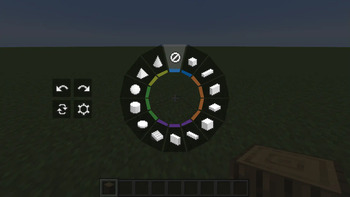
Hold LEFT_ALT/LEFT_OPTION key to open Build Mode Radial. You can switch build modes to create different structures. There are buttons for Undo/Redo, Replace, Settings, Pattern and Clipboard on the left side.
-
Click ATTACK/DESTROY key to start destroying blocks.
-
Click USE_ITEM/PLACE_BLOCK key to start placing/interacting blocks.
-
Click LEFT_BRACKET key to perform Undo. You can undo your last build operation.
-
Click RIGHT_BRACKET key to perform Redo. You can redo your last build operation.
Build Modes
-
Build modes are the basic shapes you need to choose when creating a structure. There are currently 13 different types of shapes. Each one has unique features like hollow or filled.
-
Disable: Place in the vanilla way.
-
Single: Place with increased reach distance.
-
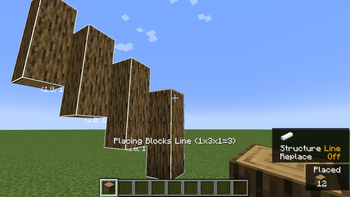
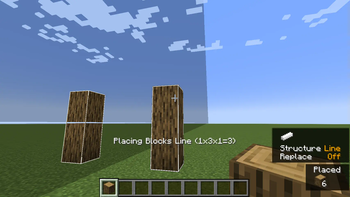
Line: Place a line in any of the three axes.
-
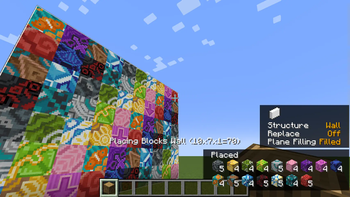
Wall: Place a wall in X or Z axis.
-
Floor: Place a floor in Y axis.
-
Diagonal Line: Place a line at any angle.
-
Diagonal Wall: Place a wall at any angle.
-
Slope Floor: Place a sloped floor at any angle.
-
Cube: Place a cube.
-
Circle: Place a circle shape in any of the three axes.
-
Cylinder: Place a cylindrical shape in any of the three axes.
-
Sphere: Place a sphere made of blocks.
-
Pyramid: Place a pyramid made of blocks.
-
Cone: Place a cone made of blocks.
Replace
-
You can choose how to replace blocks when placing new blocks.
-
Disable: Replace air and replaceable blocks like grass only when placing new blocks.
-
Blocks and Air: Replace air and blocks that can be destroyed by tools when placing new blocks.
-
Blocks Only: Replace blocks that can be destroyed by tools only when placing new blocks.
-
Offhand Only: Replace blocks that holding in your offhand only when placing new blocks.
Pattern
-
You can create complex shapes by combining different transformers. You can use a mirror to create a mirrored copy of a wall shape, or use an item randomizer to create a wall of random blocks. There are currently 4 types of transformers.
-
Mirror: Mirrors blocks and entities for even and uneven builds.
-
Array: Copies blocks and entities in a specific direction for a specified number of times.
-
Radial: Places blocks and entities in a circular pattern around a central point. The circle can be divided into sections, and each section will contain a copy of the block placements.
-
Item Randomizer: Randomizes the placement of blocks.
Clipboard
- You can use clipboard to transfer structures between worlds by copying and pasting blocks.
Transformers
Dependencies
Fabric
| Dependency | Download |
|---|---|
| Fabric Loader | https://fabricmc.net/use/installer/ |
| Fabric API | https://www.curseforge.com/minecraft/mc-mods/fabric-api/files |
Quilt
| Dependency | Download |
|---|---|
| Quilt Loader | https://quiltmc.org/install/ |
| Quilted Fabric API | https://modrinth.com/mod/qsl/versions |
Forge
| Dependency | Download |
|---|---|
| Forge Loader | https://files.minecraftforge.net/net/minecraftforge/forge/ |
NeoForge
| Dependency | Download |
|---|---|
| NeoForge Loader | https://neoforged.net/categories/releases/ |
Credits
- Requioss, the author of Effortless Building
- loehnertj, for porting to 1.20.2
License
Effortless Structure is licensed under LGPLv3.
Related projects


Mod Menu
by Prospector
Adds a mod menu to view the list of mods you have installed.

YetAnotherConfigLib (YACL)
by isxander
A builder-based configuration library for Minecraft!

Xaero's Minimap
by thexaero
Displays a map of the nearby world terrain, players, mobs, entities in the corner of your screen. Lets you create waypoints which help you find the locations you've marked.
Effortless Structure
Download Effortless Structure
or
Select a game version to see available downloads
No versions match your filters
About the organisation


Conversation