
Dyed
Dye leather horse armor only where it is meant to be dyed!
Versions
Dyed 1.2.1 (Fabric 1.21.9)
Fabric-1.21.9-1.2.1 · 4 months ago · 15.36 KB
Dyed 1.2.1 (NeoForge 1.21.9)
NeoForge-1.21.9-1.2.1 · 4 months ago · 15.23 KB
Dyed 1.2.1 (Forge 1.21.9)
Forge-1.21.9-1.2.1 · 4 months ago · 15.16 KB
Dyed 1.2.1 (Fabric 1.21.3)
Fabric-1.21.3-1.2.1 · 4 months ago · 14.27 KB
Dyed 1.2.1 (NeoForge 1.21.3)
NeoForge-1.21.3-1.2.1 · 4 months ago · 14.10 KB
Gallery
About
Dye leather horse armor only where it is meant to be dyed!
Something isn't quite right!
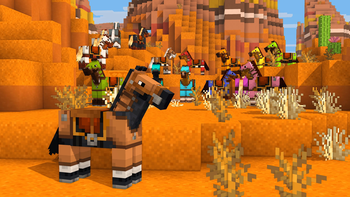
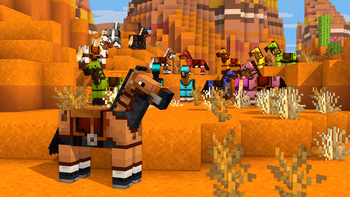
Has suiting up your prized horse in leather horse armor ever caught your eye as queer? Something is dreadfully off with leather horse armor in Minecraft. Unlike the player armor, the colored details of leather horse armor get dyed! Dyed fixes this mistake so your horses can wear their leather armor with pride!
What is wrong?
Originally an exclusive feature of Pocket Edition, when ported to Java Edition the leather horse armor textures were flattened into a single texture, causing both the colored details and monochrome base texture to be dyed. As well, any code that would have allowed for a separate overlay was lost, meaning this was not as simple to fix as adding a texture. You may think that because this already existed with the leather armor for the player, how could it have possibly gone awry for the leather horse armor? Such remains a mystery!
Give your horses some love!
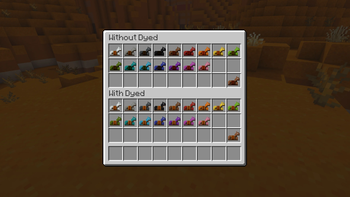
Dyed cleaves the leather horse armor texture in two once again and fixes the model code to dye only the base texture! The item model for the leather horse armor is also replaced to fix the dyeing for the item as well!
Please note that this bug has finally been fixed in Minecraft 1.21.11, so while Dyed will still work, it is now unnecessary! It will no longer be marked as compatible starting with 1.21.11.
Get the goods!
You can find releases of Dyed on both Modrinth and CurseForge and also access development builds on GitHub!
Dyed supports Fabric 1.16+, Forge 1.16+, and NeoForge 1.20.2+.
Figure it all out!
You can delve into the wiki for details or submit a bug report if something isn't quite right!
Still need help? Drop into the Discord for quick support.
Related projects


Mod Menu
by Prospector
Adds a mod menu to view the list of mods you have installed.

YetAnotherConfigLib (YACL)
by isxander
A builder-based configuration library for Minecraft!

Xaero's Minimap
by thexaero
Displays a map of the nearby world terrain, players, mobs, entities in the corner of your screen. Lets you create waypoints which help you find the locations you've marked.
Dyed
Download Dyed
or
Select a game version to see available downloads
No versions match your filters
About the creator

yurisuika
Owner · Dyed
My pleasure for this country knows no bounds!
Member since January 2022
View profile on Modrinth
Conversation