
WI Zoom
WI Zoom is a Minecraft mod offering up to 50x zoom with smooth camera movement. Supports Fabric, NeoForge, and snapshots. Also works with OptiFine and Sodium.
Versions
WI-Zoom 1.7-MC26.1-snapshot-6
1.7-MC26.1-snapshot-6 · 4 days ago · 147.37 KB
WI-Zoom 1.7-MC26.1-snapshot-5
1.7-MC26.1-snapshot-5 · 1 week ago · 147.37 KB
WI-Zoom 1.7-MC26.1-snapshot-4
1.7-MC26.1-snapshot-4 · 2 weeks ago · 147.37 KB
WI-Zoom 1.7-MC26.1-snapshot-3
1.7-MC26.1-snapshot-3 · 3 weeks ago · 147.37 KB
WI-Zoom 1.7-MC26.1-snapshot-2
1.7-MC26.1-snapshot-2 · 1 month ago · 147.37 KB
About
WI Zoom (Wurst-Imperium Zoom)
The WI Zoom Minecraft mod lets you zoom in and out with the mouse wheel, providing up to 50x magnification without the need for a spyglass. This mod is fully compatible with OptiFine and Sodium, but unlike OptiFine's zoom, WI Zoom lets the camera move in a logical way, without making it wobble around. WI Zoom supports all of the latest Minecraft versions, including snapshots.

Features
- Up to 50x zoom!
- No spyglass needed!
- Zoom in and out with the mouse wheel!
- No wobbly camera nonsense!
- Dynamic mouse sensitivity! (since v1.1)
- Fully compatible with OptiFine / Sodium!
How To Zoom
Hold down the V key to activate the zoom (this keybind can be changed).
While zooming, you can use the mouse wheel to zoom in further.
Changing The Zoom Keybind
How to change the keybind (click to expand)
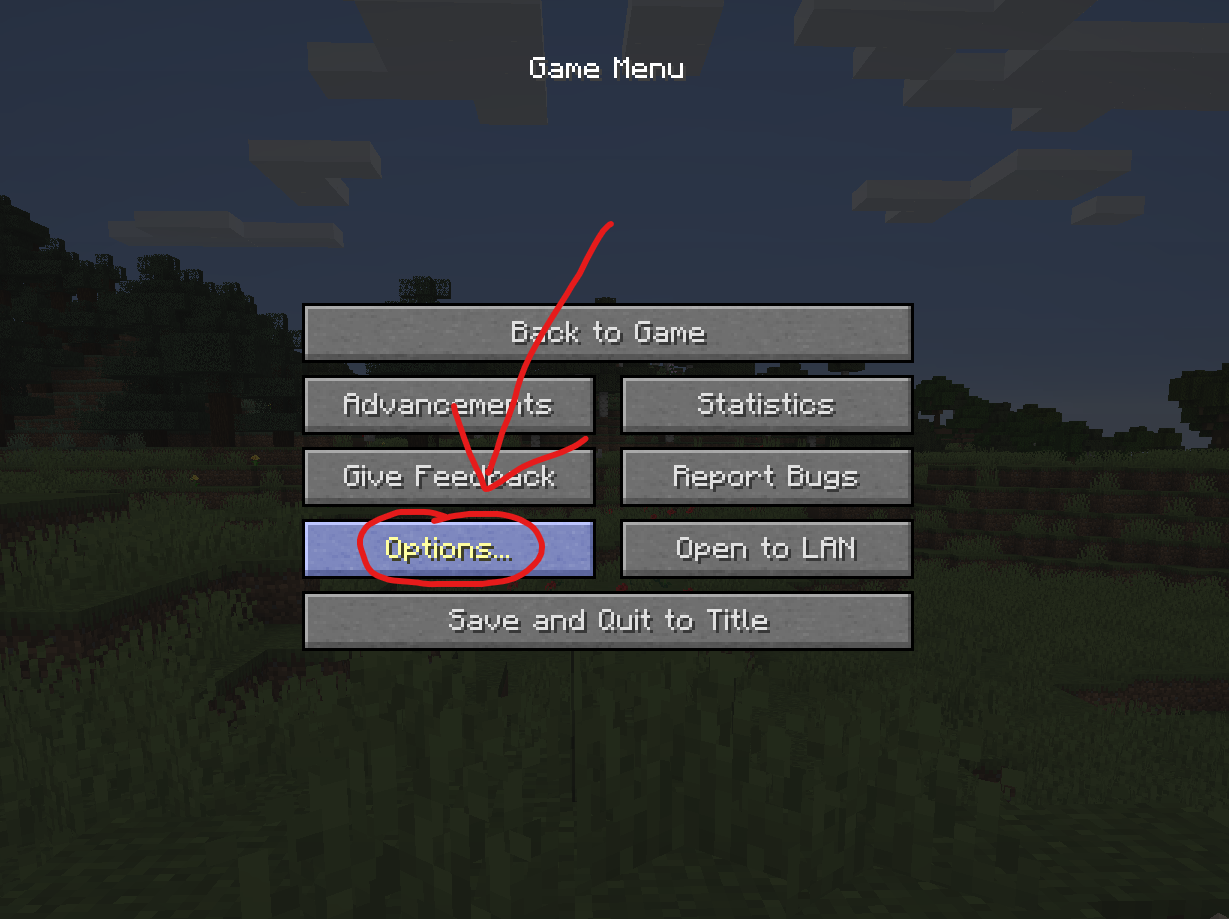
In the pause menu, click on "Options...".
In the Options menu, click on "Controls...".

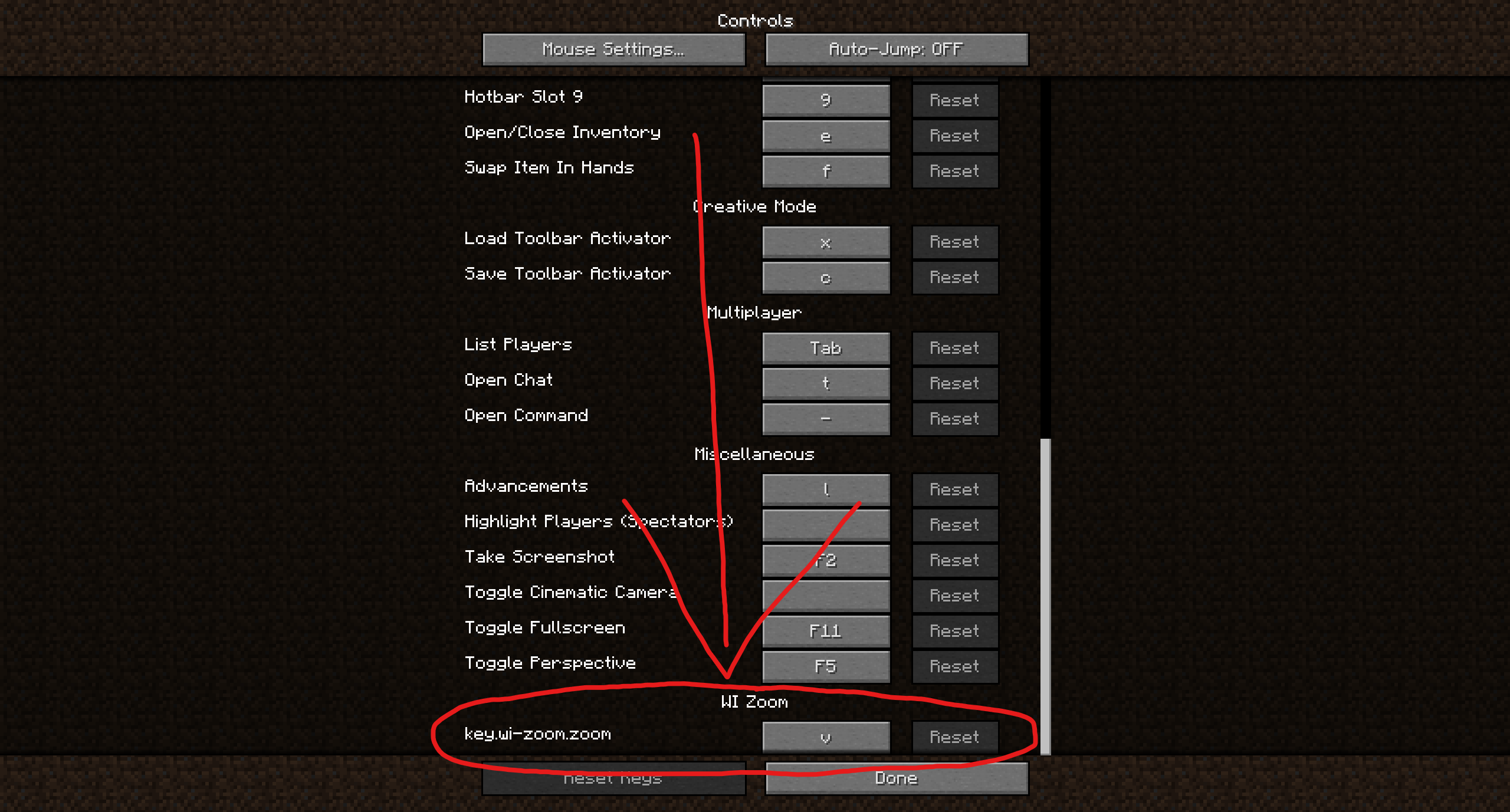
In the Controls menu, scroll down to the "WI Zoom" section. If you don't have any other mods installed, you will find this section at the very bottom.
Supported Languages
- Azerbaijani (Azerbaijan) (since v1.5)
- Chinese (Simplified/Mainland) (since v1.4)
- Chinese (Traditional/Taiwan) (since v1.4)
- Cantonese (Hong Kong) (since v1.4)
- Classical Chinese (since v1.4)
- Dutch (Netherlands) (since v1.5)
- English (US)
- Estonian (Estonia) (since v1.4)
- French (France) (since v1.4)
- German (Germany)
- Kurdish (since v1.5)
- Portuguese (Brazil) (since v1.5)
- Russian (Russia) (since v1.3)
- Turkish (Turkey) (since v1.5)
- Ukrainian (Ukraine) (since v1.5)
Related projects


Mod Menu
by Prospector
Adds a mod menu to view the list of mods you have installed.

YetAnotherConfigLib (YACL)
by isxander
A builder-based configuration library for Minecraft!

Xaero's Minimap
by thexaero
Displays a map of the nearby world terrain, players, mobs, entities in the corner of your screen. Lets you create waypoints which help you find the locations you've marked.
Download WI Zoom
or
Select a game version to see available downloads
No versions match your filters
About the creator

Alexander01998
Owner · WI Zoom
I make the Wurst Client, WI Zoom and Mo Glass.
Member since January 2023
View profile on Modrinth
Conversation