
One Block
One Block: Begin your Minecraft adventure in a desolate world with just one respawning block. Break it, level it up, and unlock richer rewards with each upgrade.
Versions
Gallery
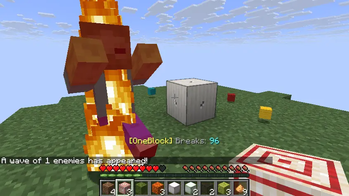
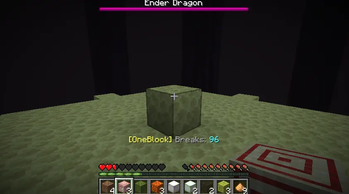
About
🧱 OneBlock
Survive and thrive on a single regenerating block in the void.
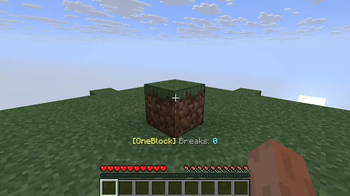
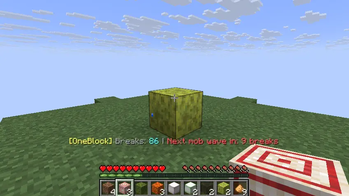
Start your journey on a small floating island with one special block at its center. Every time you break it, something new appears — dirt, wood, ores, even rare materials from the Nether and End. Build your world one block at a time while facing random events, monster waves, and evolving challenges.
Perfect for solo adventures or multiplayer servers with per-player islands and fully customizable gameplay via an in-game admin panel.
Compatibility: Fully supports Minecraft 1.21.11 (Fabric), including newly added mobs and blocks. All new 1.21.11 content is integrated into OneBlock progression, events, and drops.
🧱 Installation & Setup
💻 Singleplayer
- Install Fabric Loader for Minecraft.
- Install Fabric API from Modrinth.
- Drop
OneBlock-<version>.jarinto yourmodsfolder. - Launch with the Fabric profile and choose the OneBlock world type.
- (Optional) Enable resource packs for void dimensions or to disable the starting island.
🎮 You'll spawn on your small island with a regenerating OneBlock at its heart.
🌐 Multiplayer
- Create a Fabric server on Minecraft.
- Place both Fabric API and
OneBlockin themodsfolder. - In your
server.propertiesfindlevel-typeand set it tooneblock\:oneblock - To enable per-player islands, add
oneblock\:oneblock_multiplayertoinitial-enabled-packsinserver.properties. - Start the server and enjoy personal or shared islands.
- (Optional) Enable datapacks for void worlds:
oneblock\:oneblock_void_nether,oneblock\:oneblock_void_end, oroneblock\:oneblock_no_island.
🌴 Starting Island
You begin on a small island for safer starts:
- 🟩 Overworld: Grass (Y=63) over dirt (Y=62).
- 🌋 Nether: Netherrack island.
- 🌌 End: End Stone island.
In multiplayer, each player spawns 1000 blocks apart in a cross-pattern grid.
The starting island can be disabled with the oneblock\:oneblock_no_island datapack.
🎨 Core Features
🧱 Regenerating OneBlock
The heart of the mod — a single block that respawns infinitely with new materials based on your progression.
🌍 46 Biome Cycling System
Experience all of Minecraft's biomes through your OneBlock:
- 36 Overworld Biomes: From plains and deserts to deep dark and lush caves
- 5 Nether Biomes: Wastes, crimson forest, warped forest, soul sand valley, basalt deltas
- 5 End Biomes: The End, highlands, midlands, barrens, small islands
Each biome brings its unique blocks — jungle wood and bamboo, cherry blossoms and pink petals, warped fungi and crimson vines, chorus plants and end rods.
🔓 Dimension Unlocks
Visit the Nether or End to permanently expand your OneBlock's material pool:
- Nether: Unlocks basalt, blackstone, quartz, crimson/warped wood, fungi, vines, and more
- End: Unlocks purpur, end stone, chorus plants, end rods, and shulkers
- In multiplayer, progress is tracked per-player
- After 10k breaks, by default, end portal frames can drop as an item.
Note: New blocks and mob types introduced in 1.21.11 are included where appropriate across stages and dimensions.
⚖️ Dynamic Block Weighting
Block selection evolves as you progress:
| Stage | Useful | Structural | Rare | Random |
|---|---|---|---|---|
| 0–2,500 | 70% | 25% | 5% | 0% |
| 2,500–5,000 | 50% | 35% | 5% | 10% |
| 5,000–7,500 | 30% | 40% | 5% | 25% |
| 7,500–10,000 | 10% | 35% | 5% | 50% |
| 10,000+ | 0% | 0% | 0% | 100% |
Early game provides essential materials, late game brings variety and challenge.
🎲 Random Events
Every block break may trigger a surprise:
- 🪙 Item Drops: Random items spawn nearby or in chests
- Configurable drop count (1-64 items)
- Dimension-unlocked items from Nether and End
- Special lava bucket drops for easy lava access
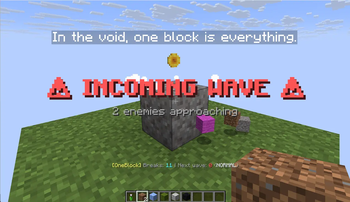
- 💀 Monster Waves: Instant combat encounters with scaling difficulty
- 🐑 Friendly Mobs: Peaceful animals, villagers, and wandering traders
All events scale with difficulty and progression.
💀 Monster Waves
Dynamic combat encounters that evolve with your progress:
- Sunlight-Aware: Burning mobs spawn only at night; others spawn anytime
- Dimension Scaling: Nether and End mobs join after visiting those dimensions
- Difficulty Scaling: Wave size and frequency adapt to game difficulty
| Stage | Enemies |
|---|---|
| Early | Zombies, Spiders |
| Mid | Skeletons, Creepers, Husks, Strays |
| Late | Endermen, Witches, Blazes, mixed chaos |
🐾 Friendly & Aquatic Mobs
Life evolves with your progress:
- 🐮 Farm Animals: Cows, pigs, sheep, chickens, rabbits
- 🐝 Neutrals: Wolves, llamas, bees, foxes
- 🦜 Ambient: Parrots, cats, turtles
- 🐠 Aquatic: Fish, axolotls, frogs, dolphins (needs 5×5 water pool)
- 🧙 Traders: Wandering traders with llamas
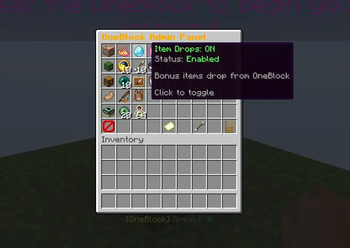
⚙️ In-Game Admin Panel
Control everything without editing config files!
Access via /oneblock admin (requires OP):
🎛️ Settings You Can Adjust
- Wave Settings: Enable/disable, frequency, max size, difficulty tiers
- Drop Settings: Item drops, friendly mobs, spawn chances
- Item Settings: Drop count (1-64), lava bucket chance
- End Portal Frames: Enable drops for End progression
- Progression Cap: Blocks needed to unlock all materials
- Wave Countdown: 7 difficulty tiers with customizable timing
- Dialog System: Toggle hints/tips, adjust display duration (1-300s)
- Visual Effects: Particles and sounds on milestones
- Wave Alerts: Configurable incoming wave warnings
🖱️ Controls
- Left/Right Click: Adjust by ±1
- Shift + Click: Adjust by ±10
- Click Toggles: Enable/disable features instantly
All changes save automatically and apply in real-time!
🧪 Custom Recipes
OneBlock adds special crafting recipes to help you survive in the void:
💧 Ice Compression → Water Bucket
Compress ice blocks to extract water:
    [Ice]
[Ice][Bucket][Ice]
    [Ice]
- Recipe: 4 ice blocks (any type: ice, packed ice, or blue ice) + 1 bucket
- Result: 1 water bucket
- Why: Ice spawns naturally from the OneBlock. Compress it to get renewable water!
🔥 Magma Compression → Lava Bucket
Compress magma blocks to extract lava:
    [Magma]
[Magma][Bucket][Magma]
    [Magma]
- Recipe: 4 magma blocks + 1 bucket
- Result: 1 lava bucket
- Why: Magma blocks spawn from the OneBlock. Compress them for renewable lava!
These recipes give you renewable access to water and lava — essential for survival, farms, and automation in the void.
🧩 Included Datapacks
oneblock_multiplayer
Enables per-player islands — each player gets their own OneBlock 1000 blocks apart.
oneblock_void_nether
Removes all Nether terrain generation, leaving only void for a true skyblock experience.
oneblock_void_end
Removes all End terrain generation (except end portal platform).
oneblock_no_island
Disables the 3×3 starting platform for hardcore challenge mode.
Enable datapacks via resource pack menu or server.properties.
🧩 Features Overview
- 🏝 Per-Player Islands: Individual progression in multiplayer
- 🌍 46 Biomes: Complete biome cycling with authentic blocks
- 🔓 Dimension Unlocks: Nether & End content expands your world
- ☀️ Smart Mob Spawning: Light-aware and dimension-aware logic
- ⚖️ Dynamic Progression: Material weighting evolves as you play
- 💀 Monster Waves: Fast-paced combat with scaling difficulty
- 🪙 Random Events: Items, mobs, and surprises
- 💬 Dialog System: Floating hints, tips, and messages (toggle in admin panel)
- 🧪 Custom Recipes: Compress ice/magma for renewable water/lava
- 🎛️ Admin Panel: In-game GUI for all settings (no client mods needed!)
- 🐾 Diverse Spawns: Farm animals, aquatic life, traders
- 💾 Persistent Data: Per-player or global progress tracking
- 📦 Optional Datapacks: Void dimensions and challenge modes
⚙️ Gameplay Loop
- Start on a small island with a regenerating OneBlock
- Break blocks to gather materials and trigger random events
- Build your world, farm, and base one block at a time
- Progress through difficulty tiers as block variety increases
- Unlock Nether and End dimensions for expanded materials
- Survive monster waves and random encounters
- Customize difficulty via the admin panel
- Compete or cooperate in multiplayer with per-player progression
🗺️ Roadmap
Planned Features
- ⚔️ Boss Waves: Epic encounters with custom rewards
- 🧱 Custom Structures: Rare buildings that spawn around your island
- 💬 Achievements & Quests: Progress tracking and challenges
- 🕹️ Multiplayer Events: Server-wide competitions
💬 Developer Message
"What starts as one block becomes an entire world. Every break is a choice, every event a story."
Thank you for playing and sharing feedback! ❤️
— Lynk
📣 Support & Links


![[EMF] Entity Model Features](https://cdn.modrinth.com/data/4I1XuqiY/6e5bbd0d06b1741bfdab6c0cfab6de8fdaf0064c_96.webp)



Conversation