
Shoulder Surfing Reloaded
Highly configurable third person camera mod
Versions
ShoulderSurfing-NeoForge-1.21.11-4.18.2
1.21.11-4.18.2+neoforge · 3 weeks ago · 257.42 KB
ShoulderSurfing-Forge-1.21.11-4.18.2
1.21.11-4.18.2+forge · 3 weeks ago · 255.50 KB
ShoulderSurfing-Fabric-1.21.11-4.18.2
1.21.11-4.18.2+fabric · 3 weeks ago · 258.07 KB
ShoulderSurfing-Fabric-1.21.1-4.18.2
1.21.1-4.18.2+fabric · 3 weeks ago · 262.61 KB
ShoulderSurfing-Forge-1.21.1-4.18.2
1.21.1-4.18.2+forge · 3 weeks ago · 256.08 KB
Gallery
About
Shoulder Surfing Reloaded
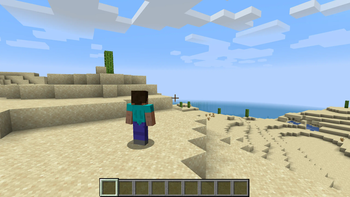
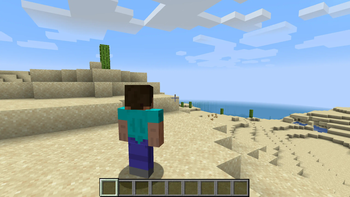
Shoulder Surfing Reloaded is a highly configurable third person camera mod for minecraft.
Features
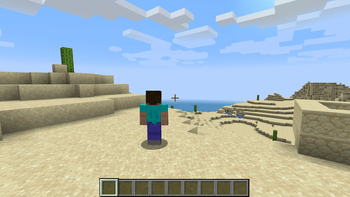
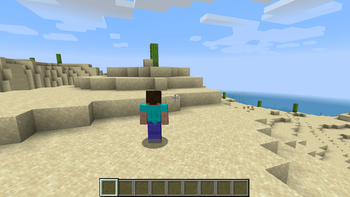
- Over-the-shoulder camera - see what you are interacting with in 3rd person
- Decoupled camera - walk left and right without turning your mouse
- Free look (default:
left alt) - keep walking in a direction while looking in a different one - Hotkeys to move the camera (default:
arrow keys,page upandpage down,oto switch shoulders) - Corrective cross-hair positioning when using adaptive or dynamic crosshair
- Adaptive player transparency - fades the player model to transparent when view is obstructed
- Highly configurable - customize your 3rd person experience with many configuration options
- Client side only - no server mods required
- Plugin API - implement custom camera behaviours and compatibility features with ease
Please note that this mod modifies the camera position and player movement, which can be an issue for servers with strict anti-cheat. Use at your own risk!
Installation
Forge
Prerequisites
- Make sure Minecraft Forge is installed
- Make sure Forge Config API Port (CurseForge, Modrinth) is installed
Manual
- Navigate to
.minecraft/mods - Move
ShoulderSurfing-Forge-[VERSION].jarinto the folder - Follow the steps below
Launcher Settings
- Select Forge as your profile
- Launch Minecraft
- Join a world or server
- Use
arrow keys,page upandpage downto adjust the perspective,oto switch shoulders
Fabric
Prerequisites
- Make sure Fabric is installed
- Make sure Fabric API (CurseForge, Modrinth) is installed
- Make sure Forge Config API Port (CurseForge, Modrinth) is installed
Manual
- Navigate to
.minecraft/mods - Move
ShoulderSurfing-Fabric-[VERSION].jarinto the folder - Follow the steps below
Launcher Settings
- Select Fabric as your profile
- Launch Minecraft
- Join a world or server
- Use
arrow keys,page upandpage downto adjust the perspective,oto switch shoulders
NeoForge
Prerequisites
- Make sure NeoForge is installed
Manual
- Navigate to
.minecraft/mods - Move
ShoulderSurfing-NeoForge-[VERSION].jarinto the folder - Follow the steps below
Launcher Settings
- Select NeoForge as your profile
- Launch Minecraft
- Join a world or server
- Use
arrow keys,page upandpage downto adjust the perspective,oto switch shoulders
Configuration
≥ 1.21: Ingame: Mods → ShoulderSurfing → Config (Manual: .minecraft/config/shouldersurfing-client.cfg)
≤ 1.20: Install Forge Config Screens (CurseForge, Modrinth) (Manual: .minecraft/config/shouldersurfing-client.cfg)
Version 2.9.7 and older
≥ 1.13: Manual: .minecraft/config/shouldersurfing.toml
≤ 1.12: Ingame: Mods → ShoulderSurfing → Config (Manual: .minecraft/config/shouldersurfing.cfg)
Plugin API
Shoulder Surfing Reloaded features a plugin API for third party mod developers. This allows for implementing custom camera behaviours and compatibility features without the use of invasive mixins. The documentation can be found in the wiki on GitHub. It explains step by step on how to create and register your own plugin, and how you can implement and register custom callbacks.
FAQ
Q: Why is the player not looking at the position of the crosshair when holding item x?
A: This needs to be configured using the config options adaptive_crosshair_hold_items or adaptive_crosshair_use_items.
Q: Why is the player not rendered correctly when using shader pack x?
A: This is caused by player transparency effects of Shoulder Surfing Reloaded. Either disable them in the config (adjust_player_transparency) and restart your game or report this to the authors of the shader pack.
Q: Can you port feature x to version y?
A: No.
Q: Can you port this to quilt, liteloader, rift, etc.?
A: No.
Q: Can I add this to my modpack?
A: Yes.
License
MIT License, Original project by Sabar: Minecraft Forum, GitHub
Related projects


Mod Menu
by Prospector
Adds a mod menu to view the list of mods you have installed.

YetAnotherConfigLib (YACL)
by isxander
A builder-based configuration library for Minecraft!

Xaero's Minimap
by thexaero
Displays a map of the nearby world terrain, players, mobs, entities in the corner of your screen. Lets you create waypoints which help you find the locations you've marked.
Shoulder Surfing Reloaded
Download Shoulder Surfing Reloaded
or
Select a game version to see available downloads
No versions match your filters
About the creator


Conversation