
QoMC
Auto-generated config commands for mods using Kaleido Config.
Versions
About
QoMC
Auto-generated server-side config commands for Minecraft mods utilizing Kaleido Config (JiJ-safe implementation of Quilt Config)!
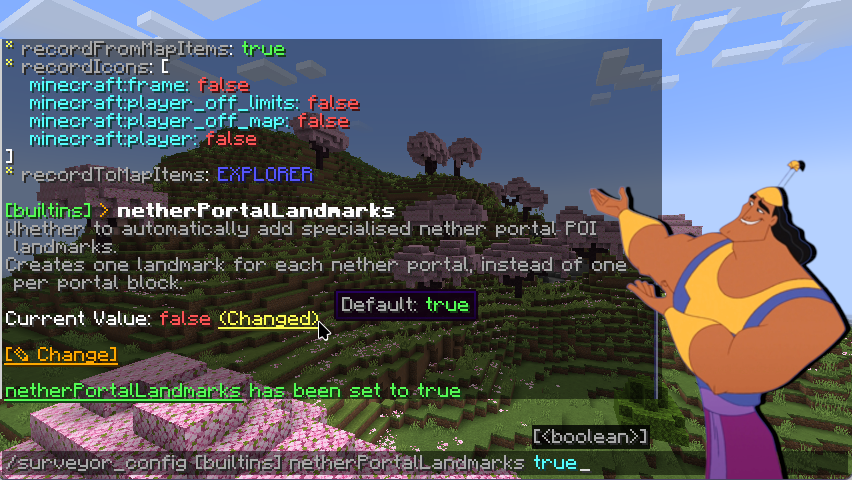
Example config command generated for the Surveyor Map Framework
Some background
Some mods utilize a config library called Kaleido Config, which relieves the work from Mod developers from having to implement a config system for their mod.
By default they generate a .toml file in the game's config directory that user can edit. However often-times they aren't quite editable in-game.
McQoy solves this by auto-generating a GUI config screen which you can edit in-game.
This mod aims to fill the remaining gap by auto-generating a Minecraft command for config, allowing server-side kaleido-based mods to be configurable by server admins.
Usage
For players
After installation, QoMC will detect mods making use of Kaleido on startup, and auto generate a command for them.
By default, the command name would be /<Mod ID>_config, for example /qomc_config.
For mods with multiple config, QoMC also allows you to specify different config, e.g. /qomc_config demo and /qomc_config main.
For developers
This is a mod which automatically generates a config command for players. Developers should not need to concern about depending on this mod.
All they need to do is to use Kaleido Config to handle their configs, and QoMC will automatically discover the config and generate the corresponding command.
Disable auto-command generation
If your mod already supply a first-party config command, it may be desirable to disable the auto-generated command from QoMC. This can be done by adding the corresponding field in the mod metadata.
Fabric Mod
- Add the following to your fabric.mod.json:
-
"custom": {
  "qomc:hidden": true
}
NeoForge Mod
- Add the following to your neoforge.mods.toml:
-
[modproperties.qomc]
hidden=true
Credits & Licenses
This project is licensed under the LGPL 3.0.
Many codes & ideas are inspired by McQoy, the GUI counterpart of QoMC!






Conversation