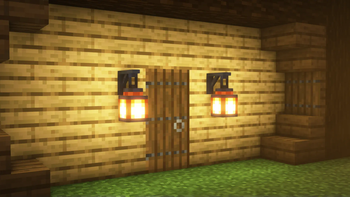
Lanterns Belong on Walls
Allows the placement of lanterns on walls.
237.3K
Downloads
·
470
Followers
·
Updated 5 months ago
Decoration
Fabric
Neoforge
Quilt
Utility
1.18
1.18.1
1.18.2
1.19
1.19.1
+11 more
Versions
About
How?
For supported lanterns, place the lantern on the side of the block, and the lantern will attach to that side.
Compatibility
For another mod's lanterns to be compatible, the other mod must add the compatibility.
Note: If you're using a resource pack that changes the lantern blockstate file, then the visual connection to the wall might not appear.
For mod developers
The basics for adding support for lanterns differs between mod loaders.
The details below are for Fabric/Architectury Loom.
For NeoForge
- Add the Gradle dependency:
Refer to the versions page for the most recent version.repositories { //... maven { name = "Modrinth" url = "https://api.modrinth.com/maven" } } dependencies { //... modImplementation "maven.modrinth:lanterns-bow:${lanterns_bow_version}" }
Read about the Modrinth Maven here. - In your mod constructor, listen for the mod bus event, then add the lanterns:
public ExampleModContstructor(IEventBus modBus) {
    modBus.addListener((WallLanternsEvent event) -> {
        event.addLantern(new WallLantern(
                WallLantern.Type.StandardCutout,
                ResourceLocation.parse("example:example_lantern"))
        );
        event.addLantern(new WallLantern(
                WallLantern.Type.Standard,
                ResourceLocation.parse("example:example_lantern_two"))
        );
    });
}
For Fabric
- Add the Gradle dependency:
Refer to the versions page for the most recent version.repositories { //... maven { name = "Modrinth" url = "https://api.modrinth.com/maven" } } dependencies { //... modImplementation "maven.modrinth:lanterns-bow:${lanterns_bow_version}" }
Read about the Modrinth Maven here. - Create an entrypoint class:
public class ExampleLanternModWall implements WallLanternsEntrypoint { @Override public void registerLanterns(WallLanternsRegistry registry) { registry.registerLantern(ResourceLocation.fromNamespaceAndPath("examplemod", "lantern")); } } - Add the entrypoint to your
fabric.mod.json:... "entrypoints": { ... "walllanterns": "com.example.mod.examplemod.ExampleLanternModWall" }
Lantern Types
Unless otherwise specified all models for lanterns are derived from the standing model of the provided lantern.
There are a few lantern types available:
- Standard - Uses the vanilla standing lantern shape.
- StandardCutout - Designed for NeoForge. Follows the same rules as Standard, but forces the use of the cutout Render Type on NeoForge.
Categories
Compatibility
Client:
Required
Server:
Required
Links
MIT






Conversation