What are you searching for?

InventoryHUD+

InventoryHUD+

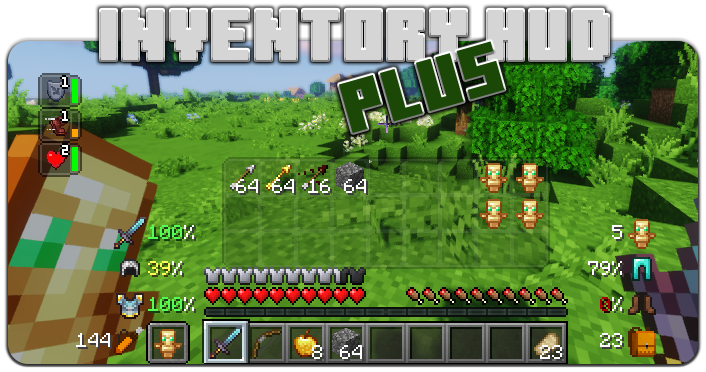
Adds your main inventory, potion effects and your equipments to your HUD. And few other features.

download 2.7M Downloads · favorite 334 Followers · Updated 1 month ago
Adventure Fabric Forge Management Neoforge Storage Utility 1.8.9 1.12.2 1.16.2 1.16.3 1.16.4 +16 more

Versions

inventory_2
InventoryHUD+ [Forge-1.21.11] (v3.4.29)

3.4.29 · 1 month ago · 217.69 KB

Release download
Forge 1.21.11
inventory_2
InventoryHUD+ [Fabric-1.21.11] (v3.4.29)

3.4.29 · 1 month ago · 220.75 KB

Release download
Fabric 1.21.11
inventory_2
InventoryHUD+ [NeoForged-1.21.11] (v3.4.29)

3.4.29 · 1 month ago · 215.93 KB

Release download
Neoforge 1.21.11
inventory_2
InventoryHUD+ [Forge-1.21.10] (v3.4.29)

3.4.29 · 3 months ago · 217.67 KB

Release download
Forge 1.21.10
inventory_2
InventoryHUD+ [Fabric-1.21.10] (v3.4.29)

3.4.29 · 3 months ago · 220.44 KB

Release download
Fabric 1.21.10

About

Quick mod showcase twitter (X) link

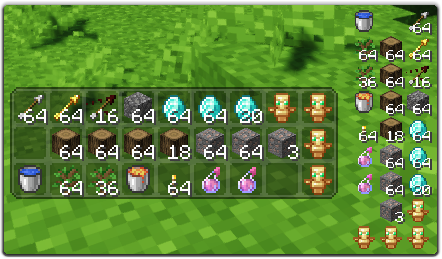
This mod contains a few features, first of all - Inventory HUD, it shows your inventory while you are playing, you can switch between mods (mini/normal and horizontal/vertical), also you can change background transparency and toggle animation on/off
Replace this with a description

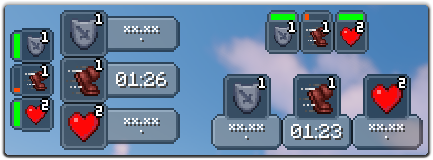
Next feature is PotionHUD, it shows your potion effects with timer or duration bar if you are using mini mode, you can change gap between effects and background transparency in config, and you can enable horizontal mode as well
Replace this with a description

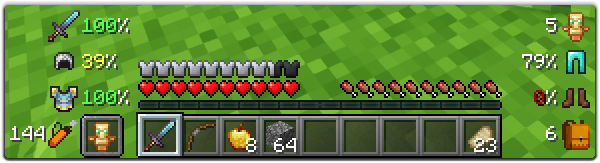
And last but not least feature is ArmorHUD, it shows durability of your armor and equipment, also shows how many free slots do you have in your inventory and how many arrows do you have. This HUD is fully customizable, you can change scale, type of damage indicator or turn on/off each part of your equipment
Replace this with a description

You can change a lot of options in config ("Mod" button in Main Menu, then "Config"), also you can change the position for each HUD by simply dragging and dropping them. To open ingame config screen you can use keybind ("O" by default)
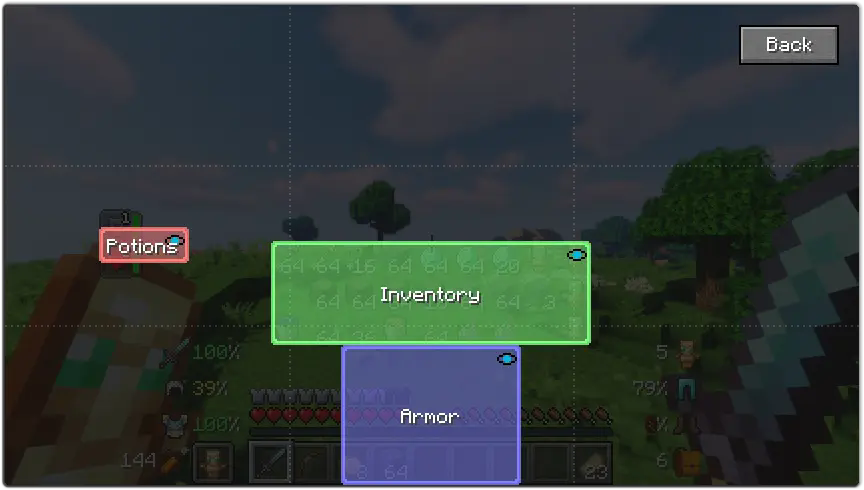
Replace this with a description


If you want to help me to make this mod better, you can translate it to your language and send json file to me.

You can find original lang file here: en_us.json

Supported languages
  • Chinese Simplified (Mainland China) (zh_cn) (thanks to Satxm)
  • Chinese Traditional (Taiwan) (zh_tw) (thanks to yichifauzi)
  • Czech (cs_cz) (thanks to Janys159)
  • English (en_us)
  • French (fr_fr) (thanks to Peperehobbits01)
  • German (de_de) (thanks to arrowlevel)
  • Hungarian (hu_hu) (thanks to Kalmix88)
  • Italian (it_it) (thanks to cranos96)
  • Japanese (ja_jp) (thanks to co_91)
  • Korean (ko_kr) (thanks to gueso-gato1355)
  • Portuguese - Brasil (pt_br) (thanks to VitorLeonardo)
  • Russian (ru_ru)
  • Spanish (es_es) (thanks to Zeedif)
  • Turkish (tr_tr) (thanks to MefeBey)
  • Ukrainian (uk_ua) (thanks to Elvis_Danger)
open_in_new View on Modrinth
Compatibility
Client: Required Server: Unsupported
gavel LicenseRef-All-Rights-Reserved

Conversation

What are your thoughts?

Related projects

Optimization Utility
FerriteCore
FerriteCore

by malte0811

Memory usage optimizations

download 84.3M
favorite 12,712
Utility
Mod Menu
Mod Menu

by Prospector

Adds a mod menu to view the list of mods you have installed.

download 77.7M
favorite 22,127
Library Management Utility
YetAnotherConfigLib (YACL)

by isxander

A builder-based configuration library for Minecraft!

download 66.1M
favorite 7,607
Adventure Transportation Utility
Xaero's Minimap
Xaero's Minimap

by thexaero

Displays a map of the nearby world terrain, players, mobs, entities in the corner of your screen. Lets you create waypoints which help you find the locations you've marked.

download 60.9M
favorite 13,668
lock Cookie consent

SkinMC uses cookies to provide functionality and features.