
Hostile Mobs Improve Over Time
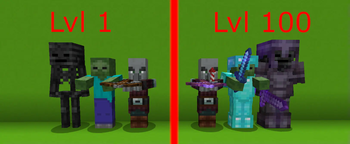
A new difficulty, where hostile mobs get stronger the longer you play, featuring a powerful config menu. With stronger stats and new abilities, are you able to prepare before it’s too late?
Versions
Gallery
About
Hostile Mobs Improve Over Time
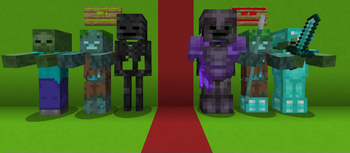
Hostile mobs get stronger the longer you play. The difficulty is per player, players who have played for a long time will have stronger monsters while new players start with unbuffed monsters.
Can be downloaded either as a datapack or a mod. Mod is only required on the server side.
Each mob is improving differently, if you wish to know how they are getting stronger/which abilities they may have, find the datapack for that mob on my profile page. Documentation sheet can be found on my discord server.
Currently, this datapack affects these mobs:
- Zombies
- Skeletons
- Spiders
- Creepers
- Pillagers
- Vindicators
- Witches
- Drowned
- Endermites
- Cave spiders
- Strays
- Zombified Piglins
- Guardians
- Hoglins
- Ravagers
- Silverfish
- Husks
- Wither skeletons
- Zoglins
- Piglins
Details
Mobs in a 32 block radius get improved based on the players score in the HostileMobs scoreboard. The score defines how much will the mob be buffed. This score increases every 20 minutes (configurable).
The improvements for each level are specified in one of 100 function files for each mob.
The mobs get improved based on the nearest player to that monster.
You can snipe a monster before it is buffed by staying 32 blocks away from that monster. This also means this datapack does not break afkable farms where the player doesnt need to be close/kill the mobs.
Commands
Config menu can be opened by using /function hostilemobs:config. There are settings for setting difficulty, toggleing some mob features, difficulty cap settings and death relief settings.
Difficulty cap can be configured to not allow mobs to be stronger past the set value. Negative cap is used when you are using death relief or to make players start at a certain difficulty.
Death relief is a feature toggled off by default. Enabling it will drop difficulty for players who die by the set amount.
Mob toggles can be used to change which mobs should be improved by the datapack. Turn off mobs which you don't like/are too strong.
The level/difficulty of mobs is tracked by the HostileMobs scoreboard, set the value yourself/players to smth and it will change the difficulty. It increments every 20 minutes. Difficulty (or days) go from 1-100, after 100 mobs stay the same as 100 ones.
Timer can be modified using the config menu
Level Shattering
A feature which enables mobs to rarely drop special shards, which can decrease monster levels. By default, it is enabled ON, and each shard decreases the level by 1. All these settings can be configured in the config menu.
Using shards has a variety of side effects, so better be prepared. Side effects can be toggled on/off.
If you wish to change the drop chances, loot tables for each mob are located in data/hostilemobs/loot_tables/
This feature is now compatible with datapacks that modify loot tables (since V1.8)
There are multiple settings for this feature in the config menu, with more along the way.
How to use level shatter shards? You should be able to figure it out yourself using the hints in the item description and advancements, but if you can't figure it out, its down below.
!SPOILER! How to use level shatter shards
UP TO VERSION 1.8 OF THE DATAPACK: You throw the item on top of a sculk catalyst.The hints were "when in contact with otherworldly technologies", and the advancement image was sculk catalyst. VERSION 1.9 AND ABOVE: You consume the shard. The description says it.
To catalyse the shard to make side effects less extreme, stand on a sculk catalyst while you eat it.
Well, at least you tried :)
Future Plans
my to-do list:
- add missing mobs
- add more settings to config menu
- more advancements
Documentation
Documentation spreadsheet can be found on my discord server. It has all the details about stats of each mob at each level and all the new abilities of monsters.
Disclaimer
This datapack buffs the explosion of creepers, so use it at your own risk, as creeper accidents cause even more damage if they explode next to your builds/terrain.
This datapack also adds a new ability to zoglins to change nearby blocks to their nether counterparts, this can be extremely destructive to player's builds and terrain, and is really hard to revert back.
This datapack can also potentionally break raid farms (needs testing).
Other
If you have any questions, suggestions, bug reports, feel free to join my discord server, link in external sources.
License
By downloading the datapack, you agree with the following:You are not allowed to redistribute this datapack in any way
You may modify this datapack, but distributing modified versions is not allowed
You can use this datapack in videos and other, but provide a link to this page in the description
You cannot take credit for the making of this datapack
You may download this datapack only from official sources - currently it is only on planet minecraft and modrinth


![[EMF] Entity Model Features](https://cdn.modrinth.com/data/4I1XuqiY/6e5bbd0d06b1741bfdab6c0cfab6de8fdaf0064c_96.webp)



Conversation