
Enchanting Plus
Enchanting Plus
Versions
Gallery
About
Enchanting Plus
Enchanting Plus is a mod which allows the player to have full control over the enchantments on their items at the cost of significantly more EXP.
How to use this mod?
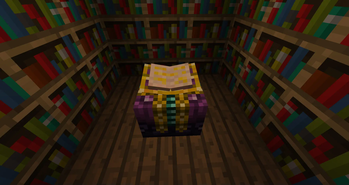
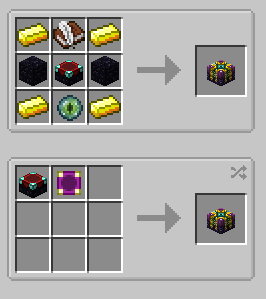
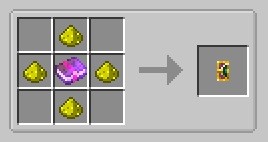
Once you have the mod and it's dependencies installed, you will be able to use the Advanced Enchanting Table. This table can be crafted in a crafting table, or you can craft the table upgrade item to convert an existing table in the world into the advanced table. Once you have the new advanced enchanting table, you can right click the table to access it.
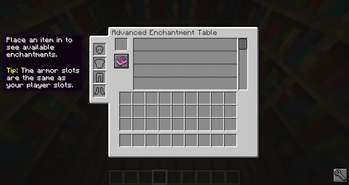
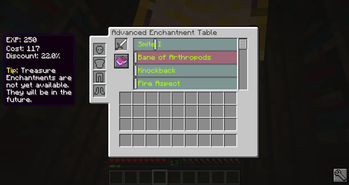
In the advanced table menu, there is an item slot near the top for putting in the item you want to enchant. When an item is in this slot, the center area will fill up with a list of all the valid enchantments that you can modify. If there are more than four possible enchantments you can use the bar on the side to scroll through them. Sliding the bar to the right will increase the level of the enchantment, and sliding it to the left will decrease it. If an enchantment is listed with a green background it means you can modify that enchantment. If the background is red it means that enchantment is not available. Enchantments normally become unavailable when another enchantment that they are not compatible with has been selected. For example, Silk Touch is not compatible with Fortune, so you can not try to put both on the same tool.
As you modify the enchantments, the enchanting cost will change. This mod uses EXP points for cost rather than levels. The amount of EXP points the player has, and the cost are both shown in the top left info box. This info box will also show other bits of information such as tips about the mod. Once you are ready to enchant your item, and you have enough EXP points, clicking on the enchanted book button will enchant your item.
Curses & Treasures
Some enchantments in the game are given the special classification of curses or treasures. These enchantments are not available to the player under normal circumstances and special conditions must be met in order for them to be available.
Curses such as the curse of binding can only be applied near midnight, on a night with a full moon. The player has a four real life minutes to work with curses, two minutes before and after in-game midnight. You can check if it is midnight by looking in the sky for the moon. If it is directly above the player it is likely midnight. Full moons happen once every 7 days in Minecraft. You can verify the conditions are right by standing close enough to the table for the book to open. If several candles of purple smoke appear around the table then all the conditions have been met.
Treasures are not currently available through the advanced table. I am planning to make them available, however I don't know a good way of adding this feature.
Configuration
This mod provides a bunch of configuration options which allow you to do things like change how much EXP certain enchantments cost, and also blacklist certain enchantments or items from being allowed in the advanced table. I am planning to add more configuration options in the future. If you would like to see a specific option, please create a new issue on the GitHub page requesting the feature.
Mod Support
This mod fully supports all enchantments that have been added to the game, including enchantments added by other mods. If an enchantment from another mod is not working as intended, it should be reported as an issue.
CraftTweaker
This mod has special support for CraftTweaker. You can use ZenScript to apply configuration changes to the mod.
- mods.eplus.Eplus.blacklistItem(IItemStack item); Can be used to blacklist an item.
- mods.eplus.Eplus.blacklistEnchantment(IEnchantment enchantment); can be used to blacklist an enchantment.
JEI - Just Enough Items
This mod has special support for Just Enough Items. If you look at the uses for any of the items/blocks added by this mod, there will be an info tab which gives a summary of what it does.



Conversation