
Effortless Building
Makes building easier by providing tools like mirrors, arrays, build modes and a block randomizer. For survival and creative mode.
Versions
About
Many well-known mods make it easier to break blocks (hammers, quarries, veinminer), but not many focus on placing them. Even the most experienced players still often place blocks one by one. This mod makes building easier by providing tools like mirrors, arrays, build modes and a block randomizer.
- Mirror blocks in realtime
- Build repeated sections quickly using arrays
- Place random blocks using the Randomizer Bag
- Quickly replace existing blocks (toggle with a key press)
- All of the above works in synergy
- Works in survival and creative mode
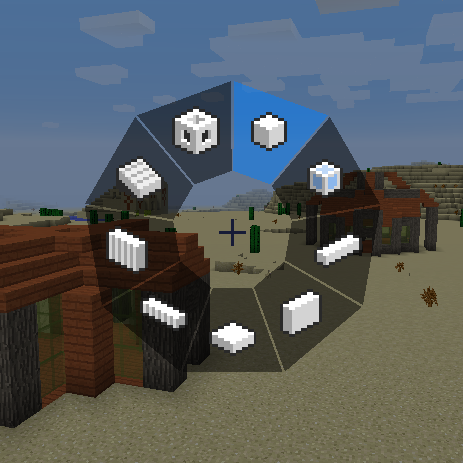
Switch build modes by holding ALT.
Build Modes
<iframe src="https://www.youtube.com/embed/LmYSV4z1UbE" height="358" width="638"></iframe> <iframe allowfullscreen="allowfullscreen" src="https://www.youtube.com/embed/TLwh-SA8gOQ" height="358" width="638"></iframe>Hold ALT to switch build modes. On the left side there are buttons for undo/redo, opening the modifier settings and toggling QuickReplace (see below). On the right side there are options for each build mode, like a filled vs hollow wall, or faster building in Normal+.
Build modes:
- Normal: vanilla placement
- Normal+: increased reach
- Line: place lines of blocks in any 3 axis
- Wall: place walls with locked x or z axis
- Floor: place 'walls' with locked y axis
- Diagonal Line: place freeform lines of blocks
- Diagonal Wall: place walls at any angle
- Slope Floor: place slopes at any angle
- Cube: place cubes with 3 clicks
- Circle: place blocks in a circle (ellipse)
- Cylinder: place a cylindrical shape like a tower
- Sphere: place a spheroid made of cubes
Build Modifiers
<iframe allowfullscreen="allowfullscreen" src="https://www.youtube.com/embed/kZjJhdPeVZI" height="358" width="638"></iframe>Open modifier settings with the + key on the numpad, or click the button in the ALT menu.
Build modifiers:
- Mirror
- Array
- Radial Mirror
Mirror
Mirror blocks in realtime, as you place them. Works with even and uneven builds (add .5 to the position).Rotates blocks like stairs, logs, slabs, pistons etc properly. Set position, radius (size) and what axes to mirror by pressing the + key on the numpad.
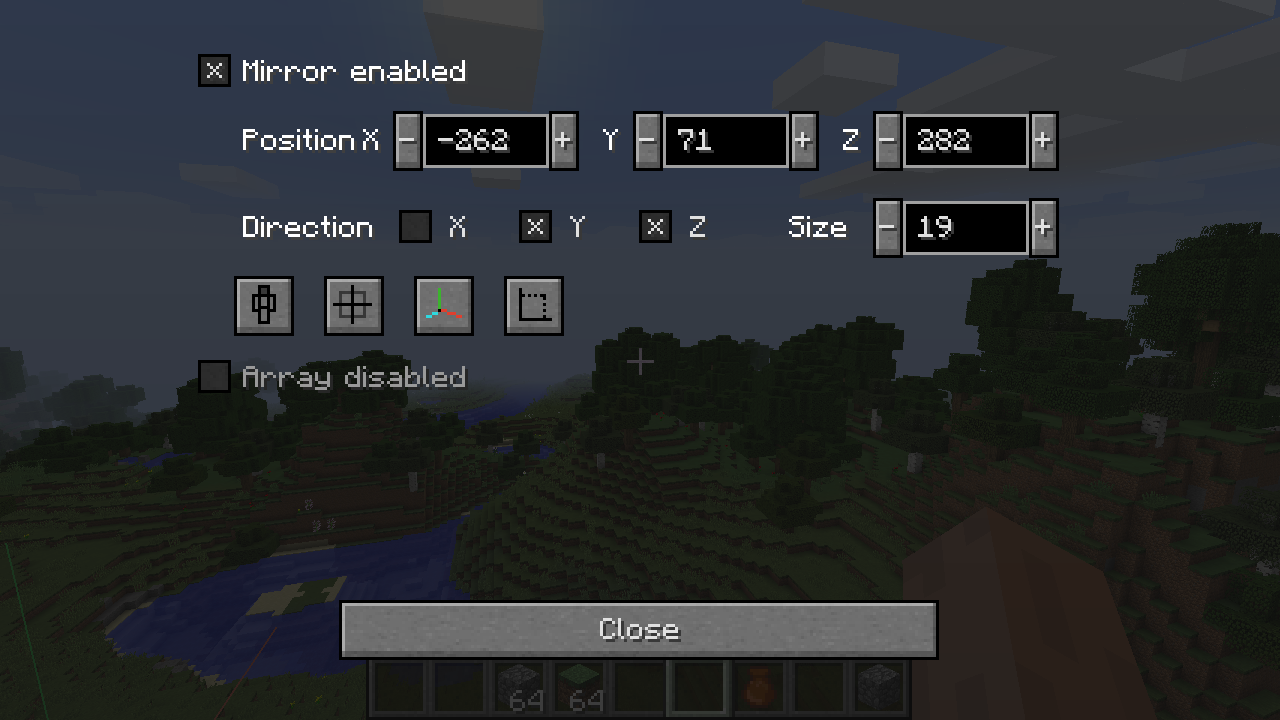
- Position: where the mirror is situated in the world
- Direction: what axes to mirror, can mirror on all axes simultaneously
- Size (radius): how many blocks away from the position the mirror will still work. Limited by your reach.
- Set to current pos: set the mirror's position to the current player position
- Toggle odd/even: set position to center or corner of block, for odd or even numbered builds
- Show lines and area: helps visualize where the mirror is
Still not sure what's going on? Watch this tutorial by ScottoMotto:The Fastest Way to Build a House in Minecraft
Array
The array modifier copies your build in a certain direction a certain number of times. Very useful for nether tunnels but also useful for quickly building walls etc.
It is possible to add offset to multiple directions so diagonal builds are possible (e.g. a nether tunnel that goes upwards or sideways). And of course breaking blocks is also supported for if you make a mistake.
Set offset and count by pressing the + key on the numpad.
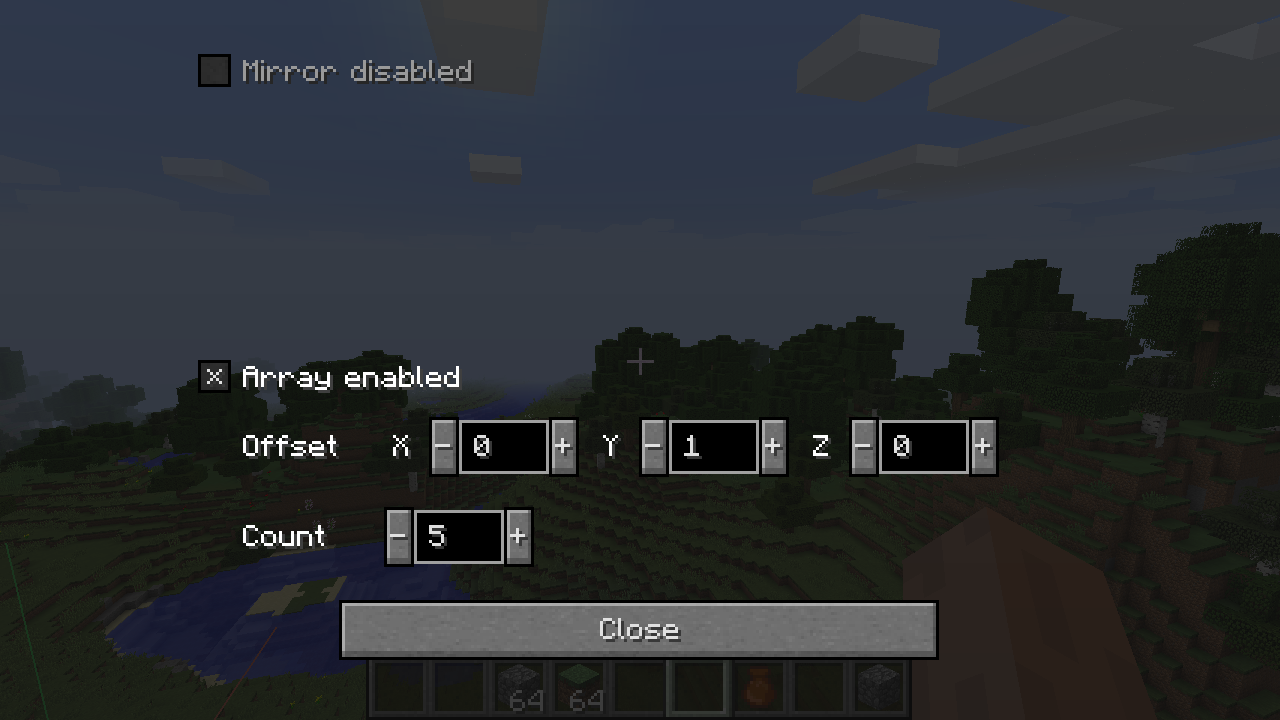
- Offset: in what direction to replicate your block. Example: with offset (2,1,0) and count 3, placing a block at (0,0,0) will also place blocks at (2,1,0), (4,2,0) and (6,3,0).
- Count: how many times to replicate your block
- Reach: limits how far away you can place blocks (highest offset * count)
Radial Mirror
The radial array lets you place blocks in a circle around a certain point. The circle can be divided into slices, and each slide will copy your block placements.
I heard you liked mirrors, so I put mirrors in your radial mirror. Mirror every other slice by enabling alternative mode.
Set position, slices, radius and alternative mode by pressing the + key on the numpad.
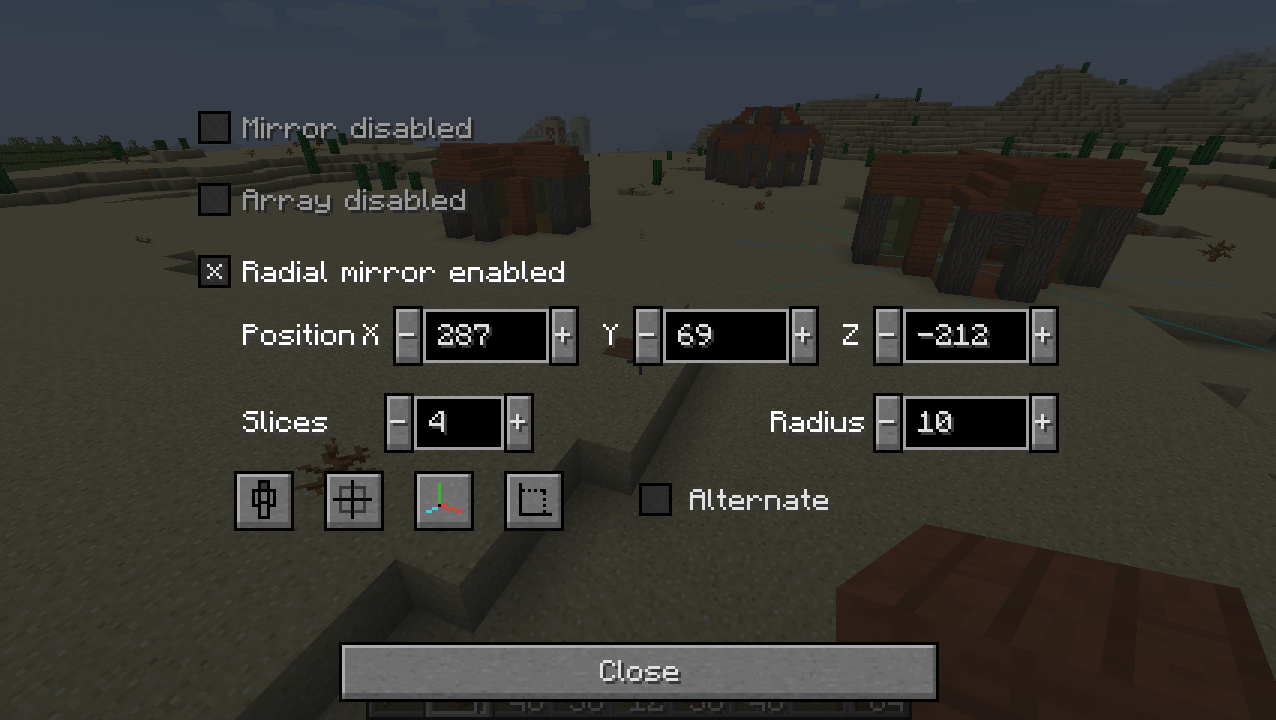
- Position: center of the radial mirror
- Slices: the amount of slices to cut the circle in. Each slice copies your block placements.
- Radius:how many blocks away from the position the radial mirror will still work. Limited by your reach.
- Alternate: mirrors every second slice
Randomizer Bag
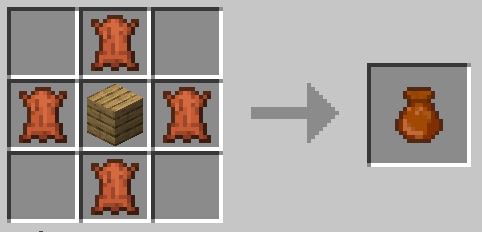
<iframe allowfullscreen="allowfullscreen" src="https://www.youtube.com/embed/APWEmAKB58o" height="358" width="638"></iframe>Put blocks in the bag, then rightclick to place a random block from the bag. Adjust ratios by filling slots with the same block (e.g. 2 slots cobble + 1 slot stone makes for a 2:1 ratio). Handy for building walls and paths with variation. Combine with array and QuickReplace for super easy path building.
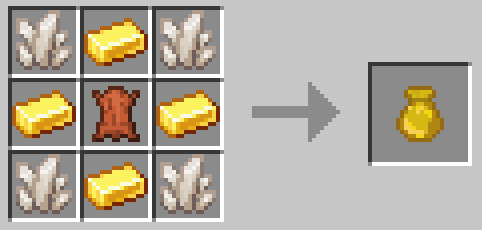
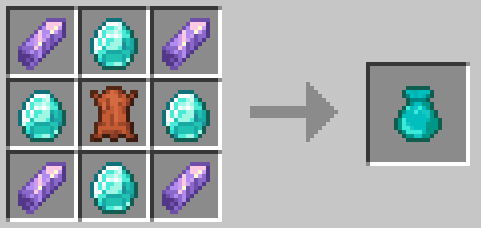
Crafting recipe:
Golden Randomizer Bag (9 slots)
Diamond Randomizer Bag (27 slots)
For 1.16: use purple dye instead of amethyst shards.
Survival-friendly
Playing this mod in survival mode is fully supported. When playing in survival mode:
- All actions consume the right amount of blocks.
- You have to use the appropriate tool to break blocks.
- This correctly damages the tool based on how many blocks are broken.
- Replacing only works on blocks that can be harvested by hand (changeable in config).
- Mining speed is decreased for each additional block mined (change percentage in config).
QuickReplace
Note: in survival mode QuickReplace only works with blocks that can be harvested by hand. You can change this setting in the config.
Reach
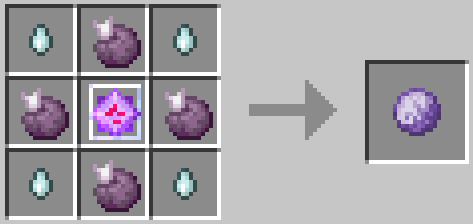
Increase your reach using craftable reach upgrades.They need to be used in order, it is not possible to skip straight to upgrade 3 without using 1 and 2. Numbers can be edited in config.
Reach Upgrade 1
Block placing: 12 blocks
Mirror radius: 25 blocks
Array reach: 50 blocks
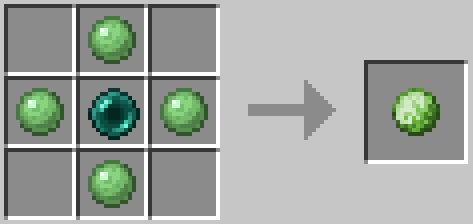
Reach Upgrade 2
Block placing: 25 blocks
Mirror radius: 50 blocks
Array reach: 100 blocks
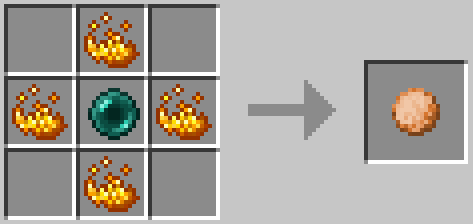
Reach Upgrade 3
Block placing: 50 blocks
Mirror radius: 100 blocks
Array reach: 200 blocks
FAQ
"Can I add this mod to my modpack?" Certainly!
"Will you update the 1.12 through 1.15 versions?"
No, those are outdated. You should probably upgrade by now.
"Will you make a Fabric version?"
Maybe. In the meantime, huskcasaca made a fabric version.
"Is this a client-side only mod?"
No, it needs to be installed on both server and client. The server part places the blocks in bulk. If there was no server part, the client would need to send all the blocks individually, which will overload most servers.
"Am I allowed to make my own version of this mod?"
Yes, as long as you comply with the LGPL-3.0 license (usually this means: link to this page, license your modification under LGPL-3.0, make the code visible and state significant changes).
Mod Spotlights
ScottoMotto
<iframe allowfullscreen="allowfullscreen" src="https://www.youtube.com/embed/NF0MuIBPfA4" height="358" width="638"></iframe>Yours here? Message me.
Credits
Many thanks to Grimmauld for porting to 1.16, Dashos for fixing 'fake player' related crashes and manapart for porting to 1.19!
Radial Menu inspired byChisels and Bits by AlgorithmX2
Build Modes inspired by Linear by Tschipp






Conversation