What are you searching for?

Delete Worlds To Trash

Delete Worlds To Trash

Deleted worlds are gone forever, right? Not anymore! Simply restore them from your recycle bin.

download 756.0K Downloads · favorite 184 Followers · Updated 1 month ago
Fabric Forge Management Neoforge Utility 1.20.1 1.20.4 1.21.1 1.21.3 1.21.4 +6 more

Versions

inventory_2
[FABRIC] [1.21.11] DeleteWorldsToTrash v21.11.0

21.11.0 · 1 month ago · 36.78 KB

Release download
Fabric 1.21.11
inventory_2
[NEOFORGE] [1.21.11] DeleteWorldsToTrash v21.11.0

21.11.0 · 1 month ago · 39.51 KB

Release download
Neoforge 1.21.11
inventory_2
[NEOFORGE] [1.21.10] DeleteWorldsToTrash v21.10.0

21.10.0 · 4 months ago · 39.26 KB

Release download
Neoforge 1.21.10
inventory_2
[FABRIC] [1.21.10] DeleteWorldsToTrash v21.10.0

21.10.0 · 4 months ago · 36.53 KB

Release download
Fabric 1.21.10
inventory_2
[NEOFORGE] [1.21.9] DeleteWorldsToTrash v21.9.0

21.9.0 · 4 months ago · 39.25 KB

Release download
Neoforge 1.21.9

About

📖 About:

Delete Worlds To Trash makes it so that when deleting a Minecraft world it is moved to the recycle bin/trash instead of being nuked out of existence. Gives you a chance to reconsider, and after all you never know when it might come in handy later on!

📷 Media:
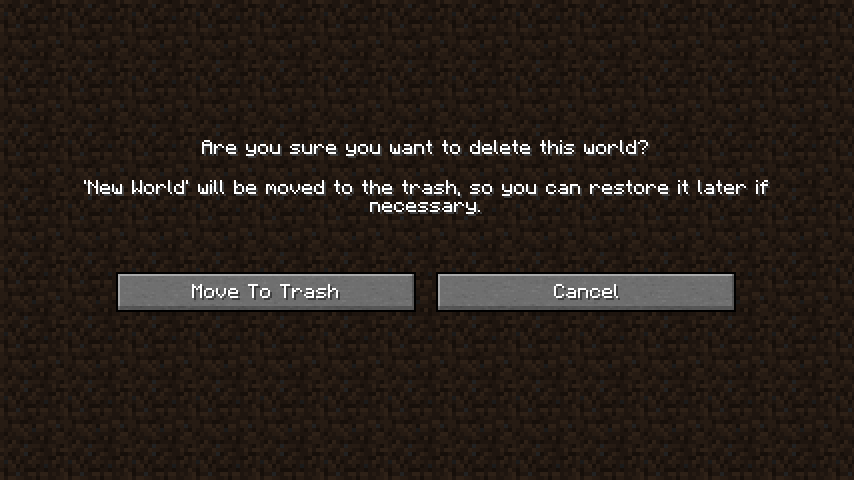
    
New screen for deleting worlds     
 

💡 FAQ:

Q: Does this support all operating systems?
A: Moving an item to the recycle bin/trash varies a lot between operating systems, so this is indeed not guaranteed to work on all systems. This mod has been tested to work on Windows and Mac. Other Gnome based Unix systems should work, too (1.18+ only). If your Linux system is not supported, running apt-get install libgnome2-0 in terminal for installing the necessary components might just do the trick. If your system is not supported, worlds will be deleted using the vanilla method, meaning they're gone forever.

Q: How can I tell whether my operating system is supported?
A: The delete world screen will tell you! If it gives you the option to move a world to the recycle bin/trash everything is supported. If you only see the vanilla delete world screen you're out of luck unfortunately.

🏆 Credits:

Developing Delete Worlds To Trash was helped and inspired by:

Reddit


open_in_new View on Modrinth
Compatibility
Client: Required Server: Unsupported
gavel MPL-2.0

Conversation

What are your thoughts?

Related projects

Optimization Utility
FerriteCore
FerriteCore

by malte0811

Memory usage optimizations

download 84.3M
favorite 12,712
Utility
Mod Menu
Mod Menu

by Prospector

Adds a mod menu to view the list of mods you have installed.

download 77.7M
favorite 22,127
Library Management Utility
YetAnotherConfigLib (YACL)

by isxander

A builder-based configuration library for Minecraft!

download 66.1M
favorite 7,607
Adventure Transportation Utility
Xaero's Minimap
Xaero's Minimap

by thexaero

Displays a map of the nearby world terrain, players, mobs, entities in the corner of your screen. Lets you create waypoints which help you find the locations you've marked.

download 60.9M
favorite 13,668
lock Cookie consent

SkinMC uses cookies to provide functionality and features.