
Dark Mode Everywhere
Have dark GUIs everywhere with the power of shaders
220.7K
Downloads
·
79
Followers
·
Updated 2 months ago
Decoration
Forge
Neoforge
1.18.1
1.18.2
1.19.1
1.19.2
1.19.3
+4 more
Versions
About

 Join my Discord
  Support me on Patreon
  Follow me on twitter
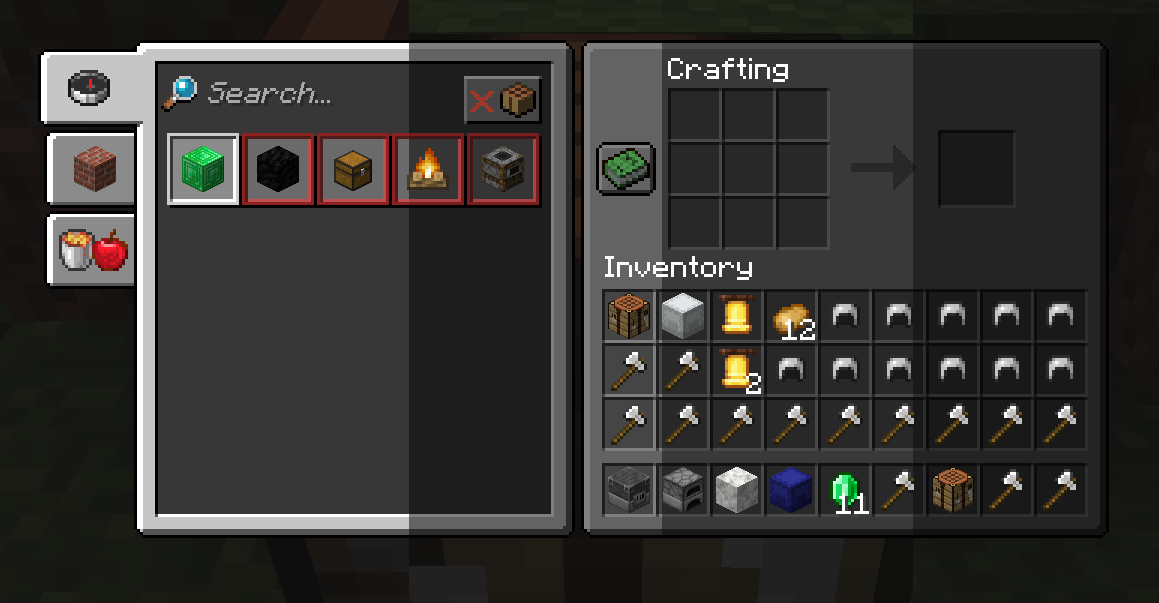
Dark Mode Everywhere uses the built in 1.18 Minecraft shaders to transform any GUI texture into a Dark Mode. Thanks to the shaders it will work in any GUI in the game, it will also try to modify the text color is its not hard to read in dark mode. Please report any visual issues so I can fix it.
The mod currently provides with 3 dark modes to suit your needs that can be easily changed by clicking on the button on the bottom left:
You can have the possibilty if adding new GUI shaders by modifying the "darkmodeeverywhereshaders.json" and using a Resource Loader mod or a Resource Pack.<
Shader Blacklist
# A list of strings that will prevent the dark shader to be used.
# Each string consists of the class and the method or any part of it to prevent the use of the dark shader.
# The dump will consist of a bunch of string with this style:
# 'net.minecraftforge.client.gui.overlay.ForgeGui:renderHunger' (class:method)
# Any part of that dump (like just using renderHunger) will prevent the hunger bar from using the dark shader.
METHOD_SHADER_BLACKLIST = [
    "mezz.jei.common.render.FluidTankRenderer:drawTextureWithMasking",
    "renderCrosshair",
    "net.minecraft.client.gui.screens.TitleScreen",
    "renderSky",
    "renderHotbar",
    "setupOverlayRenderState",
    "net.minecraftforge.client.gui.overlay.ForgeGui",
    "renderFood",
    "renderExperienceBar"
]
# Enabling this config will dump every 5 seconds which classes and methods were used to render something
# in the screen and the dark shader was trying to be used
METHOD_SHADER_DUMP = false
Categories
Compatibility
Client:
Required
Server:
Unsupported
Links
MIT

![[ETF] Entity Texture Features](https://cdn.modrinth.com/data/BVzZfTc1/af683d206d50b05258d865b0d6e4aa2f2cee12f2_96.webp)
![[EMF] Entity Model Features](https://cdn.modrinth.com/data/4I1XuqiY/6e5bbd0d06b1741bfdab6c0cfab6de8fdaf0064c_96.webp)



Conversation