What are you searching for?

ContainerSearcher
ContainerSearcher

ContainerSearcher

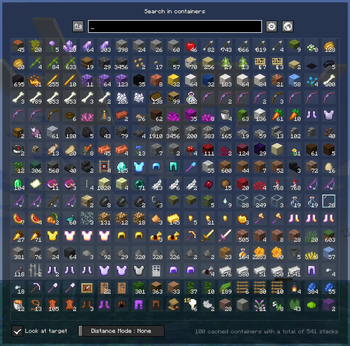
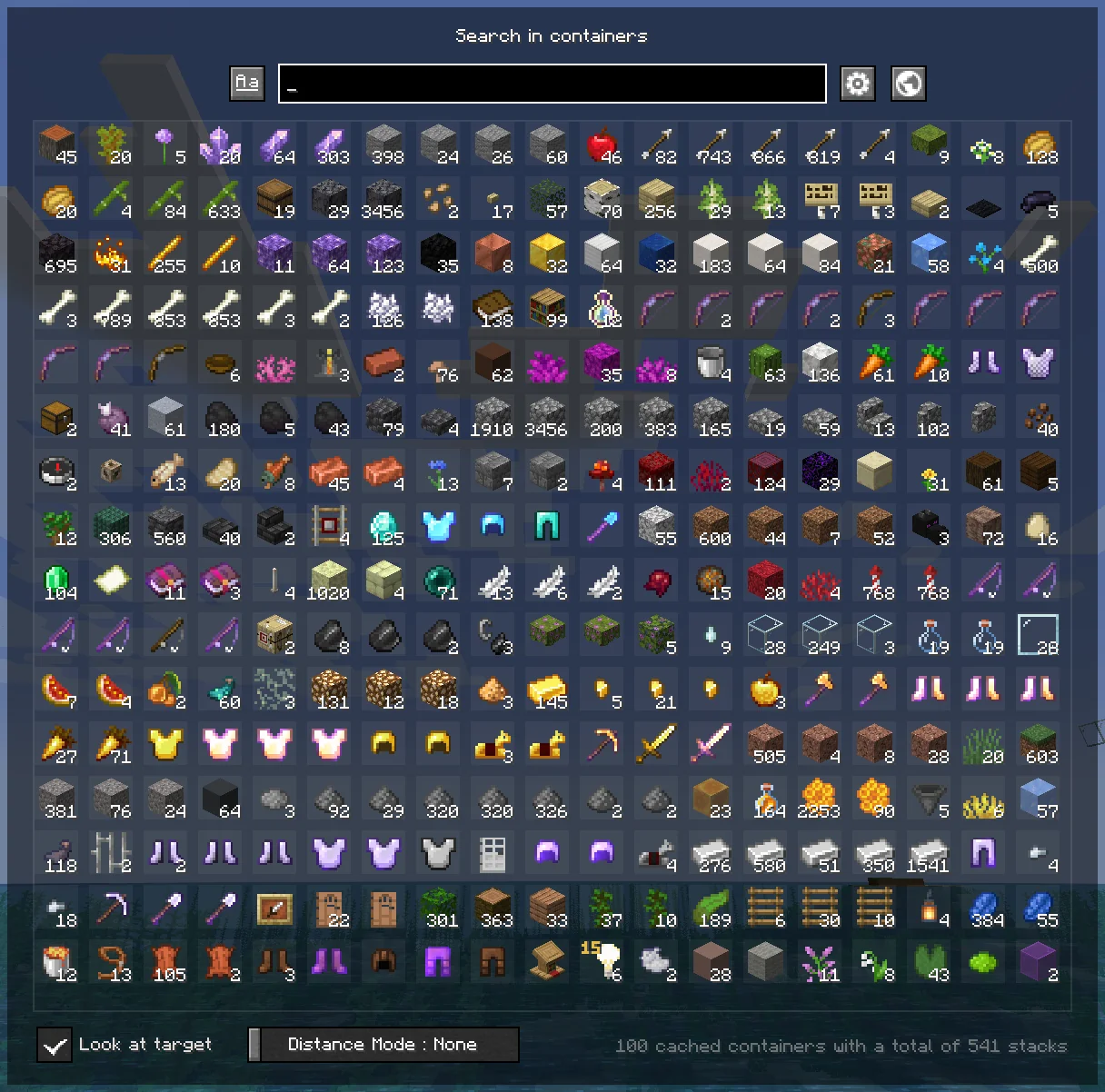
Caches opened containers and allows you to search through them via an in-game menu.

download 427.9K Downloads · favorite 279 Followers · Updated 1 month ago
Fabric Management Storage Technology Utility 1.19 1.19.1 1.19.2 1.19.3 1.20 +12 more

Versions

inventory_2
ContainerSearcher 0.3.5+mc1.21.10

0.3.5+mc1.21.10 · 1 month ago · 106.11 KB

Release download
Fabric 1.21.10
inventory_2
ContainerSearcher 0.3.4 (beta.1) for 1.21.6-1.21.8

0.3.4-beta.1+mc1.21.8 · 4 months ago · 103.91 KB

Fabric 1.21.6 1.21.7 1.21.8
inventory_2
ContainerSearcher 0.3.3 (beta.1) for 1.21.5

0.3.3-beta.1+mc1.21.5 · 5 months ago · 103.34 KB

Fabric 1.21.5
inventory_2
ContainerSearcher 0.3.2 beta-1 for 1.21.4

0.3.2+beta1+mc1.21.4 · 7 months ago · 102.05 KB

Fabric 1.21.4
inventory_2
ContainerSearcher 0.3.1 for 1.21.3

0.3.1+mc1.21.3 · 11 months ago · 102.19 KB

Release download
Fabric 1.21.3 1.21.4

About

ContainerSearcher

Caches opened containers and allows you to search through them via an in-game menu.

When you open a chest, its contents are saved to a file.
Using a keybind (NUMPAD 5 by default, can be changed in your keybindings) you can open a menu that shows the contents of all chests opened while you had this mod, allowing you to search for items with different sorting modes.
Clicking on an item will highlight the container it's in, draw a particle trail, and make you look in the direction of that container; if you're close enough, the container will open directly.
Once inside the container, the items you clicked on will be highlighted.
You can also configure a keybind to search for a hovered item in your inventory in nearby containers, as the Extra Utilities mod does.

👉🏻 Requires Fabric API and Cloth Config.

Mod menu is recommended to configure the mod.
FREQUENTLY ASKED QUESTIONS

How do I change the mod's keybindings?

You can find them in your normal Minecraft keybindings, look for the Container Searcher section, usually under the Miscellaneous section.
You will find two configurable keybindings, one to open the search menu as mentioned above, and another to search for the hovered stack in nearby containers.


ISSUES

⚠ DO NOT ASK (OR CREATE ISSUES) FOR UPDATES, UPDATES WILL COME WHENEVER I HAVE TIME ⚠

You would like to report an issue about this mod? refer to the Issue Tracker and please be concise, unique, and constructive.

You like what I do? Consider supporting me on my Patreon so I can continue to make and update Minecraft mods like this!

open_in_new View on Modrinth
Compatibility
Client: Required Server: Unsupported
Links
gavel LicenseRef-All-Rights-Reserved

Conversation

What are your thoughts?

Related projects

Optimization Utility
FerriteCore
FerriteCore

by malte0811

Memory usage optimizations

download 84.3M
favorite 12,712
Utility
Mod Menu
Mod Menu

by Prospector

Adds a mod menu to view the list of mods you have installed.

download 77.7M
favorite 22,127
Library Management Utility
YetAnotherConfigLib (YACL)

by isxander

A builder-based configuration library for Minecraft!

download 66.1M
favorite 7,607
Adventure Transportation Utility
Xaero's Minimap
Xaero's Minimap

by thexaero

Displays a map of the nearby world terrain, players, mobs, entities in the corner of your screen. Lets you create waypoints which help you find the locations you've marked.

download 60.9M
favorite 13,668
lock Cookie consent

SkinMC uses cookies to provide functionality and features.
