What are you searching for?

Construction Wand (Fabric)

Construction Wand (Fabric)

Unofficial Fabric Port of Construction Wand.

download 1.1M Downloads · favorite 94 Followers · Updated 6 months ago
Decoration Equipment Fabric Game-mechanics Magic Utility 1.20 1.20.1 1.20.2 1.20.3 1.20.4 +9 more

Versions

inventory_2
Construction Wand (Fabric) 2.0.3 for 1.21.7

2.0.3 · 6 months ago · 287.23 KB

Release download
Fabric 1.21.7
inventory_2
Construction Wand (Fabric) 2.0.2 for 1.21.6

2.0.2+1.21.6 · 7 months ago · 287.22 KB

Release download
Fabric 1.21.6
inventory_2
Construction Wand (Fabric) 2.0.1 for 1.21.6

2.0.1+1.21.6 · 7 months ago · 286.12 KB

Release download
Fabric 1.21.6
inventory_2
Construction Wand (Fabric) 2.0.1 for 1.20.1

2.0.1+1.20.1 · 7 months ago · 292.16 KB

Release download
Fabric 1.20.1
inventory_2
Construction Wand (Fabric) 2.0.0 for 1.21.6

2.0.0+1.21.6 · 7 months ago · 286.40 KB

Release download
Fabric 1.21.6

Gallery

About

Need a custom mod for your server?
Or maybe your favorite mod has been abandoned?
Perhaps I can help! Check out my commission form.


Header https://modrinth.com/mod/fabric-api

(Unoffical Fabric Port)

Overview

Also works with Polymer!

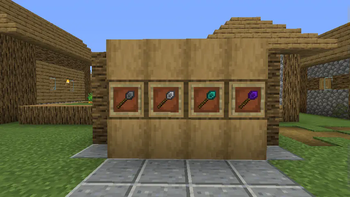
This is an unofficial port of ConstructionWand for the Fabric Mod Loader.
No balance changes have been made, and no new items have been added.
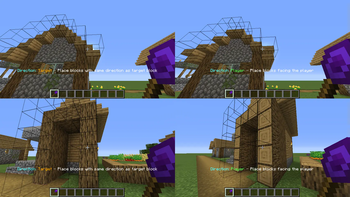
For a full content description refer to the original mod page.

Please report any issues you encounter using the link in the sidebar!

Usage

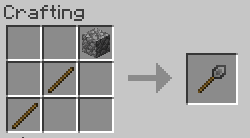
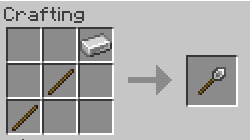
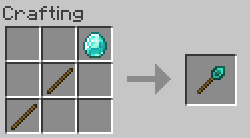
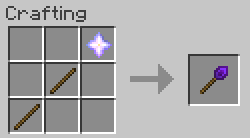
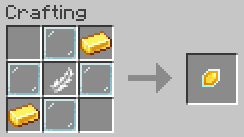
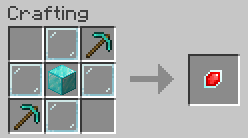
Craft a wand and any desired cores. Apply cores by combining in a crafting grid.

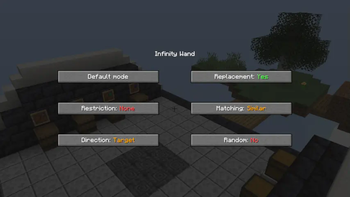
Open the menu with the menu key (V by default) or with Sneak + <OPTION_KEY> while right-clicking air.

To undo, hold Sneak + <OPTION_KEY> while right-clicking any solid block. You will get a preview before.

By default, <OPTION_KEY> is the left control key. This can be changed in the Minecraft settings starting with version 1.1.2! It is also worth noting that this key should not interfere with other keys, such as sprinting, despite it being highlighted in red, though I have observed that this could still happen in combination with certain other mods. In that case simply rebind it.
For older versions you will have to open the config file constructionwand-client.toml and change the keycode manually.

License

Credits go to Theta-Dev for creating the original mod.

This project makes use of the following third-party libraries:

  • forge-config-api-port (MPLv2 License), to keep config compatibility between both loaders (for now)
  • Botania (Custom License), for its API
  • REI (MIT License), for its API

Just like the original release, this mod is licensed under the MIT license!

open_in_new View on Modrinth
Compatibility
Client: Required Server: Required
gavel MIT

Conversation

What are your thoughts?

Related projects

Decoration Optimization
Iris Shaders
Iris Shaders

by coderbot

A modern shader pack loader for Minecraft intended to be compatible with existing OptiFine shader packs

download 90.5M
favorite 23,773
Optimization Utility
FerriteCore
FerriteCore

by malte0811

Memory usage optimizations

download 84.3M
favorite 12,712
Utility
Mod Menu
Mod Menu

by Prospector

Adds a mod menu to view the list of mods you have installed.

download 77.7M
favorite 22,127
Library Management Utility
YetAnotherConfigLib (YACL)

by isxander

A builder-based configuration library for Minecraft!

download 66.1M
favorite 7,607
lock Cookie consent

SkinMC uses cookies to provide functionality and features.