
Command Keys
A powerful command macro mod.
Versions
v2.3.16+1.21.11-Fabric
2.3.16+1.21.11 · 1 month ago · 243.31 KB
v2.3.16+1.21.11-NeoForge
2.3.16+1.21.11 · 1 month ago · 241.36 KB
v2.3.16+1.21.10-Fabric
2.3.16+1.21.10 · 2 months ago · 244.06 KB
v2.3.16+1.21.10-NeoForge
2.3.16+1.21.10 · 2 months ago · 241.20 KB
v2.3.16+1.21.8-Fabric
2.3.16+1.21.8 · 2 months ago · 243.59 KB
Gallery
About

CommandKeys
A powerful command macro mod.








Features
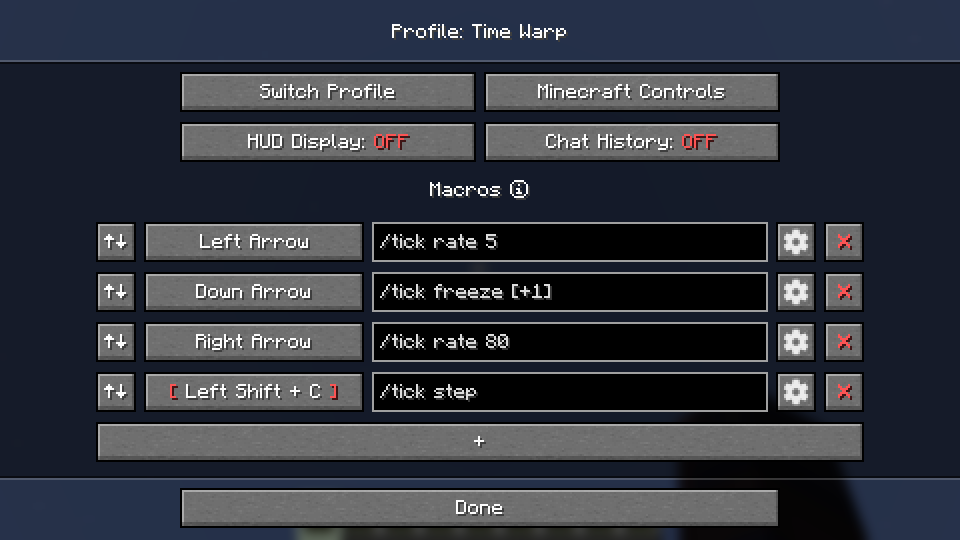
- Multiple commands per macro
- Multiple macros per keybind
- Optional delay timing between commands
- Efficient keybind conflict management with modifier key support
- Five modes:
- Send all commands when the key is pressed
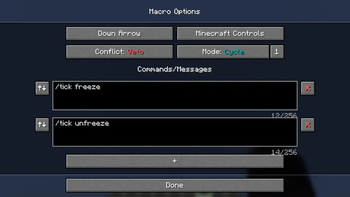
- Cycle through commands, one per keypress
- Repeat on a configurable interval
- Select a random message and send
- Type the command in chat, but don't send it
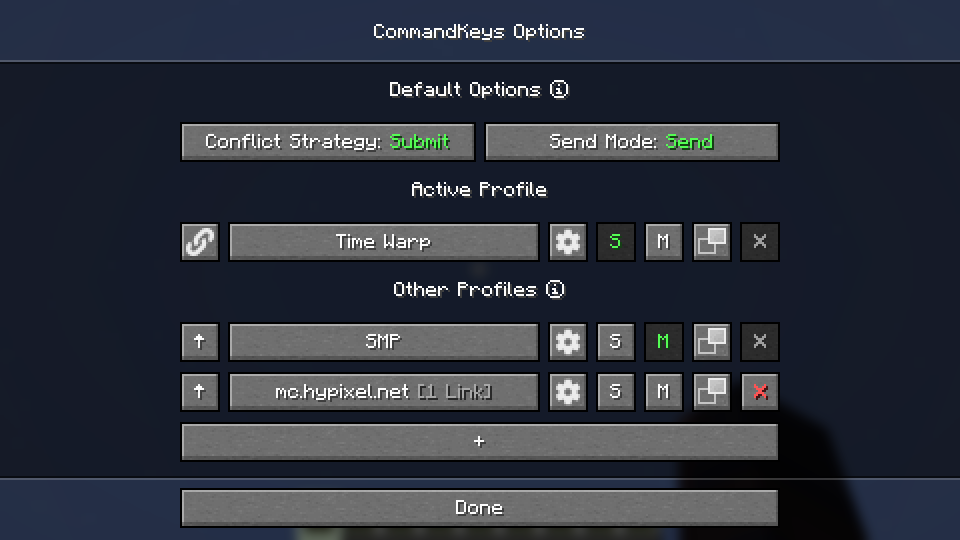
- Profiles with automatic switching based on server address or world name
- Fully custom GUI for easy configuration
 |
 |
 |
Usage
Profiles
Automatic Switching
- When you join a world/server, the name/address will be checked against the list of profiles. If there is a profile linked to that world/server, it will be activated. Otherwise, the default profile will be used.
- Use the
SandMbuttons to make a profile the default for singleplayer or multiplayer.
Manual Switching
- To activate a profile manually, click the up-arrow button on the left.
- Click the link button to link the profile to the world/server for future automatic activation.
- Click the settings button to rename the profile or remove links.
Macros
Access
- Edit a profile by clicking the large button on the profile selection screen, or by pressing the
edit key
(default:
K) in-game.
Binding Keys
- You can bind almost any keyboard key or mouse button to a macro, similar to Minecraft's own Controls. However, you can also bind any pair of keys; just press one while holding the other ( e.g. press 'T' while holding 'Shift').
Conflict Strategy
- If a key is already in use by Minecraft, you can choose a conflict strategy;
Submit: The macro will be ignored, the Minecraft keybind will function normally.Assert: The macro and the Minecraft keybind will both function.Veto: The macro will function, the Minecraft keybind will be cancelled (if possible).Avoid: The macro will not work in-game, but you can still activate it by pressing the key while on the edit screen (with nothing selected). For example, if you have a macro bound toW, pressKthenWto activate it.
Send Mode
Send: All commands for the macro will be sent. You can configure delays between commands.Type: The first command will be typed into the chat box, but not sent.Edit: A GUI will be shown to allow you to enter a replacement for the%edit%placeholder, then the first message will be sent.Cycle: The commands will be cycled through, with one command sent each time you press the key.- Note: In
Cyclemode, if you need more than one command to be sent for a single key-press, enter those commands into a single box, separated by pairs of commas (e.g./tick freeze,,/say Stopped). Random: A message will be chosen at random and sent each time the key is pressed.Repeat: LikeSend, but the macro will be repeated (delay is configurable) until you press the key again.
Placeholders
-
Simple Placeholders
%lastsent%: The most recently-sent message or command in history, if any.%lastcmd%: The most recently-sent command in history, if any.%clipboard%: The contents of the clipboard, if any.%myname%: Minecraft username.%pmsender%: The name of the sender of the most recently-received private message, if any. ( Searches max of 50).%pos%: The integer coordinates of the player (x y z).%x%: The integer X coordinate of the player. Also available for Y and Z.%lpos%: The integer coordinates of the block the player is looking at, if any. Also provides%lx%,%ly%,%lz%.
-
Regex Placeholders
%#(.*)%: Regex Group 1 from the most recently-received message matching the regex following the#, if any. Note: regex pattern must have at least 1 capturing group.%clipboard#(.*)%: The contents of the clipboard, if any, verified to match a regex pattern following the#. This can be used to prevent unintentional exposure of clipboard contents. E.g. use%clipboard#^-?\d+ -?\d+ -?\d+$%to only send the clipboard contents if it's formatted like a set of coordinates.%pos([FBLR])(\d+)%:%pos%but offset some number of blocks in a direction relative to the cardinal direction that the player is nearest to facing. E.g. use%posL20%to get the coordinates 20 blocks to the player's left.%x([+-]\d+)%:%x%but offset some number of blocks. E.g. use%x-10%to get the X coordinate 10 blocks to the player's West. Also available for Y and Z.%lpos([FBLR])(\d+)%: As perposabove but for the block the player is looking at, if any.%lx([+-]\d+)%: As perxabove but for the block the player is looking at, if any.
Dependencies
Fabric: Fabric API, ModMenu
NeoForge: None
Compatibility
If you encounter issues, please report on Discord or GitHub.
Contact



Related projects


Mod Menu
by Prospector
Adds a mod menu to view the list of mods you have installed.

YetAnotherConfigLib (YACL)
by isxander
A builder-based configuration library for Minecraft!

Xaero's Minimap
by thexaero
Displays a map of the nearby world terrain, players, mobs, entities in the corner of your screen. Lets you create waypoints which help you find the locations you've marked.
Command Keys
Download Command Keys
or
Select a game version to see available downloads
No versions match your filters
About the organisation

About the creator


Conversation