
Cobblemon Spawn Alerts
A highly customizable Cobblemon sidemod to alert you when a certain Pokemon spawns
Versions
About
Cobblemon Spawn Alerts
A highly customizable Cobblemon sidemod to alert you when a certain Pokemon spawns
IMPORTANT:
Some Pokemon info may not display properly if you are on a server! Servers can optionally install this mod to broadcast this info to clients if they desire, also with a config of its own. If a server does not have this mod installed, then things will not display correctly.
Also, while the serverside mod is optional, all clients must have the mod if the server does.
No more staring at the minimap!
Have you ever been hunting for an ultra-rare, and as you're flying around your eyes are too focused on reading each Pokemon's name that you miss something? Well with this mod, you can simply receive a message in chat when the Pokemon spawns instead! The config is a JSON file that is very easy to edit and add any Pokemon you want.
Speaking of minimaps...
CSA is fully compatible with Journeymap and can automatically create and remove waypoints when Pokemon spawn/despawn. More details below in the Journeymap Integration tab.
Complete the Pokedex!
By simply editing the config, you can be alerted whenever an unregistered or uncaught Pokemon spawns near you!
Customizability!
Each Pokemon can be individually customized exactly to your needs. If you want to shiny hunt for a Ralts while making sure you don't miss out on any beautiful Bidoofs (i love bidoof), you can do that. Messages use MiniMessage formatting to easily color or format messages however you like (see the MiniMessage docs).
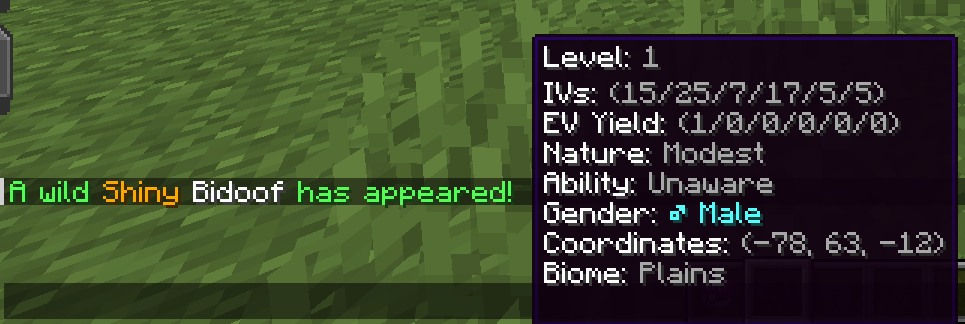
The default message looks like this:

But can be modified to look like this, or however you want!

Global Alerts!
Inspired by Cobblemon Spawn Notification, all players will be alerted when a rare Pokemon (such as a shiny or legendary) spawns. This can be disabled in the server's server.json config for the mod. The server simply sends a packet to all clients, so that each player can individually customize their messages.
FAQ:
My alerts don't work when using commands?
This is intended behavior, which I still need to find a better solution for (if one exists). You can use enableSpawnCommandAlerts in server.json, but use this at your own risk. This can break spawning of some Pokemon, such as in Cobblemon: Path to Legends.
Technical details: This mixins to SpawnPokemon#execute and uses the player spawner system to forcibly post a spawn event.
Support for Xaero's Minimap waypoints?
Unfortunately, no. While it is technically already possible via modifying templates and using custom MiniMessage scripts in your alerts, I will not be adding direct compatibility to the mod. Xaero's is completely closed source, offering no API, no wiki, and no Discord server. I am not going to go through the effort of trying to figure out how to integrate someone's mod when they provide no resources for doing such. However, if someone wants to PR this, I'd love to make compatibility possible.
Rarity bucket alerts?
No promises on when, but yes. It happens when I feel like getting around to it instead of making black hole shaders. Soon™.
In-game config editing?
Again, I can't say when I'll get around to it. The plan right now though is to have it be after rarity buckets, so it's gonna be a bit. It will also require a full rewrite of the config system as well as a system to migrate to the new system, so it won't be any time soon.
Config:
Config - Main (client)
The config is found in your Minecraft instance folder under config -> cobblemon-spawn-alerts. You can also use the command /csa openconfig.
This file is called main.json
Config Settings:
- alertAllShinies: Alerts you when any shiny spawns, unless
alertShinyis disabled in its config, or its config is disabled. - alertAllLegendaries: Alerts you when any legendary spawns, unless its config is disabled.
- alertAllMythicals: Alerts you when any mythical spawns, unless its config is disabled.
- alertAllUltraBeasts: Alerts you when any ultra beast spawns, unless its config is disabled.
- alertAllParadox: Alerts you when any paradox spawns, unless its config is disabled.
- alertAllParadox: Alerts you when any starter spawns, unless its config is disabled.
- alertAllNotInDex: Alerts you when any Pokemon which is not already registered in your Pokedex spawns, unless its config is disabled.
- alertAllUncaught: Alerts you when any Pokemon which you have not caught spawns, unless its config is disabled.
- alertEverything: Alerts you to every single spawn near you, unless its config is disabled. Why would you want to do this? Idk.
Level filter: Allows you to set min and max levels for triggering alerts.
For IV/EV hunting, see the IV/EV Hunting tab under Config
Reloading the Config:
You can edit the config while the game is running, and simply use the command /csa reload to reload it. Leaving/entering a world will NOT reload the config, but restarting the game will. The command must be run to take effect while the game is running.
Config - Pokemon (client)
The config is found in your Minecraft instance folder under config -> cobblemon-spawn-alerts. You can also use the command /csa openconfig.
IMPORTANT:
All custom configs must have the Pokemon's name in the language you are playing on! If you are playing Cobblemon on any language other than English, you must ensure that Pokemon names are written in that language, otherwise the configs will not work! This does not apply to the default config, that will work fine.
Alternatively, you can also use the Pokedex number.
pokemon.json is where the bulk of the config is at. By default, the config will come with a default set of options that will be applied to any alert for a Pokemon that is not added to the config. DO NOT DELETE OR RENAME THIS. You can freely edit its contents, but leave the name as it is exactly. You can copy the formatting and change the name of the Pokemon to add a new spawn message for any other Pokemon.
Config Parameters:
The name of each Pokemon's config can be formatted like "x, y, z" to include multiple Pokemon. E.g. "charmander, charmeleon, charizard" will alert to the whole Charmander line.
- enabled: Enables the spawn message for the Pokemon. If set to false, this setting will override every other config setting for the Pokemon and make its spawn message never display.
- alwaysAlert: Whether to always alert the Pokemon's spawn message, assuming enabled is set to true. Setting this to false will only display a spawn message given some other condition is true (e.g. alertShiny).
- alertShiny: Whether to alert a shiny Pokemon, or if the Pokemon is shiny. If alwaysAlert is set to false, this will ONLY alert that Pokemon's spawn if it is shiny. If alwaysAlert is set to true, then it will simply specify if the spawned Pokemon is shiny.
- alertHiddenAbility: Whether to alert a shiny Pokemon, or if the Pokemon has a Hidden Ability. This requires the mod to be installed server side and the server must have abilities being broadcast in the server config.
- showLegendary: Shows whether the Pokemon is legendary, mythical, paradox, or ultra beast.
- customAlertMessage: Used to create a custom alert message for a Pokemon using MiniMessage format.
- autoGlow: Makes a Pokemon glow when alerted. Click the alert to toggle the glow.
The following are a sub category of the config for displaying certain info about a Pokemon. These have 3 options --"MAIN_MESSAGE","HOVER", and"DISABLED": - level: Shows the Pokemon's level.
- ivs: Lists the Pokemon's IVs in order of HP/Atk/Def/Sp.Atk/Sp.Def/Speed.
- evs: Lists the Pokemon's EV Yield in order of HP/Atk/Def/Sp.Atk/Sp.Def/Speed.
- nature: Shows the Pokemon's nature.
- ability: Shows the Pokemon's ability.
- gender: Shows the Pokemon's gender.
- coordinates: Shows the Pokemon's coordinates (x/y/z).
- biome: Shows the biome the Pokemon spawned in.
- nearestPlayer: Shows the nearest player to the spawned Pokemon.
You will also see sounds listed below the stat displays. See the Custom Sounds tab under Config.
Examples:
Full template example
{
  "configVersion": "1.11.3",
  "pokemonConfigs": {
    "default (You can modify anything BELOW this, but dont delete it!)": {
      "enabled": true,
      "alwaysAlert": true,
      "alertShiny": true,
      "alertHiddenAbility": true,
      "alertDespawned": true,
      "showLegendary": true,
      "statDisplayModes": {
        "level": "MAIN_MESSAGE",
        "ivs": "HOVER",
        "evs": "HOVER",
        "nature": "HOVER",
        "ability": "HOVER",
        "gender": "DHOVER",
        "coordinates": "DISABLED",
        "biome": "MAIN_MESSAGE",
        "nearestPlayer": "MAIN_MESSAGE"
      },
      "customAlertMessage": "",
      "sounds": {
        "shiny": "",
        "legendary": "",
        "mythical": "",
        "ultrabeast": "",
        "paradox": "",
        "starter": "",
        "unregistered": "",
        "uncaught": "",
        "ivs": "",
        "evs": ""
      },
      "customAlertSound": "",
      "autoGlow": false,
      "journeyMap": {
        "enableWaypoint": true,
        "waypointName": "",
        "waypointHexColor": "",
        "persistent": false
      }
    },
    "bidoof": {
      "enabled": true,
      "alwaysAlert": true,
      "alertShiny": true,
      "alertHiddenAbility": true,
      "alertDespawned": true,
      "showLegendary": true,
      "statDisplayModes": {
        "level": "MAIN_MESSAGE",
        "ivs": "HOVER",
        "evs": "HOVER",
        "nature": "HOVER",
        "ability": "HOVER",
        "gender": "DHOVER",
        "coordinates": "DISABLED",
        "biome": "MAIN_MESSAGE",
        "nearestPlayer": "MAIN_MESSAGE"
      },
      "customAlertMessage": "<rainbow>A beautiful <gradient:light_purple:white><b>{shiny_unformatted}</b></gradient><u>{name}</u> spawned in a <u>{biome_unformatted}</u> biome</rainbow><white>{coords}!</white>",
      "sounds": {
        "shiny": "",
        "legendary": "",
        "mythical": "",
        "ultrabeast": "",
        "paradox": "",
        "starter": "",
        "unregistered": "",
        "uncaught": "",
        "ivs": "",
        "evs": ""
      },
      "customAlertSound": "",
      "autoGlow": false,
      "journeyMap": {
        "enableWaypoint": true,
        "waypointName": "",
        "waypointHexColor": "",
        "persistent": false
      }
    }
  }
}
Show all stats in message:
"bidoof": {
      "enabled": true,
      "alwaysAlert": true,
      "alertShiny": true,
      "alertHiddenAbility": true,
      "alertDespawned": true,
      "showLegendary": true,
      "statDisplayModes": {
        "level": "MAIN_MESSAGE",
        "ivs": "MAIN_MESSAGE",
        "evs": "MAIN_MESSAGE",
        "nature": "MAIN_MESSAGE",
        "ability": "MAIN_MESSAGE",
        "gender": "MAIN_MESSAGE",
        "coordinates": "MAIN_MESSAGE",
        "biome": "MAIN_MESSAGE",
        "nearestPlayer": "MAIN_MESSAGE"
      },
      ...other config stuff
},
 Show all stats in hover:
"bidoof": {
      "enabled": true,
      "alwaysAlert": true,
      "alertShiny": true,
      "alertHiddenAbility": true,
      "alertDespawned": true,
      "showLegendary": true,
      "statDisplayModes": {
        "level": "HOVER",
        "ivs": "HOVER",
        "evs": "HOVER",
        "nature": "HOVER",
        "ability": "HOVER",
        "gender": "HOVER",
        "coordinates": "HOVER",
        "biome": "HOVER",
        "nearestPlayer": "HOVER"
      },
      ...other config stuff
},
Config - Templates (client)
The config is found in your Minecraft instance folder under config -> cobblemon-spawn-alerts. You can also use the command /csa openconfig.
message_templates.json is where you can find and edit the default messages, and message parts. These apply to EVERY spawn, with the exception of fullSpawnMessage, which is only used when a custom spawn message is not provided. These templates are what replace the dynamic replacement placeholders.
Finding the Default Templates:
The default values for the templates are found in your Minecraft instance's language file for the mod.
The defaults for en_us.json (the only currently added language)
  {
  "cobblemon-spawn-alerts.client_config_reloading": "<green>[CSA] </green><white>Client config reloading...</white>",
  "cobblemon-spawn-alerts.client_config_reloaded": "<green>[CSA] </green><white>Client config reloaded!</white>",
  "cobblemon-spawn-alerts.client_config_reload_failed": "<green>[CSA] </green><red>Client config reload failed.</red>",
  "cobblemon-spawn-alerts.config_load_failed": "<green>[CSA] </green><red>Config failed to load properly while loading `%s`.</red>",
  "cobblemon-spawn-alerts.config_save_failed": "<green>[CSA] </green><red>Config failed to save properly while saving `%s`.</red>",
  "cobblemon-spawn-alerts.multiplayer_warning": "<green>[CSA]</green> <yellow>WARNING!</yellow> <white>You are playing on a server. If the server doesn't have the mod installed, or has disabled broadcasting of Pokemon info, certain things, like IVs, EV yield, or Nature, may be displayed incorrectly!",

  "cobblemon-spawn-alerts.default_spawn_message": "<green>A wild {legendary}{shiny}{HA}{gender}<white>{name}</white> {level}{ivs}{evs}{nature}{ability}has appeared{nearest_player}{coords}{biome}!</green>",
  "cobblemon-spawn-alerts.default_despawn_message": "<green>A {legendary}{shiny}{HA}<white>{name}</white> {despawned}.",
  "cobblemon-spawn-alerts.despawn_reason_despawned": "despawned",
  "cobblemon-spawn-alerts.despawn_reason_captured": "was captured by %s",
  "cobblemon-spawn-alerts.despawn_reason_fainted": "was defeated by %s",
  "cobblemon-spawn-alerts.shiny": "<gold>Shiny </gold>",
  "cobblemon-spawn-alerts.shiny_unformatted": "Shiny ",
  "cobblemon-spawn-alerts.hidden_ability": "<aqua>Hidden Ability </aqua>",
  "cobblemon-spawn-alerts.hidden_ability_unformatted": "Hidden Ability ",
  "cobblemon-spawn-alerts.level": "<gray>(Lvl. %s) </gray>",
  "cobblemon-spawn-alerts.level_hover": "Level: <gray>%s</gray>",
  "cobblemon-spawn-alerts.level_unformatted": "%s",
  "cobblemon-spawn-alerts.ivs": "with IVs: <gray>(%s/%s/%s/%s/%s/%s)</gray> ",
  "cobblemon-spawn-alerts.ivs_hover": "IVs: <gray>(%s/%s/%s/%s/%s/%s)</gray> ",
  "cobblemon-spawn-alerts.ivs_unformatted": "(%s/%s/%s/%s/%s/%s)",
  "cobblemon-spawn-alerts.evs": "with EV yield: <gray>(%s/%s/%s/%s/%s/%s)</gray> ",
  "cobblemon-spawn-alerts.evs_hover": "EV Yield: <gray>(%s/%s/%s/%s/%s/%s)</gray> ",
  "cobblemon-spawn-alerts.evs_unformatted": "(%s/%s/%s/%s/%s/%s)",
  "cobblemon-spawn-alerts.nature": "with Nature: <gray>%s</gray> ",
  "cobblemon-spawn-alerts.nature_hover": "Nature: <gray>%s</gray> ",
  "cobblemon-spawn-alerts.nature_unformatted": "%s",
  "cobblemon-spawn-alerts.ability": "with Ability: <gray>%s</gray> ",
  "cobblemon-spawn-alerts.ability_hover": "Ability: <gray>%s</gray> ",
  "cobblemon-spawn-alerts.ability_unformatted": "%s",
  "cobblemon-spawn-alerts.gender": "%s ",
  "cobblemon-spawn-alerts.gender_hover": "Gender: %s",
  "cobblemon-spawn-alerts.gender_unformatted": "%s",
  "cobblemon-spawn-alerts.male": "<aqua>♂ %s</aqua>",
  "cobblemon-spawn-alerts.female": "<light_purple>♀ %s</light_purple>",
  "cobblemon-spawn-alerts.genderless": "<gray>%s</gray>",
  "cobblemon-spawn-alerts.coords": " at <gray>(%s, %s, %s)</gray>",
  "cobblemon-spawn-alerts.coords_hover": "Coordinates: <gray>(%s, %s, %s)</gray>",
  "cobblemon-spawn-alerts.coords_unformatted": "(%s, %s, %s)",
  "cobblemon-spawn-alerts.biome": " in a <gray>%s</gray> biome",
  "cobblemon-spawn-alerts.biome_hover": "Biome: <gray>%s</gray>",
  "cobblemon-spawn-alerts.biome_unformatted": "%s",
  "cobblemon-spawn-alerts.nearest_player": " near player: <gray>%s</gray>",
  "cobblemon-spawn-alerts.nearest_player_hover": "Nearest Player: <gray>%s</gray>",
  "cobblemon-spawn-alerts.nearest_player_unformatted": "%s",
  "cobblemon-spawn-alerts.legendary": "<light_purple>Legendary </light_purple>",
  "cobblemon-spawn-alerts.legendary_unformatted": "Legendary",
  "cobblemon-spawn-alerts.mythical": "<light_purple>Mythical </light_purple>",
  "cobblemon-spawn-alerts.mythical_unformatted": "Mythical",
  "cobblemon-spawn-alerts.ultrabeast": "<light_purple>Ultra Beast </light_purple>",
  "cobblemon-spawn-alerts.ultrabeast_unformatted": "Ultra Beast",
  "cobblemon-spawn-alerts.paradox": "<light_purple>Paradox </light_purple>",
  "cobblemon-spawn-alerts.paradox_unformatted": "Paradox"
}
Modifying Templates:
When modifying templates, keep in mind the spacing and parameters. %s is used internally to insert values, and the amount of them MUST match the default template. For example, if you are modifying the template for IVs, your new template must have EXACTLY 6 %s - no more, no less. These also insert values in order, so unfortunately changing the order of IVs or coordinates is currently impossible.
Note: Some of the default templates have spaces in them to make formatting work properly, so just be aware of that if you are modifying a template.
Examples:
Change the shiny color for all Pokemon:
"shiny": "<blue><b>Shiny </b></blue>",

Change the default spawn message for all Pokemon:
"fullSpawnMessage": "<white>A wild {shiny}{level}<blue><b>{name}</b></blue> has appeared{coords}!</white>",
"shiny": "<gold><b>Shiny</b> </gold>",
"level": "<gray>Level %s </gray>",

Config - Server
The config is found in your server folder under config -> cobblemon-spawn-alerts. You can also use the command /csa openconfig in singleplayer.
This file is called server.json
Config Settings:
- enableSpawnCommandAlerts: Enables alerts for Pokemon spawned via commands. IMPORTANT - This can break other addons, such as Cobblemon: Path to Legends! Only enable this if you know what you're doing, or if you know the addon is compatible with this option.
- alertShinies: Alerts all players on the server when a shiny spawns.
- alertLegendaries: Alerts all players on the server when a legendary spawns.
- alertMythicals: Alerts all players on the server when a mythical spawns.
- alertUltraBeasts: Alerts all players on the server when a ultra beast spawns.
- alertParadox: Alerts all players on the server when a paradox spawns.
- alertStarters: Alerts all players on the server when a starter spawns.
- broadcastIVs: Tells clients what IVs a spawned Pokemon has.
- broadcastEVs: Tells clients what EV Yield a spawned Pokemon has.
- broadcastNature: Tells clients what Nature a spawned Pokemon has.
- broadcastAbility: Tells clients what Ability a spawned Pokemon has.
Note: Disabling these on your own client will also stop things from displaying properly in singleplayer... so don't do that?
Reloading the Config:
You can edit the config while the game is running, and simply use the command /csa-server reload to reload it. You must have permission level 3 (OP) or higher to use this command.
Custom Alert Messages
Custom alert messages can utilize dynamic replacement to include info about the Pokemon. Currently, the available dynamic replacements are:
- {name} / {name_lower} / {name_upper}: Inserts the Pokemon's name
- {legendary} / {legendary_unformatted}: Inserts the Pokemon's rarity (legendary/mythical/ultra beast/paradox) if
showLegendaryis enabled - {shiny} / {shiny_unformatted}: Inserts a shiny message if the Pokemon is shiny and
alertShinyis enabled - {HA} / {HA_unformatted}: Inserts a Hidden Ability message if the Pokemon has a Hidden Ability and
alertHiddenAbilityis enabled - {level} / {level_unformatted}: Inserts the Pokemon's level if enabled
- {ivs} / {ivs_unformatted}: Inserts the Pokemon's IVs if enabled
- {evs} / {evs_unformatted}: Inserts the Pokemon's EV Yield if enabled
- {nature} / {nature_unformatted}: Inserts the Pokemon's nature if enabled
- {ability} / {ability_unformatted}: Inserts the Pokemon's ability if enabled
- {gender} / {gender_unformatted}: Inserts the Pokemon's gender if enabled
- {coords} / {coords_unformatted}: Inserts the Pokemon's coordinates if enabled
- {biome} / {biome_unformatted}: Inserts the biome the Pokemon spawned if enabled
- {nearest_player} / {nearest_player_unformatted}: Inserts the name of the nearest player to the spawned Pokemon if enabled
- {despawned}: Inserts the Pokemon's despawn message for despawn, captured, and fainted respectively. This probably shouldn't be used though.
Examples:
Creating a custom alert message:
"bidoof": {
      "enabled": true,
      "alwaysAlert": true,
      "alertShiny": true,
      "alertHiddenAbility": true,
      "alertDespawned": true,
      "showLegendary": true,
      "statDisplayModes": {
        "level": "MAIN_MESSAGE",
        "ivs": "HOVER",
        "evs": "HOVER",
        "nature": "HOVER",
        "ability": "HOVER",
        "gender": "DHOVER",
        "coordinates": "DISABLED",
        "biome": "MAIN_MESSAGE",
        "nearestPlayer": "MAIN_MESSAGE"
      },
      "customAlertMessage": "<rainbow>A beautiful <gradient:light_purple:white><b>{shiny_unformatted}</b></gradient><u>{name}</u> spawned in a <u>{biome_unformatted}</u> biome</rainbow><white>{coords}!</white>",
      ...other config stuff
}
Note: This can also be done by modifying the fullSpawnMessage template or the default Pokemon config if you want it to apply to all Pokemon.
Custom Sounds
In your pokemon.json configs, custom spawn sounds can be added for a bunch of things, like shiny, legendary, or even whenever a Pokemon spawns at all. To get started with adding your own sounds, download the resource pack template and drag it into your resource packs folder (you can open this in the menu in game).
Inside the resource pack, start by adding your sound (this must be .ogg!) in assets\minecraft\sounds\cobblemonspawnalerts. Once you have your sounds added, edit sounds.json using whatever text editor -- Notepad++ is a great free option. In the file, you'll find a template for creating your own sounds. When adding a sound, you must begin with the name of the directory where the sounds are located. By default, this will be cobblemonspawnalerts. So, if you are adding a sound called legendary.ogg, you would add it like so:
"cobblemonspawnalerts.legendary": {
  "sounds": [
    {
    "name": "cobblemonspawnalerts/legendary",
    "attenuation_distance": 0
    }
  ]
}
Also, an attenuation distance of 0 is set so that the sound stays a constant volume no matter your distance to the source. For more info, see the Minecraft wiki page.
Next up is adding your sound in the config, which is super simple. Whatever your sound is called in the sounds file -- so cobblemonspawnalerts.legendary in this case -- you just put minecraft: then the sound. To add this sound for legendary spawns, it would be added like so: "legendary": "minecraft:cobblemonspawnalerts.legendary",
Full template using the default sounds provided in the pack
This plays the Pokemon: Legends Arceus shiny sound when any shiny spawns
{
"configVersion": "1.11.3",
"pokemonConfigs": {
  "default (You can modify anything BELOW this, but dont delete it!)": {
    "enabled": true,
    "alwaysAlert": true,
    "alertShiny": true,
    "alertHiddenAbility": true,
    "alertDespawned": true,
    "showLegendary": true,
    "statDisplayModes": {
      "level": "MAIN_MESSAGE",
      "ivs": "HOVER",
      "evs": "HOVER",
      "nature": "HOVER",
      "ability": "HOVER",
      "gender": "HOVER",
      "coordinates": "DISABLED",
      "biome": "MAIN_MESSAGE",
      "nearestPlayer": "MAIN_MESSAGE"
    },
    "customAlertMessage": "",
    "sounds": {
      "shiny": "minecraft:cobblemonspawnalerts.your_sound_here",
      "legendary": "",
      "mythical": "",
      "ultrabeast": "",
      "paradox": "",
      "starter": "",
      "unregistered": "",
      "uncaught": "",
      "ivs": "",
      "evs": ""
    },
    "customAlertSound": "",
    "autoGlow": false,
    "journeyMap": {
      "enableWaypoint": true,
      "waypointName": "",
      "waypointHexColor": "",
      "persistent": false
    }
  }
}
}
Also, you can use sounds from vanilla Minecraft or any other mod! E.g. minecraft:entity.warden.sonic_boom or cobblemon:pokemon.charmander.cry.
IV/EV Hunting
IV and EV hunting can be found in your main.json config. To prevent bloating of the Pokemon-specific configs, these apply to all spawns. This may be changed in the future if deemed necessary or is heavily requested.
Let's start with IV hunting, as it is the more complicated of the two:
- requireAllMinimumsMet: Requires all of the specified minimum stats to be met for an alert to trigger. For example, say
minHpandminAtkare both set to 20, and a Pokemon spawns with 25 hp but only 10 atk. If this is enabled, then an alert will NOT trigger, since both conditions aren't met. If this is disabled, however, an alert will trigger since at least one of the conditions is met. (basically, if it's true it functions as an AND gate, and false, an OR gate) - minPerfectIVs: Requires at least x perfect IVs to trigger an alert
For EV hunting, there is no equivalent of requireAllMinimumsMet. An alert will be triggered if any of the minimum conditions are true. So, if minHp and minAtk are both set to 1, then any Pokemon with an EV yield of at least 1 hp OR attack will trigger an alert.
Lastly, for both IV and EV hunting, anything set to 0 will be ignored when determining whether to alert. This means you can safely leave any stats you don't care about at 0 and it will not falsely alert.
Journeymap Integration
In pokemon.json, there are a few options for Journeymap waypoints:
- enableWaypoint: Enables waypoints for the config.
- waypointName: Sets the name of the waypoint. Default's to the Pokemon's name if left blank.
- waypointHexColor: Sets the color of the waypoint. Formatted using hexadecimal (e.g. #FFFFFF for white). You can use an online tool to help with creating the color code.
- persistent: Determines whether the waypoint should persist when leaving/rejoining the world.
More to come!
I currently plan to add the following:
- In-game editable config using ForgeConfigAPIPort
- Alerts for rarity buckets
- Nature hunting
- Maybe individual IV hunting?
If you have any other ideas, feel free to share them with me!
Feedback | Contact me
You can contact me on Discord; my username is stasis_the_shattered. You can find me in the Cobblemon discord in #content-zone-help and search for Cobblemon Spawn Alerts. Feel free to ping so I see your message.
Note: Please do not send a friend request or DM, I will ignore it and redirect you to the Cobblemon server. Only reason I'm choosing to do this now is so future problems can be solved by searching in that channel.






Conversation