![CobbleDollars [Cobblemon Addon]](https://cdn.modrinth.com/data/s7N7AsqL/images/a2e5a2acfb8bf4b657b6fda332203f25f380ca44_350.webp)
![CobbleDollars [Cobblemon Addon]](https://cdn.modrinth.com/data/s7N7AsqL/684040a264fc1d7f9b856ec5d2da39767398c7ad.png)
CobbleDollars [Cobblemon Addon]
CobbleDollars adds Money and Merchants to Cobblemon
3.3M
Downloads
·
185
Followers
·
Updated 8 months ago
Adventure
Economy
Fabric
Forge
Game-mechanics
Neoforge
Utility
1.20.1
1.21.1
Versions
Gallery
![CobbleDollars [Cobblemon Addon]](https://cdn.modrinth.com/data/s7N7AsqL/images/aad21d9e40ec54c6f0e239bf838ed9862c858923.png)
![CobbleDollars [Cobblemon Addon]](https://cdn.modrinth.com/data/s7N7AsqL/images/a331b070901f3c4b16c2c1853f87dcf8ba3a3dc3_350.webp)
![CobbleDollars [Cobblemon Addon]](https://cdn.modrinth.com/data/s7N7AsqL/images/d6ea8f198104e04712cf475bb7d2ca7e4bb7ffd2.png)
![CobbleDollars [Cobblemon Addon]](https://cdn.modrinth.com/data/s7N7AsqL/images/1516bc617f014a074465ad94782505d5db159db8.png)
About
This mod adds money and Merchants for Cobblemon.
Dependencies:
- Kotlin For Forge (forge & NeoForge)
- Fabric API (fabric only)
- Architectury API (1.5.2 & lower only)
- Cobblemon
If you'd like to support me, I have a Patreon <3.
How to use the mod
- To earn money you have to kill wild pokémons, you'll earn a certain amount depending on their level.
- The merchant spawns in overworld villages, just like vanilla villagers (~8%).
- Vanilla Villagers can obtain the CobbleMerchant profession with a Display Case block from Cobblemon
- The merchant follow the player if you hold a pokéball.
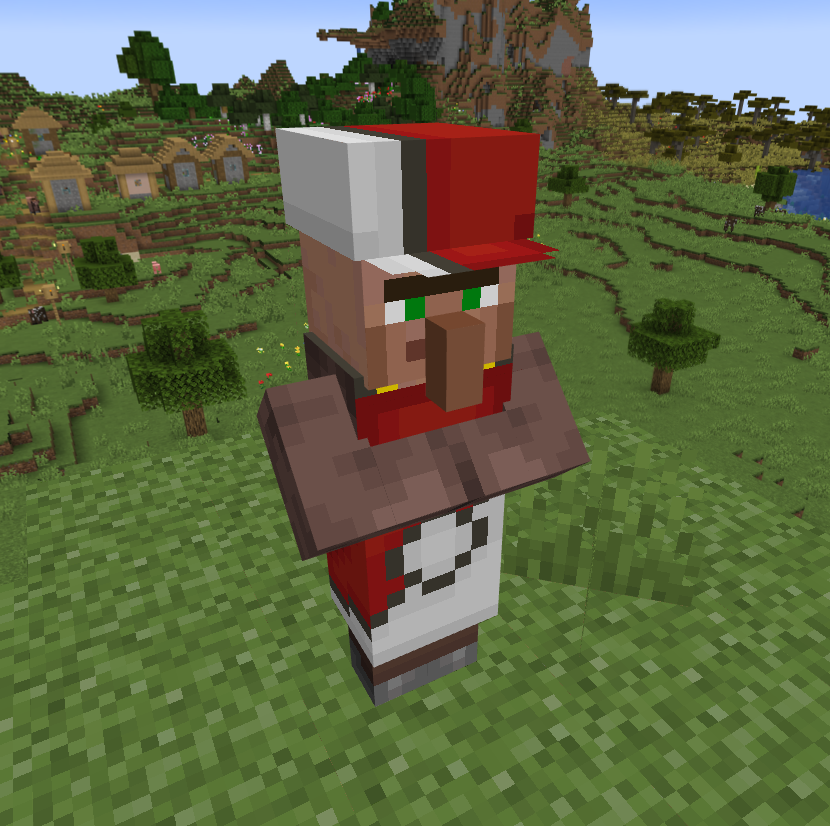
The Merchant Menus
The Shop
- By Right Clicking the merchant:
- You can scroll in the list, search for items, set the amount (MAX 256) and click the Buy button (you can see the total price on the right of the preview item) ! (if you don't have enough CobbleDollars the price will be red)
- You can switch between the configured tabs, each one offer different items.
The Bank
- By Shift + Right Clicking the merchant:
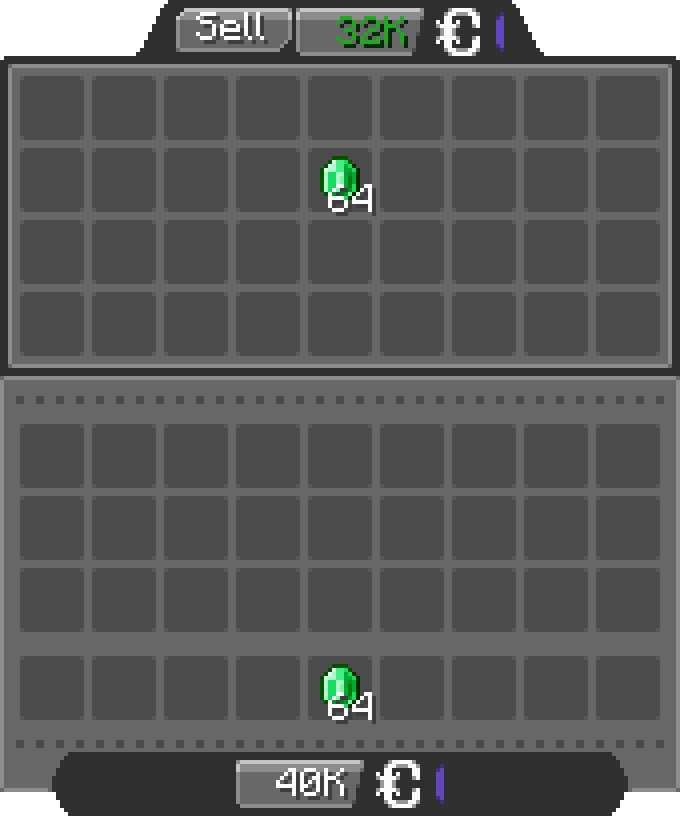
- You can insert any items allowed by the config in the bank inventory, the merchant will buy the items for the configured price (by default 1 Emerald = 500 CobbleDollars).
Configuration
The configuration files are located under "[Minecraft files or Server location]\config\cobbledollars"
Client
You can choose the position of the money overlay:
- top left
- top right
- bottom left
- bottom right (default)
Common
Shop
You can configure which items the merchant sells, for example:
2.X.X:
{
  "defaultShop": [
    {
      "Poké Balls": [
        {
          "item": "cobblemon:poke_ball",
          "price": 2000
        }
      ]
    },
    {
      "Items": [
        {
          "item": "minecraft:stick",
          "price": 250000
        },
        {
          "item": "create:cogwheel",
          "price": 100
        }
      ]
    }
  ]
}
1.5.X:
{
  "merchantShop": {
    "balls": {
      "cobblemon:poke_ball": 2000
    },
    "items": {
      "minecraft:stick": 250000,
      "create:cogwheel": 100
    }
  }
}
Before 1.5:
{
  "merchantBalls": {
    "cobblemon:poke_ball": 2000
  },
  "merchantItems": {
    "minecraft:stick": 250000,
    "create:cogwheel": 100
  }
}
Here they will sell
- Pokéballs for 2k CobbleDollars each under the category "Balls"
- Sticks for 250k CobbleDollars each and Cogwheels from the mod Create for 100 CobbleDollars each under the category "Items"
Bank
You can configure the items accepted in the bank and for what price:
2.X.X:
{
  "bank": [
    {
      "item": "minecraft:emerald",
      "price": 500
    },
    {
      "item": "cobblemon:red_apricorn",
      "price": 2500
    }
  ]
}
1.5.X:
{
  "bankItems": {
    "minecraft:emerald": 500,
    "cobblemon:red_apricorn": 2500
  }
}
Here the bank accept
- Emeralds for 500 CobbleDollars each
- Red Apricorns for 2.5k each
You can even put items from other mods.
Permissions
- cobbledollars
- cobbledollars.reload
- cobbledollars.leaderboard
- cobbledollars.leaderboard.update
- cobbledollars.cobbledollars
- cobbledollars.cobbledollars.give
- cobbledollars.cobbledollars.pay
- cobbledollars.cobbledollars.query
- cobbledollars.cobbledollars.remove
- cobbledollars.cobbledollars.set
- cobbledollars.cobblemerchant
- cobbledollars.cobblemerchant.edit
- cobbledollars.cobblemerchant.open
- cobbledollars.cobblemerchant.open.bank
- cobbledollars.cobblemerchant.open.shop
Categories
Compatibility
Client:
Required
Server:
Required
Links
LicenseRef-All-Rights-Reserved






Conversation