
AdvancementsSearch
A client-side mod that adds a search feature to the advancements window.
Versions
About
AdvancementsSearch
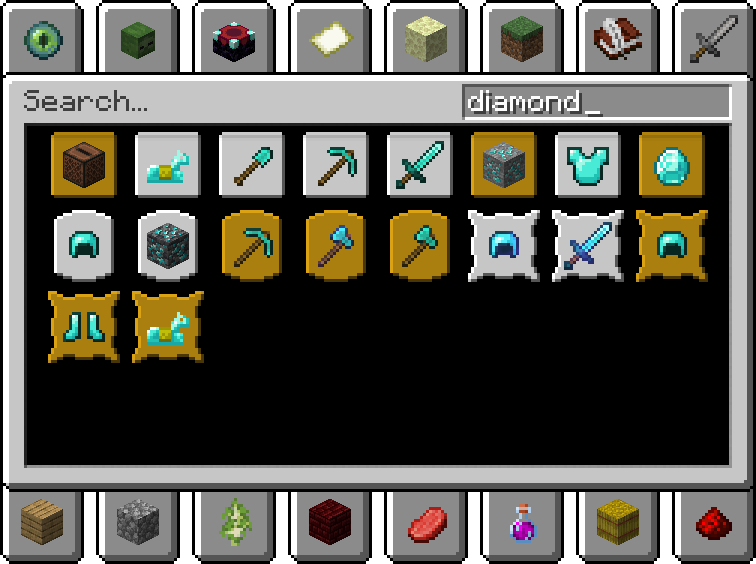
A client-side mod that adds a search feature to the advancements window with an interface similar to the search in the creative inventory.
The text you enter is searched in the titles, descriptions, and names of items in icons for all available advancements. Search results are displayed in a grid that fits the window and sorted by type (task -> goal -> challenge). Clicking on a search result will open the tab in which the advancement is located and highlight it in the advancements tree.
Technically, the search functions as a virtual invisible advancements tab with a black background, within which a simple tree of advancements is displayed, but it is constructed in such a way that it draws a grid without lines.
Advanced search
By default, text is searched everywhere, but you can set a filter to search only by specific criteria. To do this, you need to enter one of the following prefixes in the search bar: title:, description:, icon:.
Commands
Starting from version for Minecraft 1.16.2 you can use the search and highlight features of this mod in your projects using client-side commands.
Command to open the advancements window to highlight an advancement:
/advancementssearch highlight <advancementId> <highlightType>
<advancementId> is the ID of an advancement.
<highlightType> is the type of highlight: widget or obtained_status.
Command to open the advancements window to search:
/advancementssearch search <query> <by> <autoHighlightSingle> <highlightType>
<query> is the text for the search.
<by> is the filter: everywhere, title, description, icon.
If <autoHighlightSingle> is true and a single advancement is found, then instead of opening the search, it will be highlighted.
<highlightType> is the type of highlight: widget or obtained_status.






Conversation